




01. Edit your california 2004 online
Type text, add images, blackout confidential details, add comments, highlights and more.

Type text, add images, blackout confidential details, add comments, highlights and more.

Draw your signature, type it, upload its image, or use your mobile device as a signature pad.

Send form 540 2004 via email, link, or fax. You can also download it, export it or print it out.
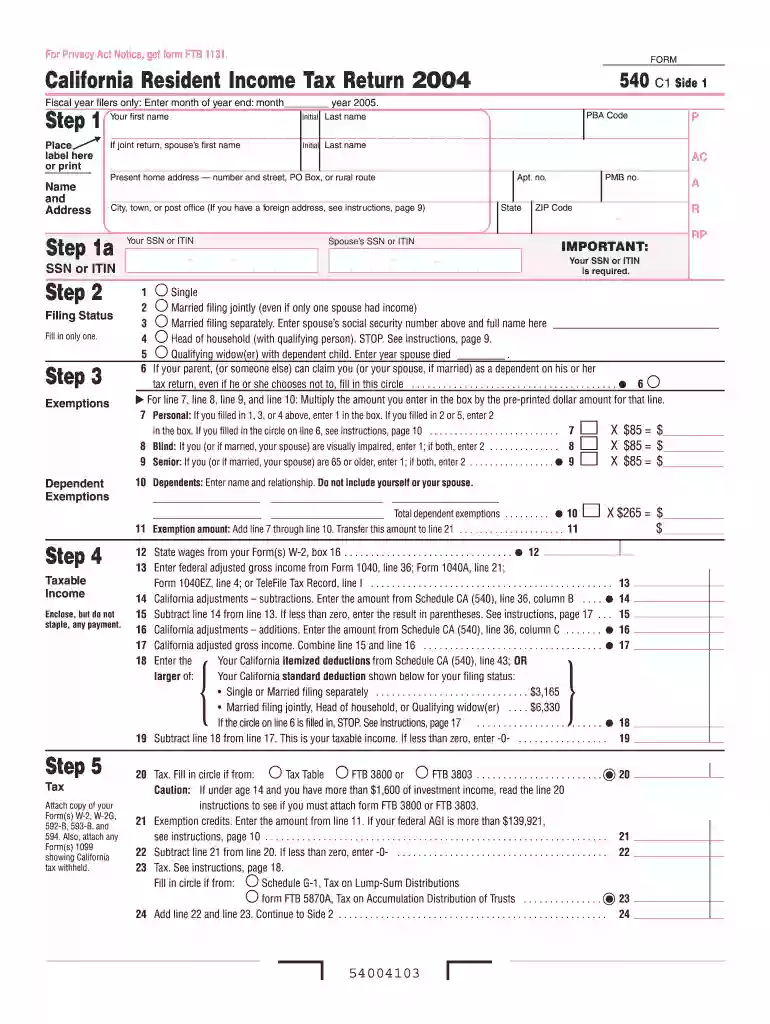
The 2004 California Tax Form, also referred to as the 540 form, is a crucial document for residents of California who are required to report their state income tax. This form allows taxpayers to calculate their income tax obligations for the year 2004. It encompasses various financial components, including exemptions, deductions, and credits, which are fundamental to determining the total tax liability or refund one may be entitled to.
Several critical sections make up the 2004 California Tax Form. These include:
These elements are designed to ensure accuracy in reporting and to make sure that taxpayers are assessed correctly on their income.
Completing the 2004 California Tax Form requires careful attention to detail. Here's a step-by-step guide:
Gather Required Documents:
Select Correct Filing Status: Determine whether you are filing as single, head of household, or married filing jointly/separately, as this impacts tax rates and deductions.
Enter Personal and Income Information: Include personal details accurately. Report all income sources cumulatively to ensure no underreporting.
Calculate Deductions and Credits: Choose between the standard deduction or itemizing deductions, then derive credits which you are eligible for to maximize refunds.
Review and Sign: Thoroughly review for accuracy before signing. An unsigned form is considered invalid and can result in penalties.
Submit the Form: Choose to file via traditional mail, or if allowed, electronically through approved e-filing systems to ensure timely processing.
Securing a copy of the 2004 California Tax Form is straightforward:
While the primary deadline for filing the 2004 form would have been April 15, 2005, individuals who need to amend or revisit their returns should be aware of any statutes of limitations, typically within three years of the original filing date. Extensions or amended returns should still adhere to this timeframe to avoid penalties.
The 2004 California Tax Form is mandated for individuals demonstrating income within the state during that tax year. It is legally binding and subject to audits, requiring complete accuracy and truthfulness in entries. Filing a false or fraudulently completed form could result in fines or legal repercussions.
Certain scenarios necessitate the use of the 2004 California Tax Form, including:


While the 2004 California Tax Form pertains specifically to state income, it's essential to align with federal IRS guidelines to ensure consistency across both state and federal filings. Any discrepancies could trigger audits or require explanations to state authorities.
Failing to submit the required 2004 form can lead to interest on unpaid taxes and penalties for late filings. Misreporting income or deductions could also result in fines depending on the severity or intent behind inaccuracies.
In 2004, most taxpayers would file paper forms, yet digital filing has since become more prevalent. Modern software solutions now allow for more straightforward filing processes and enhanced accuracy checks, which were only just emerging at that time.
Providing comprehensive, up-to-date support and insight into managing the 2004 California Tax Form is essential for ensuring compliance, accuracy, and optimizing any potential returns or liabilities.
We've got more versions of the california 2004 form. Select the right california 2004 version from the list and start editing it straight away!
| Versions | Form popularity | Fillable & printable |
|---|---|---|
| 2025 | 4.9 Satisfied (32 Votes) | |
| 2024 | 4.5 Satisfied (41 Votes) | |
| 2023 | 4.8 Satisfied (57 Votes) | |
| 2022 | 4.4 Satisfied (58 Votes) | |
| 2021 | 4.8 Satisfied (196 Votes) | |
| 2020 | 4.4 Satisfied (68 Votes) | |
| 2019 | 4.3 Satisfied (176 Votes) | |
| 2018 | 4.3 Satisfied (120 Votes) | |
| 2017 | 4.3 Satisfied (127 Votes) | |
| 2016 | 4.4 Satisfied (234 Votes) | |
| 2015 | 4.3 Satisfied (243 Votes) | |
| 2014 | 4 Satisfied (31 Votes) | |
| 2013 | 4 Satisfied (47 Votes) | |
| 2012 | 4.3 Satisfied (54 Votes) | |
| 2011 | 4 Satisfied (35 Votes) |
At DocHub, your data security is our priority. We follow HIPAA, SOC2, GDPR, and other standards, so you can work on your documents with confidence.
2004 Tax Due - If Line 3 is greater than Line 8. 9. 2004 Tax Overpayment- If Line 8 is greater than Line 3. 10. 2005 First Quarter Prepayment. 11.Read more
Chapter 1. Rules for Everyone. 6. Your adjusted gross income cannot be more than the limit. You must have a valid social security number.Read more
The Company is currently under examination by the Internal Revenue Service (IRS) for the 2004 tax year, the. Indian tax authorities for the 2004 tax yearRead more


