






Definition & Meaning
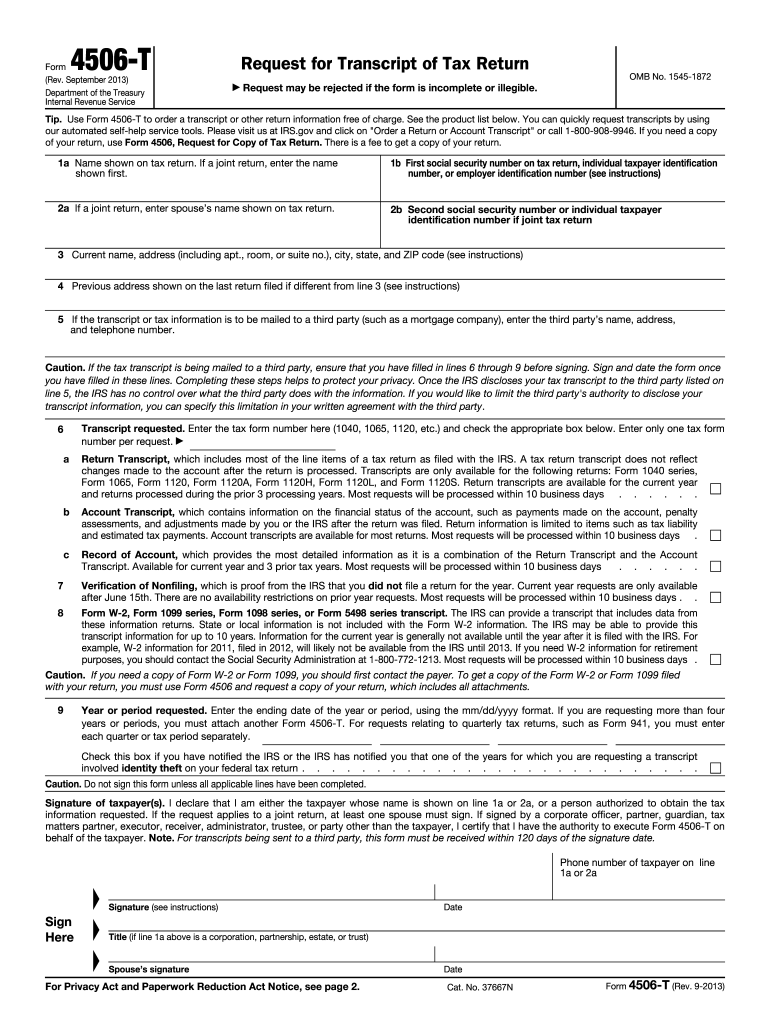
Form 4506-T is an official IRS document used to request a transcript of a tax return. The transcript provides detailed information extracted from original tax returns filed with the IRS. This form is crucial when you need a statement of your income information for a specific year, like 2013, rather than a full tax return copy, which saves time and resources for both the taxpayer and the IRS. It serves various purposes such as verifying income for loans, student grants, or complying with legal requests.
How to Use the IRS Form 4506-T 2013
Using Form 4506-T is straightforward when you need to present your tax information to third parties such as mortgage lenders or financial institutions. First, it is necessary to fill out personal information, including name, address, and taxpayer identification number. Boxes on the form should be checked according to the specific type of transcript required, such as a Return Transcript or Account Transcript. Ensure that you specify the tax year you're interested in receiving information for—2013, in this case. Sign and date the form before submission, which can usually be done through mail or online, ensuring to follow IRS submission guidelines.
Obtaining the IRS Form 4506-T 2013
To obtain the IRS Form 4506-T for the year 2013, you can visit the IRS website, where it is available in PDF format for download and print. Alternatively, you can order it by calling the IRS directly if you prefer a paper form mailed to you. Also, third-party providers and tax preparation software may offer access to download this form, ensuring its compliance with IRS standards.
Steps to Complete the IRS Form 4506-T 2013
-
Provide Personal Information: Start with filling in your name as it appears on the tax return and current address.
-
Taxpayer Identification: Enter your Social Security Number or Individual Taxpayer Identification Number.
-
Spouse Information: If you're married and filed jointly, include your spouse's information.
-
Transcript Type: Check the appropriate boxes for the transcript type required, whether it is a Return Transcript or another variant.
-
Tax Year Specification: Clearly indicate the year you need, ensuring "2013" is identified.
-
Third Party Authorization: If giving permission to a third party, provide their name and contact information.
-
Signature and Date: Sign and date the form as per the IRS instructions at the bottom.
-
Form Submission: Send the form to the designated IRS office based on your state of residence.
Why Use IRS Form 4506-T 2013
Using Form 4506-T for the year 2013 is necessary for various legal and financial scenarios where proof of income or tax return verification is demanded. It is often used during mortgage applications, loan adjustments, or audit situations. The form ensures official and detailed tax data is sourced directly from the IRS, providing reliable verification that safeguards against errors and fraud.
Who Typically Uses the IRS Form 4506-T 2013
Form 4506-T is primarily utilized by individuals, businesses, or legal entities that need access to previous tax information. This includes:
- Homebuyers and refinancers: Seeking to validate income for mortgage loans.
- Students: Applying for federal financial aid or scholarships requiring tax documentation.
- Businesses: Necessitating proof of revenue or loss for potential investors or partners.
- Legal professionals: Collecting evidence or documentation for legal proceedings.


Key Elements of the IRS Form 4506-T 2013
- Taxpayer Information: Essential personal and contact details.
- Request Type: Specific transcript category selections.
- Tax Year: Identification of specific year needed, in this case, 2013.
- Authorization Details: Permissions for third-party access.
- Signature Section: Mandatory for processing, confirming consent for information release.
Required Documents
Before submitting Form 4506-T, ensure you possess:
- A copy of your past tax returns for reference, especially if addressing income variances.
- Identification documents to match the details on the form.
- Any necessary authorization letters if you're representing or acting on behalf of another individual or entity.
Form Submission Methods
Submission can be conducted via:
- Mail: Sending the completed form to the specific IRS address listed for your state.
- Online: Through the IRS's official portal for digital submission, offering quicker processing times.
- In-Person: At IRS Taxpayer Assistance Centers, if you prefer hands-on help.
Penalties for Non-Compliance
While requesting via Form 4506-T does not directly incur penalties, providing inaccurate information or failing to comply with IRS guidelines in other tax-related matters while using this form could lead to consequences. Ensure clarity and correctness when filling out the document to avoid fines, delays, or legal issues.
Software Compatibility (TurboTax, QuickBooks, etc.)
Leading tax software like TurboTax or QuickBooks can assist in form completion, providing guidance and ensuring compliance. These platforms offer features such as pre-filling data and cross-checking for accuracy, reducing time and increasing efficiency for users seeking to streamline their tax documentation processes.