Type text, add images, blackout confidential details, add comments, highlights and more.
02. Sign it in a few clicks
Draw your signature, type it, upload its image, or use your mobile device as a signature pad.
03. Share your form with others
Send home moving inventory list template via email, link, or fax. You can also download it, export it or print it out.
How to use or fill out moving inventory list with our platform
Ease of Setup
DocHub User Ratings on G2
Ease of Use
DocHub User Ratings on G2
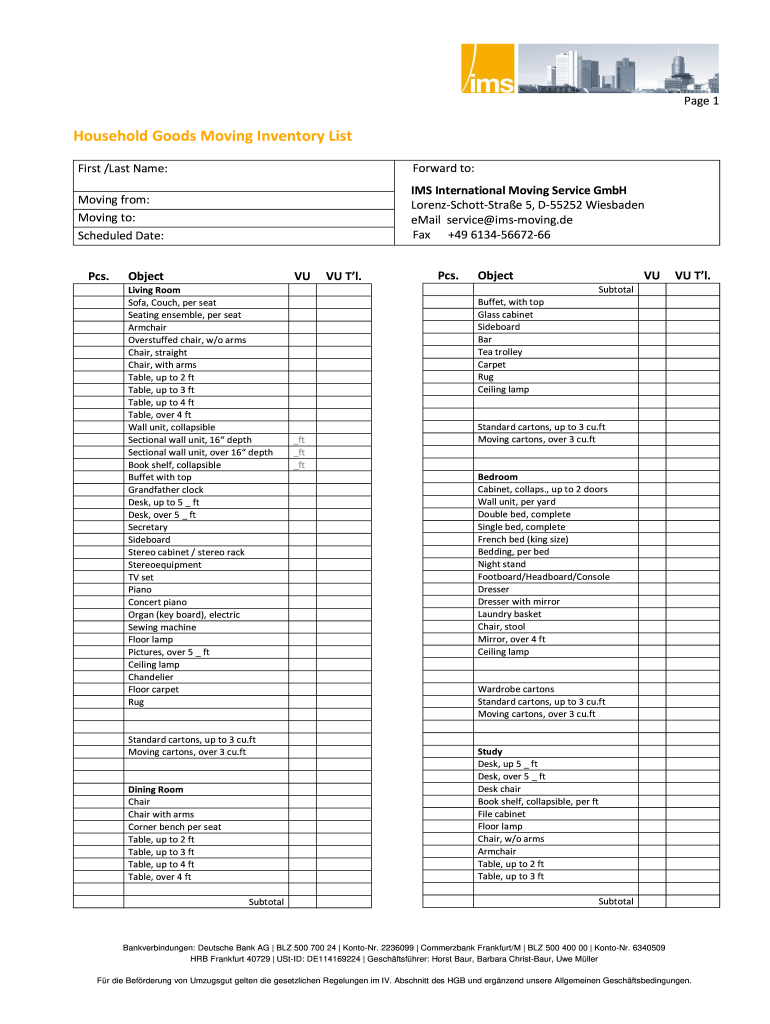
Click ‘Get Form’ to open the moving inventory list in the editor.
Begin by entering your first and last name at the top of the form. This personalizes your inventory list and ensures accurate tracking.
Fill in the 'Forward to' section with your new address, followed by the current address under 'Moving from'.
Specify the scheduled date for your move, which helps in planning logistics effectively.
Proceed to each room section (Living Room, Dining Room, etc.) and input the number of pieces for each item listed. Use the provided categories to ensure nothing is overlooked.
For items that require special handling, note them in the designated fields. This will assist movers in managing fragile or valuable items appropriately.
Review all entries for accuracy before saving or sharing your completed inventory list.
Start using our platform today to streamline your moving process for free!
Moving inventory list templatePrintable moving inventory listMoving inventory list excelMoving inventory list pdfMoving inventory list template freeMoving inventory list template wordMoving inventory list Template Excel free downloadMoving inventory list template Google Sheets
Security and compliance
At DocHub, your data security is our priority. We follow HIPAA, SOC2, GDPR, and other standards, so you can work on your documents with confidence.
Cookie consent notice
This site uses cookies to enhance site navigation and personalize your experience.
By using this site you agree to our use of cookies as described in our Privacy Notice.
You can modify your selections by visiting our Cookie and Advertising Notice.