Incident report form blank 2025

Get Form
incident report form blank Preview on Page 1

Here's how it works

01. Edit your form online
Type text, add images, blackout confidential details, add comments, highlights and more.

02. Sign it in a few clicks
Draw your signature, type it, upload its image, or use your mobile device as a signature pad.

03. Share your form with others
Send it via email, link, or fax. You can also download it, export it or print it out.

How to use or fill out incident report form blank with DocHub

Form edit decoration
9.5
Ease of Setup
DocHub User Ratings on G2
9.0
Ease of Use
DocHub User Ratings on G2
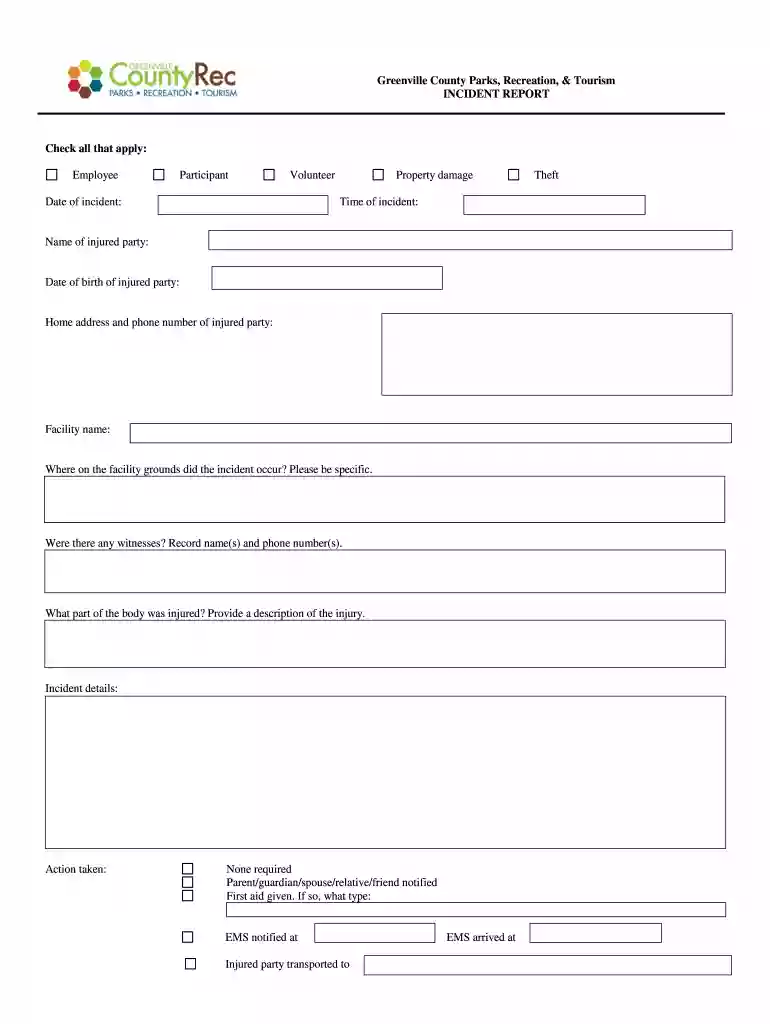
  1. Click ‘Get Form’ to open the incident report form blank in our editor.
  2. Begin by checking all applicable boxes for the type of individual involved: Employee, Participant, or Volunteer.
  3. Fill in the date and time of the incident, along with the name and date of birth of the injured party. Ensure you include their home address and phone number for follow-up.
  4. Specify the facility name and provide detailed information about where on the grounds the incident occurred.
  5. If there were witnesses, record their names and phone numbers in the designated section.
  6. Describe the injury by indicating which part of the body was affected and providing a brief description.
  7. Detail any actions taken post-incident, such as notifying a parent/guardian or administering first aid. Include specifics like EMS involvement if applicable.
  8. For property damage or theft incidents, list what was damaged or stolen, including inventory or serial numbers if available.
  9. Complete your personal information at the bottom, including your title and work location before submitting it promptly.

Start using our platform today to easily fill out your incident report form blank for free!

be ready to get more

Complete this form in 5 minutes or less

Get form

Got questions?

We have answers to the most popular questions from our customers. If you can't find an answer to your question, please contact us.
Contact us

Yes, you can use DocHub for signing any business and private paperwork, including your incident report form blank. All electronic signatures you generate with our service are legally binding and court-admissible, as DocHub complies with standards required by ESIGN and UETA. Save your completed paperwork with a detailed Audit Trail if needed.

It is a no-brainer on a computer or via a mobile device to complete a incident report form blank with DocHub. All you need to do is open any installed browser on your smartphone and go to the DocHub site. Once authenticated, add your file and open it in editing mode. Use our toolbar to make your edits and save changes. Optionally, keep your document in your files or send it to a recipient immediately.

Core Components of an Effective Incident Report Location, date and time: The where and when of any incident is a must. Be as specific as you can with location, and with date and time. Names of individuals involved: List all people involved in the incident.
What are the five rules of incident report writing? Timeliness: Always report the incident as soon as possible. Accuracy: Make sure all information provided is accurate and detailed. Completeness: Be thorough and provide all important details. Confidentiality: Handle sensitive and personal information carefully.
How to write a workplace incident report Gather essential information. Describe the incident. Include injuries and damages. Interview witnesses. Identify contributing factors. Review company policies and procedures. Attach supporting documents. Maintain objectivity.
be ready to get more

Complete this form in 5 minutes or less

Get form

People also ask

A general staff incident report generally includes: Persons name and contact details. Incident Time, date, and site. Pertinent details about what happened. Kind of injury or damage. Name of witnesses. Safety measures taken Suggestions for prevention.
2:02 20:25 And here incident type of incident by type of incidents. And this is the incident by the status. AndMoreAnd here incident type of incident by type of incidents. And this is the incident by the status. And here we have the incident by the month. You can just click on any of the slicer to filter the data.

Related links