Type text, add images, blackout confidential details, add comments, highlights and more.

02. Sign it in a few clicks
Draw your signature, type it, upload its image, or use your mobile device as a signature pad.

03. Share your form with others
Send dsps complaint via email, link, or fax. You can also download it, export it or print it out.

How to use or fill out 102DLSC Complaint Form - dsps wi with our platform
Ease of Setup
DocHub User Ratings on G2
Ease of Use
DocHub User Ratings on G2
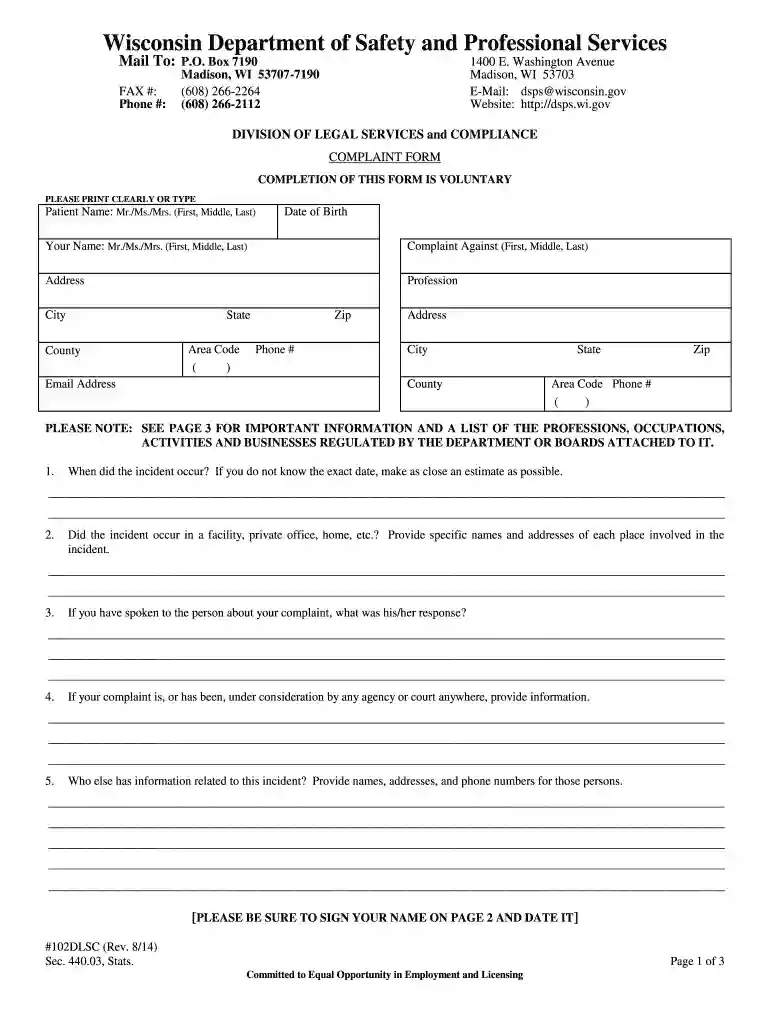
Click ‘Get Form’ to open the 102DLSC Complaint Form in the editor.
Begin by entering your personal information in the designated fields, including your name, date of birth, and contact details. Ensure that all entries are clear and legible.
In the section for 'Complaint Against', provide the full name and address of the individual or entity you are filing a complaint against.
Detail the incident by answering questions about when it occurred, where it took place, and any responses received from the person involved. Be as specific as possible to strengthen your complaint.
If applicable, include information about any other individuals who may have relevant information regarding your complaint. This can help in gathering more evidence.
Finally, describe the incident thoroughly in the provided space. Attach any supporting documents if necessary. Don’t forget to sign and date the form on page 2 before submission.
Start using our platform today to easily complete your 102DLSC Complaint Form for free!
Fill out 102DLSC Complaint Form - dsps wi online It's free
See more 102DLSC Complaint Form - dsps wi versions
We've got more versions of the 102DLSC Complaint Form - dsps wi form. Select the right 102DLSC Complaint Form - dsps wi version from the list and start editing it straight away!
DSPS complaint LookupWI DSPS complaintWisconsin Department of Safety and Professional Services DSPSDHS file a complaintWisconsin DHS complaintsState of Wisconsin CBRF complaintsWisconsin nursing home complaintsHow to file a complaint against a hospital in Wisconsin
Security and compliance
At DocHub, your data security is our priority. We follow HIPAA, SOC2, GDPR, and other standards, so you can work on your documents with confidence.
Attach copies of any relevant documents or evidence such as contracts, photographs, medical records, billing statements, personal notes, pill bottles, etc. ItRead more
Cookie consent notice
This site uses cookies to enhance site navigation and personalize your experience.
By using this site you agree to our use of cookies as described in our Privacy Notice.
You can modify your selections by visiting our Cookie and Advertising Notice.