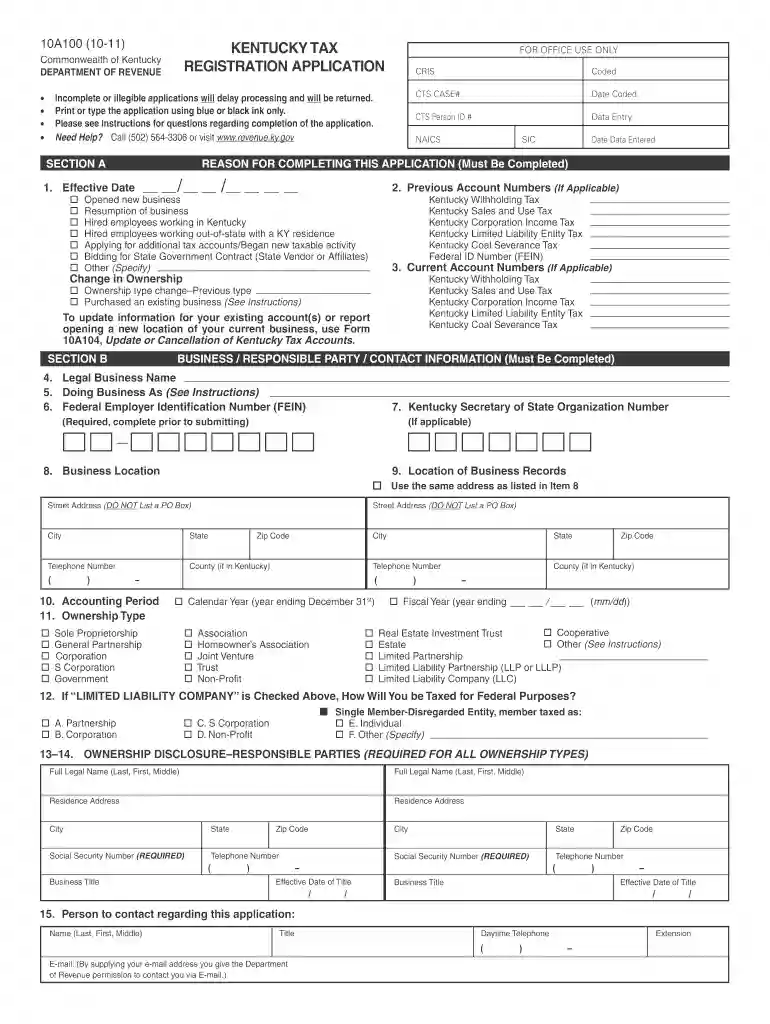
Kentucky tax registration 2011 form-2026

Get Form
kentucky tax registration 2011  form Preview on Page 1

Here's how it works

01. Edit your form online
Type text, add images, blackout confidential details, add comments, highlights and more.

02. Sign it in a few clicks
Draw your signature, type it, upload its image, or use your mobile device as a signature pad.

03. Share your form with others
Send it via email, link, or fax. You can also download it, export it or print it out.

How to use or fill out Kentucky Tax Registration 2011 form with DocHub

Form edit decoration
9.5
Ease of Setup
DocHub User Ratings on G2
9.0
Ease of Use
DocHub User Ratings on G2
  1. Click ‘Get Form’ to open the Kentucky Tax Registration Application in our editor.
  2. Begin with Section A, where you must provide the effective date and any previous account numbers if applicable. Select the reason for completing this application by checking the appropriate boxes.
  3. In Section B, fill in your business information including the legal business name, DBA (Doing Business As), and Federal Employer Identification Number (FEIN). Ensure that you provide a physical address instead of a P.O. Box.
  4. Proceed to Section C, where you will describe your business activities both within and outside Kentucky. Answer all questions regarding employee hiring and sales activities accurately.
  5. Complete Sections D through I as applicable based on your responses in previous sections. Each section pertains to specific tax accounts such as withholding tax, sales and use tax, or corporation income tax.
  6. Finally, ensure that the application is signed by an authorized person before submitting it via mail or fax as indicated at the end of the form.

Start filling out your Kentucky Tax Registration Application today using our platform for free!

be ready to get more

Complete this form in 5 minutes or less

Get form

Got questions?

We have answers to the most popular questions from our customers. If you can't find an answer to your question, please contact us.
Contact us
Prior year tax returns are available from the IRS for a fee. Taxpayers can request a copy of a tax return by completing and mailing Form 4506, Request for Copy of Tax Return, to the IRS address listed on the form. Theres a $30 fee for each copy. These are available for the current tax year and up to seven years prior.
Visit the e-filing website ​ Click on the Login button and enter your PAN details and password. Upon successful login, the user will land on the Home Page. On the Taskbar of the Home page, click on e-file -- Income Tax Returns -- View Filed Returns.
Log in to your MyGov account, select Link a Service, and choose the ATO. Youll be prompted for your Tax File Number (TFN) and other details such as bank account information from a previous tax return, a notice of assessment reference number, or your superannuation fund details.
KY 720 Information All corporations, other than S corporations, are required by law to file a Kentucky Corporation Income Tax and LLET Return. Any corporation electing S corporation treatment in accordance with Sections 1361(a) and 1362(a) of the Internal Revenue Code must use Form 720S and related schedules.
Forms and instructions are available online from the Department of Revenues website at revenue.ky.gov and at all Kentucky Taxpayer Service Centers. They may also be obtained by writing FORMS, Kentucky Department of Revenue, 501 High Street, Station 23B, Frankfort, KY 40601, or by calling (502) 564-3658.

Security and compliance

At DocHub, your data security is our priority. We follow HIPAA, SOC2, GDPR, and other standards, so you can work on your documents with confidence.

Learn more
ccpa2
pci-dss
gdpr-compliance
hipaa
soc-compliance
be ready to get more

Complete this form in 5 minutes or less

Get form

People also ask

Form 740 is the Kentucky Individual Income Tax Return used by residents of the state of Kentucky to report their income and calculate any taxes owed or due for the tax year 2023.

Related links