




Here's how it works



How to use or fill out move out checklist pdf with our platform

- Click ‘Get Form’ to open the move out checklist PDF in the editor.
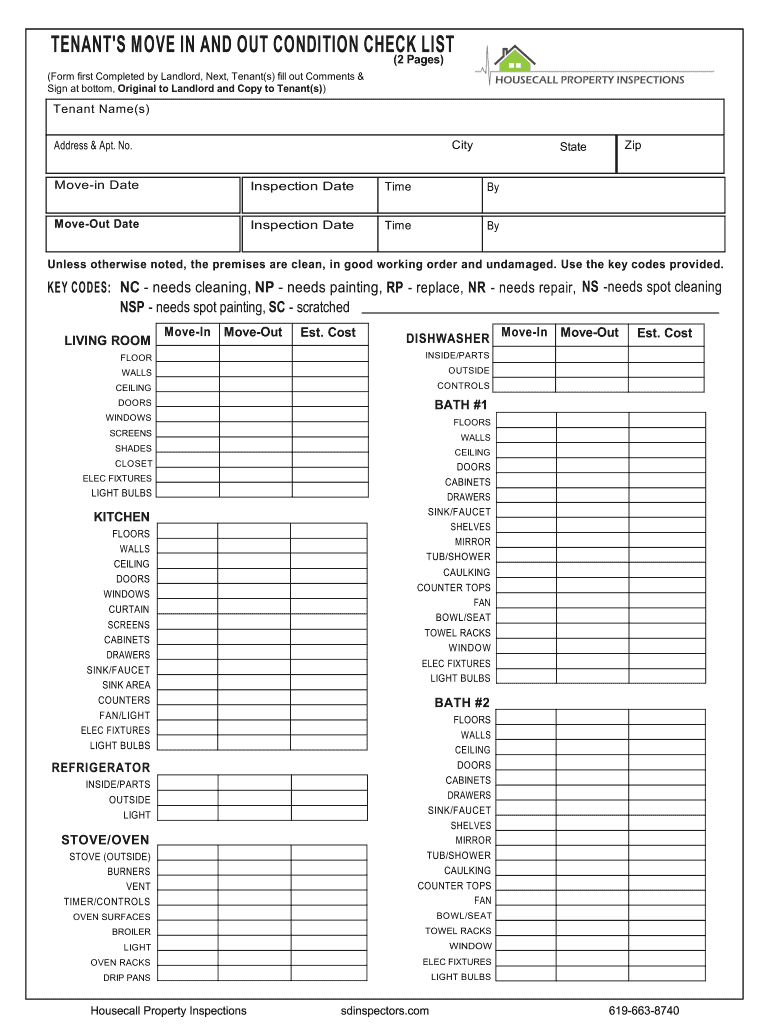
- Begin by entering your name(s), address, and move-in date at the top of the form. This information is crucial for identifying your inspection details.
- Proceed to the sections labeled 'Move-In' and 'Move-Out'. For each room listed, assess its condition and mark any issues using the provided key codes (e.g., NC for needs cleaning, NP for needs painting).
- In the 'Est. Cost' column, estimate any repair costs if applicable. This will help you understand potential deductions from your security deposit.
- Finally, ensure all tenants sign at the bottom of the form and provide a forwarding address. This step is essential for communication regarding your security deposit.
Start using our platform today to easily fill out your move out checklist PDF for free!
It's free
See more move out checklist pdf versions
| Versions | Form popularity | Fillable & printable |
|---|---|---|
| 2011 | 3.9 Satisfied (36 Votes) |
Got questions?
Can I sign my move out checklist for landlords pdf on a mobile?
Sure, you’ll find numerous applications for this on the web. Nevertheless, if you need to eSign your move out checklist for landlords pdf without installing additional software, DocHub is the best choice you can make. This powerful editor works on mobile devices just like on desktops. Open our editor in your preferred internet browser, register or sign in to your account, and start managing your paperwork.
Do I need to install software to edit my best free printable moving checklist pdf?
When you edit your best free printable moving checklist pdf with DocHub, you merely require a stable web connection and virtually any browser installed on your device. No need to install any third-party software or study tutorials. Just open a tab with DocHub, drag and drop your file, and edit it immediately.
What should be included in rental inventory?
Does tenant have to be present for final inspection Ontario?
What are the responsibilities of a tenants when moving out?
Security and compliance
At DocHub, your data security is our priority. We follow HIPAA, SOC2, GDPR, and other standards, so you can work on your documents with confidence.
Learn more


