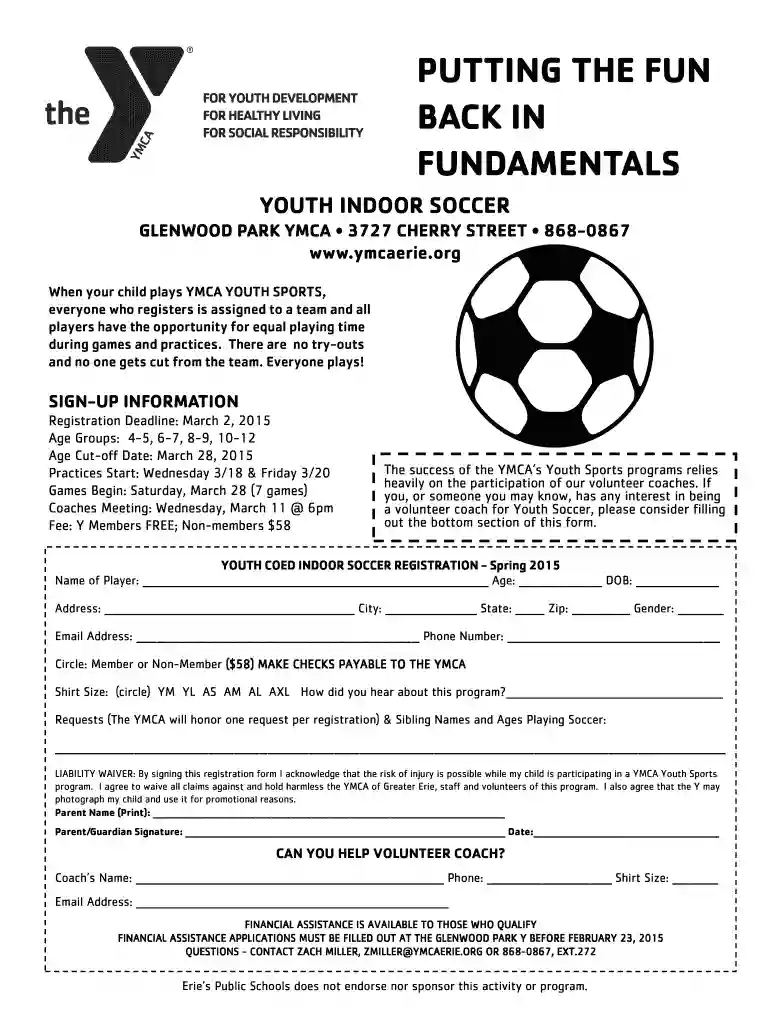
soccer registration form Preview on Page 1

Spring Soccer Registration Form - YMCA of Greater Erie 2026

Here's how it works

  • 01. Edit your soccer registration form online

    Type text, add images, blackout confidential details, add comments, highlights and more.

  • 02. Sign it in a few clicks

    Draw your signature, type it, upload its image, or use your mobile device as a signature pad.

  • 03. Share your form with others

    Send it via email, link, or fax. You can also download it, export it or print it out.

How to use or fill out Spring Soccer Registration Form - YMCA of Greater Erie with DocHub

Form edit decoration
9.5
Ease of Setup
DocHub User Ratings on G2
9.0
Ease of Use
DocHub User Ratings on G2
  1. Click ‘Get Form’ to open the Spring Soccer Registration Form in our editor.
  2. Begin by entering the player's name, age, and date of birth in the designated fields. Ensure accuracy for proper team assignment.
  3. Fill in the address, city, state, zip code, and gender of the player. This information is crucial for communication and organization.
  4. Provide a valid email address and phone number for contact purposes. This will help keep you informed about practices and games.
  5. Indicate whether you are a member or non-member by circling the appropriate option. Note that non-members have a fee of $58.
  6. Select the shirt size by circling one of the options provided (YM, YL, AS, AM, AL, AXL).
  7. In the requests section, mention any specific requests or sibling names and ages if applicable.
  8. Read through the liability waiver carefully before signing. By signing, you acknowledge potential risks associated with participation.
  9. Finally, fill out your name as a parent/guardian and provide your signature along with the date to complete registration.

Start filling out your Spring Soccer Registration Form today using our platform for free!

See more soccer registration form versions

We've got more versions of the soccer registration form form. Select the right soccer registration form version from the list and start editing it straight away!

VersionsForm popularityFillable & printable
20154.8 Satisfied (37 Votes)

be ready to get more

Complete this form in 5 minutes or less

Security and compliance

At DocHub, your data security is our priority. We follow HIPAA, SOC2, GDPR, and other standards, so you can work on your documents with confidence.

Related links

Lake Ontario - Advisory Council - National Marine Sanctuaries

The Lake Ontario Advisory Councils 15 voting members will represent a variety of interests, from recreation and tourism to education and research.

Learn more
History - Albany College of Pharmacy and Health

When it was chartered in 1881, ACP -- as it would be known for the next 127 years -- was one of only 14 colleges of pharmacy in the United States.Read more

Learn more
If you believe that this page should be taken down, please follow our DMCA take down process here