




Here's how it works



How to use or fill out Academy Nomination Form - Congresswoman Lynn Jenkins - lynnjenkins house with our platform

- Click ‘Get Form’ to open the Academy Nomination Form in the editor.
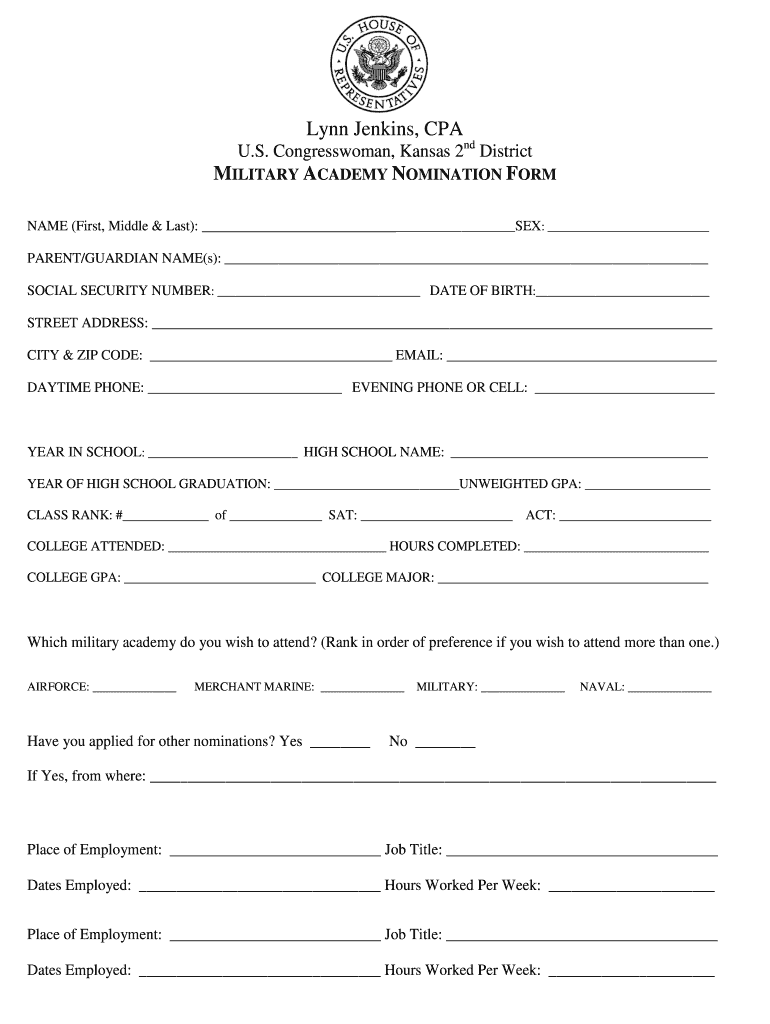
- Begin by filling in your full name, including first, middle, and last names. Ensure accuracy as this will be used for official purposes.
- Provide your parent or guardian's name(s) and complete the personal information section, including social security number, date of birth, and contact details.
- Indicate your current year in school and high school name. Fill out your GPA, class rank, and standardized test scores (SAT/ACT) accurately.
- Select your preferred military academy(s) and indicate if you have applied for other nominations. This helps streamline the nomination process.
- List your employment history, extracurricular activities, awards, and community involvement. This section highlights your qualifications.
- Attach required documents such as a brief essay about your character and leadership abilities, a recent photo, transcripts, test score verifications, and letters of reference.
- Finally, review all entries for accuracy before signing the form. Submit it by mailing it to Congresswoman Jenkins' office before the deadline.
Start using our platform today to easily fill out the Academy Nomination Form for free!
It's free
See more Academy Nomination Form - Congresswoman Lynn Jenkins - lynnjenkins house versions
| Versions | Form popularity | Fillable & printable |
|---|---|---|
| 2016 | 4.2 Satisfied (29 Votes) |
Got questions?
How can I send my Academy Nomination Form - Congresswoman Lynn Jenkins - lynnjenkins house for eSignature?
Upload your Academy Nomination Form - Congresswoman Lynn Jenkins - lynnjenkins house to DocHub (once you’ve set up an account for this). If you need to fill out fields in it, use appropriate tools from the top pane. For instance, add Signature Fields, assign each to specific person, and click on Sign → Request signatures from others. Customize your message for your recipients and click Send Request. You can also send your document by fax or as a Signing link instead of using email (you’ll locate these options by navigating to the Menu → Send)
How to manage my Academy Nomination Form - Congresswoman Lynn Jenkins - lynnjenkins house from Gmail?
If your go-to electronic mail service is Gmail, it is simple to incorporate your DocHub editor into your work. Modify your Academy Nomination Form - Congresswoman Lynn Jenkins - lynnjenkins house with DocHub instruments and attach it to your drafts in Gmail. See how straightforward it is to exchange files and work together with a swift PDF editing solution at hand.
Security and compliance
At DocHub, your data security is our priority. We follow HIPAA, SOC2, GDPR, and other standards, so you can work on your documents with confidence.
Learn more


