




Here's how it works

01. Edit your cargo damage report online
Type text, add images, blackout confidential details, add comments, highlights and more.

02. Sign it in a few clicks
Draw your signature, type it, upload its image, or use your mobile device as a signature pad.

03. Share your form with others
Send damage claim form via email, link, or fax. You can also download it, export it or print it out.
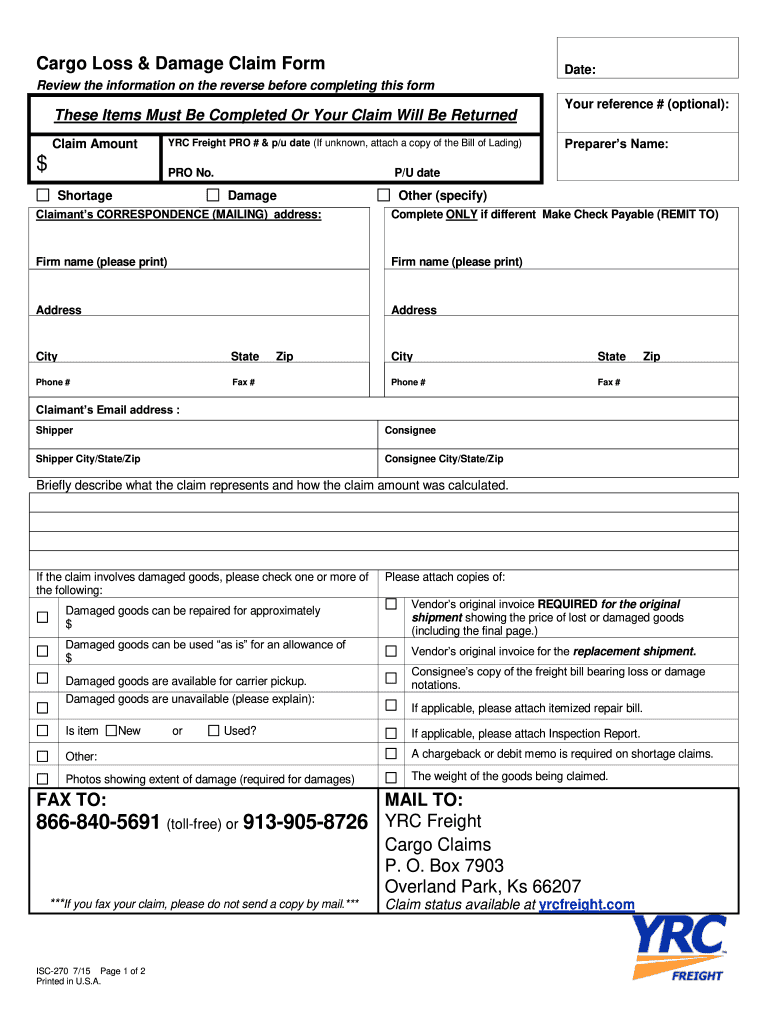
How to use or fill out ISC-270 Cargo Loss Damage Claim form - 5-09.doc with our platform

- Click ‘Get Form’ to open the ISC-270 Cargo Loss Damage Claim form in the editor.
- Begin by entering your reference number (optional) and the claim amount in the designated fields. Ensure accuracy as this information is crucial for processing your claim.
- Fill in the YRC Freight PRO number and pick-up date. If you are unsure, attach a copy of the Bill of Lading for reference.
- Complete the claimant’s correspondence address section, including firm name, mailing address, city, state, and zip code. This ensures that all communications regarding your claim reach you promptly.
- In the section describing the claim, provide a brief explanation of what the claim represents and how you calculated the claim amount. Be clear and concise to facilitate understanding.
- If applicable, check any boxes related to damaged goods and attach necessary documentation such as vendor invoices or photographs showing damage.
- Finally, review all entered information for accuracy before submitting your claim via fax or mail as indicated on the form.
Start using our platform today to streamline your claims process for free!
Fill out ISC-270 Cargo Loss Damage Claim form - 5-09.doc online
It's free
It's free
Security and compliance
At DocHub, your data security is our priority. We follow HIPAA, SOC2, GDPR, and other standards, so you can work on your documents with confidence.
Learn more


