Ar accounts atap 2026

Get Form
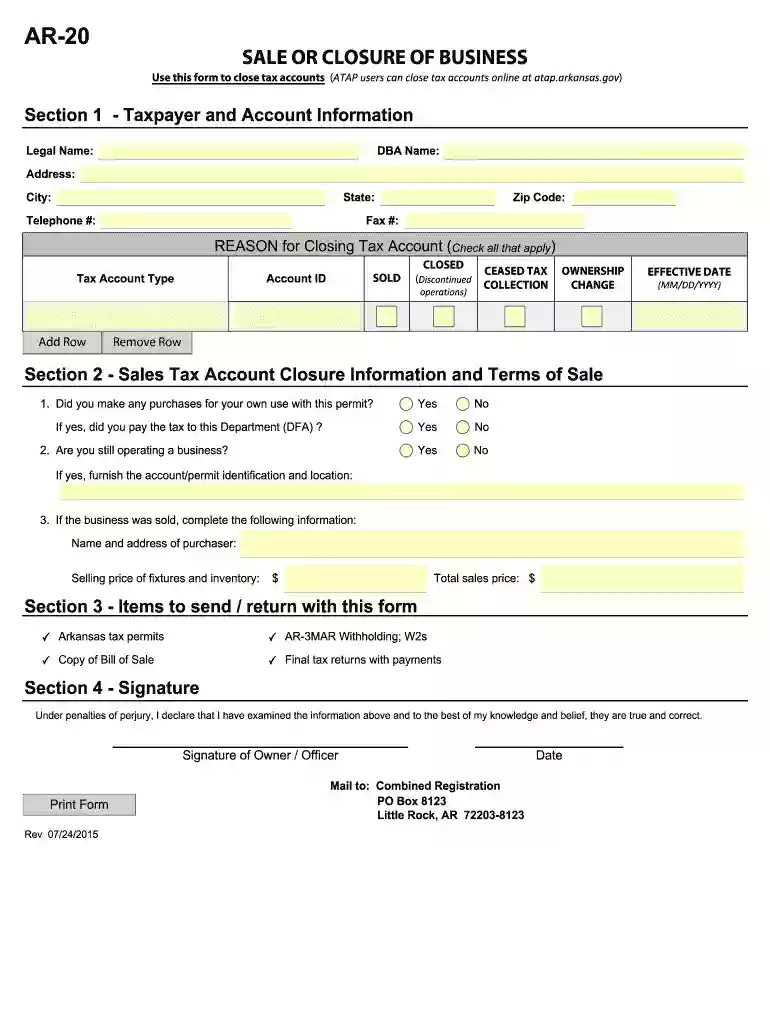
arkansas ar 20 form Preview on Page 1

Here's how it works

01. Edit your arkansas ar 20 form online
Type text, add images, blackout confidential details, add comments, highlights and more.

02. Sign it in a few clicks
Draw your signature, type it, upload its image, or use your mobile device as a signature pad.

03. Share your form with others
Send ar 20 form via email, link, or fax. You can also download it, export it or print it out.

How to use or fill out ar accounts atap with our platform

Form edit decoration
9.5
Ease of Setup
DocHub User Ratings on G2
9.0
Ease of Use
DocHub User Ratings on G2
  1. Click ‘Get Form’ to open the ar accounts atap in the editor.
  2. Begin by entering your personal information in the designated fields, including your name, address, and contact details. Ensure accuracy for seamless processing.
  3. Next, navigate to the financial information section. Here, input relevant account numbers and transaction details as required. Double-check for any errors.
  4. If applicable, review any terms and conditions provided within the form. Acknowledge your understanding by checking the appropriate box.
  5. Finally, sign the document electronically using our platform’s signature feature. This ensures your submission is valid and complete.

Start using our platform today to fill out your ar accounts atap easily and for free!

See more ar accounts atap versions

We've got more versions of the ar accounts atap form. Select the right ar accounts atap version from the list and start editing it straight away!
Versions Form popularity Fillable & printable
2015 4.9 Satisfied (47 Votes)
2012 4.4 Satisfied (9438 Votes)
be ready to get more

Complete this form in 5 minutes or less

Get form

Got questions?

We have answers to the most popular questions from our customers. If you can't find an answer to your question, please contact us.
Contact us
Arkansas Taxpayer Access Point (ATAP) ATAP is available for most taxes administered by the Revenue Division. ATAP provides Arkansas taxpayers with secure access to their tax accounts 24 hours a day, 7 days a week and will afford users the ability to perform the following functions: Register for Tax Accounts.
Just like the federal government, if you earn an income, you must pay income taxes in Arkansas. As a traditional W-2 employee, your Arkansas taxes will be drawn on each payroll automatically. You will see this on your paycheck stub, near or next to the federal taxes.
Arkansas Taxpayer Access Point (ATAP) ATAP is a web-based service that allows taxpayers, or their designated representative, online access to their tax accounts and related information. ATAP is available for most taxes administered by the Revenue Division.
The Telecommunication Access Program (TAP) provides specialized telecommunication equipment to eligible Arkansans who are deaf, hard of hearing, deaf-blind, or who have a speech, visual, mobility, or intellectual impairment.
How do I log in to ATAP? Enter your ATAP Login ID (Username) and Password and click Log in. Select the method by which you wish to receive your Security Code to setup the two-step verification. You may select to receive the security code by email, text message, or through an Authentication App.

Security and compliance

At DocHub, your data security is our priority. We follow HIPAA, SOC2, GDPR, and other standards, so you can work on your documents with confidence.

Learn more
ccpa2
pci-dss
gdpr-compliance
hipaa
soc-compliance

People also ask

ATAP is a web-based service that will give taxpayers, or their designated representative, online access to their tax accounts and offers the following services: Register a business. File a return online (except Individual Income Tax) File a return using XML return upload.
The purpose of the ARIA system is to perform a functional-needs assessment to assist in the development of an individuals Person-Centered Service Plan (PCSP), Personal Care services plan and for certain populations to establish the per member per month payment to a managed care entity.

ar 20 sale or closure of business