



Here's how it works



How to use or fill out vitals sheet template with our platform

- Click ‘Get Form’ to open the vitals sheet template in the editor.
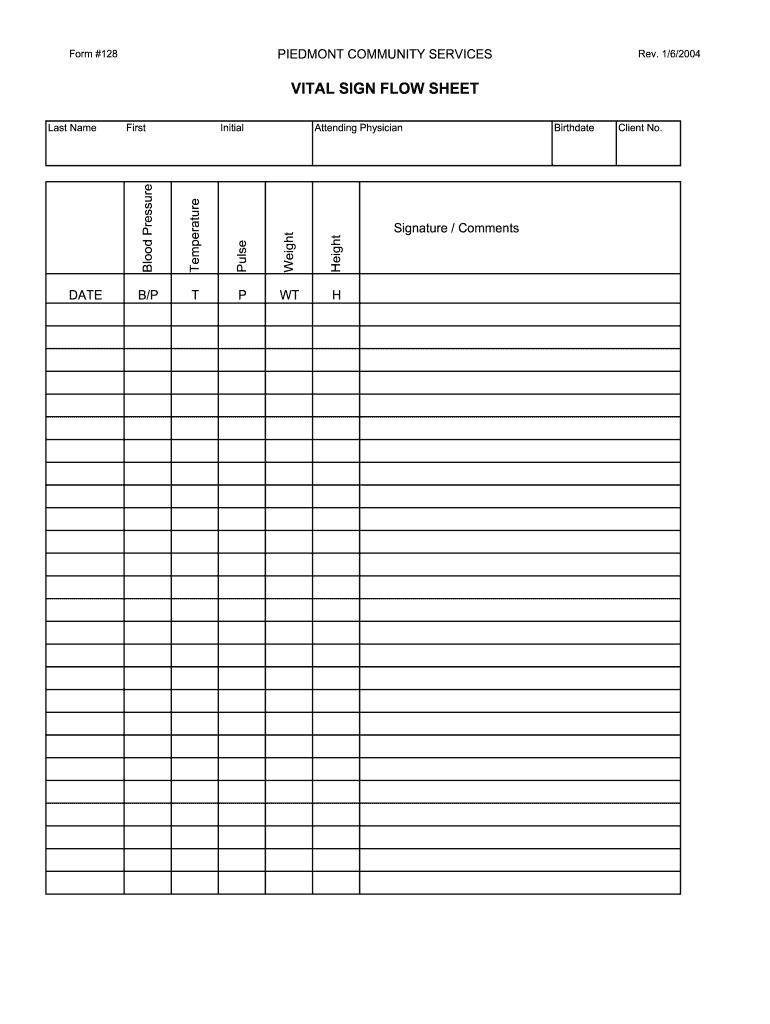
- Begin by entering the 'Date' at the top of the form. This is essential for tracking patient progress over time.
- Fill in the 'Height' and 'Weight' fields, ensuring accurate measurements are recorded for effective health assessments.
- Next, input the 'Attending Physician's name' to identify who is responsible for the patient's care.
- Record vital signs: enter 'Pulse', 'Temperature', and 'Blood Pressure'. Use clear values to maintain precise health records.
- Complete the personal information section by filling in 'Last Name', 'Birthdate', and 'Client No.' for proper identification.
- Finally, add any additional notes or comments in the 'Signature / Comments' section to provide context or observations related to the patient's condition.
Start using our platform today to effortlessly complete your vitals sheet template online for free!
It's free
See more vitals sheet template versions
| Versions | Form popularity | Fillable & printable |
|---|---|---|
| 2004 | 4.9 Satisfied (52 Votes) |
Got questions?
Is it secure to sign my vital signs sheet for multiple patients free electronically?
You need to use only trusted software solutions with strong security compliance to sign your documents electronically. DocHub is just the type of service you need! It stores data on Amazon Web Servers and complies with all essential security criteria and eSignature regulations, so it’s a trusted way to electronically sign your vital signs sheet for multiple patients free or other forms using this tool.
How do you edit multiple patient vital signs sheet in Chrome?
If you use Chrome, there are two simple methods to edit your multiple patient vital signs sheet online. First, go to the DocHub site, add your file, and edit it utilizing our toolbar. You can also install our Chrome extension and edit any document by dragging and dropping it in your web browser window.
How do you document vitals for a patient?
How do you document vitals for a patient?
What is a vital sheet?
Security and compliance
At DocHub, your data security is our priority. We follow HIPAA, SOC2, GDPR, and other standards, so you can work on your documents with confidence.
Learn more