Type text, add images, blackout confidential details, add comments, highlights and more.
02. Sign it in a few clicks
Draw your signature, type it, upload its image, or use your mobile device as a signature pad.
03. Share your form with others
Send electrical bid proposal template via email, link, or fax. You can also download it, export it or print it out.
How to use or fill out electrical bid template with our platform
Ease of Setup
DocHub User Ratings on G2
Ease of Use
DocHub User Ratings on G2
Click ‘Get Form’ to open the electrical bid template in the editor.
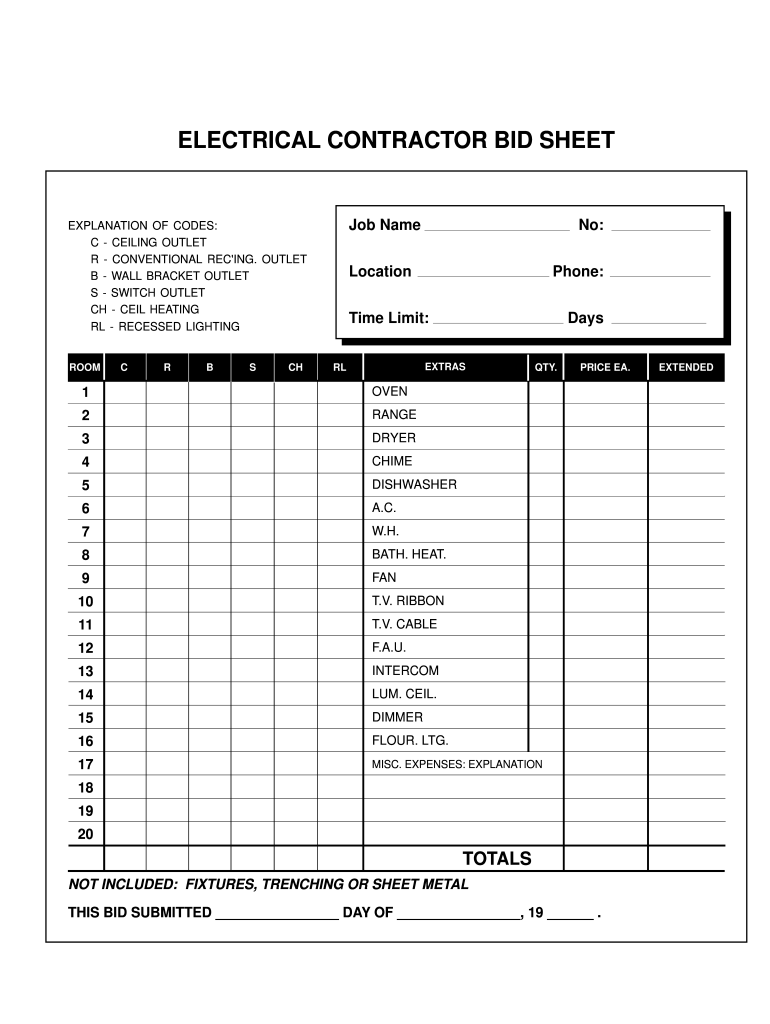
Begin by entering the 'Job Name' at the top of the form. This identifies the project for which you are submitting a bid.
Refer to the 'EXPLANATION OF CODES' section to understand the abbreviations used for different outlets and fixtures. Make sure to select the appropriate codes for your project.
In the 'ROOM' section, specify each room where electrical work will be performed, followed by filling in the corresponding codes (C, R, B, S, CH, RL) based on your needs.
Fill in details such as 'Location', 'Phone', and 'Time Limit'. Specify how many days you anticipate needing for completion.
For each item listed under 'EXTRAS', indicate quantity (QTY.) and price per item (PRICE EA.). This includes appliances like ovens and dishwashers.
Finally, calculate and enter your total costs in the 'TOTALS' section. Note any exclusions such as fixtures or trenching as mentioned at the bottom of the form.
Start using our platform today to streamline your electrical bidding process for free!
RCW 35.92.350: Electrical construction or improvement
Any city or town owning an electrical utility shall require that bid proposals upon any electrical construction or improvement shall be made upon contractRead more
Cookie consent notice
This site uses cookies to enhance site navigation and personalize your experience.
By using this site you agree to our use of cookies as described in our Privacy Notice.
You can modify your selections by visiting our Cookie and Advertising Notice.