Type text, add images, blackout confidential details, add comments, highlights and more.
02. Sign it in a few clicks
Draw your signature, type it, upload its image, or use your mobile device as a signature pad.
03. Share your form with others
Send 1023 ez form pdf via email, link, or fax. You can also download it, export it or print it out.
How to use or fill out form 1023 ez pdf with DocHub
Ease of Setup
DocHub User Ratings on G2
Ease of Use
DocHub User Ratings on G2
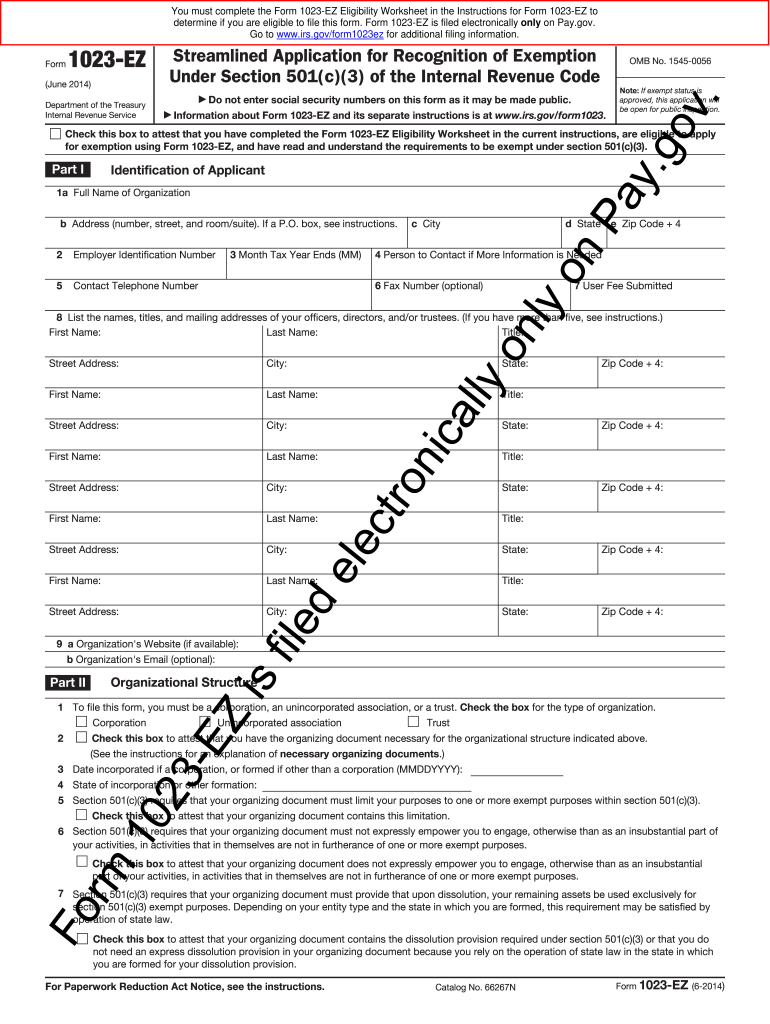
Click ‘Get Form’ to open the Form 1023-EZ in our editor.
Begin with Part I: Identification of Applicant. Fill in your organization’s full name, Employer Identification Number (EIN), and contact details including telephone number and address.
In Part II, select the type of organization you are applying for (Corporation, Trust, or Unincorporated Association) and confirm that you have the necessary organizing documents.
Proceed to Part III: Your Specific Activities. Enter the NTEE Code that best describes your activities and check all applicable purposes for which your organization is established.
Complete Part IV regarding Foundation Classification by checking the appropriate box that reflects your organization's support structure.
Finally, in Part VI, ensure to sign and date the application electronically. Review all entries for accuracy before submission.
Start using our platform today to fill out Form 1023-EZ easily and efficiently!
Irs form 1023 ez pdf downloadForm 1023 PDFIRS 1023-EZ Form downloadIRS 1023-EZ Form onlineForm 1023 ez pdf 2022Irs form 1023 ez pdf 2022Form 1023-EZ Eligibility WorksheetPay gov 1023-EZ
Security and compliance
At DocHub, your data security is our priority. We follow HIPAA, SOC2, GDPR, and other standards, so you can work on your documents with confidence.
Discuss Form 1023-EZ. View Compliance Returns. Complete, and Submit Form 1023-EZ: For those with all the information needed and payment capacity. Page 6Read more
Form 1023-EZ is used to apply for recognition as a tax-exempt organization under Section 501(c)(3). Applicants can learn more about the requirements,Read more
Complete if the organization is a section 501(c)(3) organization or a section 4947(a)(1) nonexempt charitable trust. Attach to Form 990 or Form 990-EZ. Go toRead more
Cookie consent notice
This site uses cookies to enhance site navigation and personalize your experience.
By using this site you agree to our use of cookies as described in our Privacy Notice.
You can modify your selections by visiting our Cookie and Advertising Notice.