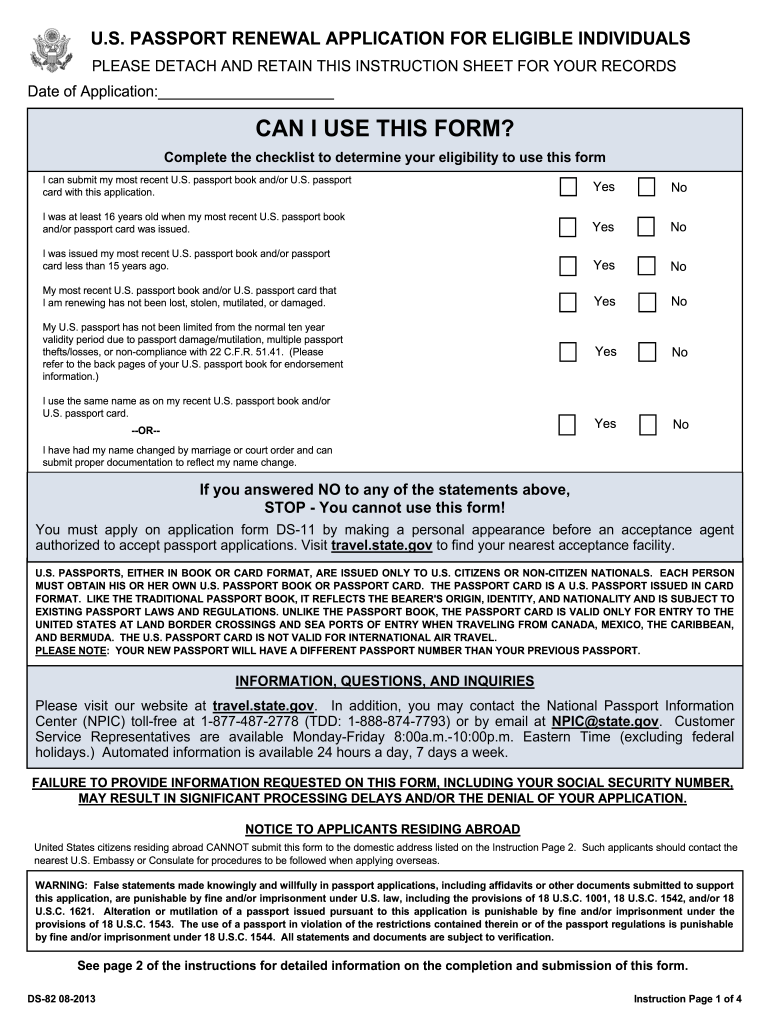
Ds 82 c 08 2013 form-2026

Get Form
ds 182 sample filled form Preview on Page 1

Here's how it works

01. Edit your ds 182 sample filled form online
Type text, add images, blackout confidential details, add comments, highlights and more.
02. Sign it in a few clicks
Draw your signature, type it, upload its image, or use your mobile device as a signature pad.
03. Share your form with others
Send ds 82 form printable via email, link, or fax. You can also download it, export it or print it out.

How to use or fill out ds 82 c 08 2013 form with our platform

Form edit decoration
9.5
Ease of Setup
DocHub User Ratings on G2
9.0
Ease of Use
DocHub User Ratings on G2
  1. Click ‘Get Form’ to open the ds 82 c 08 2013 form in the editor.
  2. Begin by filling in your personal information. Enter your name, date of birth, and place of birth in the designated fields. Ensure accuracy as this information is crucial for your application.
  3. Complete the eligibility checklist at the top of the form. Confirm that you can submit your most recent passport and meet all other criteria listed.
  4. Provide your Social Security number and contact details. This includes your email address and phone number, which will help facilitate communication regarding your application.
  5. Attach a recent color photograph that meets the specified requirements. Ensure it is stapled securely to the form.
  6. Review all sections for completeness and accuracy before signing and dating the application at the bottom of page one.
  7. Finally, follow instructions for mailing your completed application to the appropriate National Passport Processing Center based on whether you are requesting routine or expedited service.

Start using our platform today to simplify your document editing and submission process for free!

See more ds 82 c 08 2013 form versions

We've got more versions of the ds 82 c 08 2013 form form. Select the right ds 82 c 08 2013 form version from the list and start editing it straight away!
Versions Form popularity Fillable & printable
2022 4.6 Satisfied (198 Votes)
2020 4.3 Satisfied (152 Votes)
2017 4.4 Satisfied (1664 Votes)
2016 4.4 Satisfied (215 Votes)
2013 4.2 Satisfied (68 Votes)
2010 4.1 Satisfied (69 Votes)
2008 3.9 Satisfied (42 Votes)
be ready to get more

Complete this form in 5 minutes or less

Get form

Got questions?

We have answers to the most popular questions from our customers. If you can't find an answer to your question, please contact us.
Contact us
As you can see there are many reasons why the U.S. Department of State can deny your application or passport renewal. Be sure to follow all the guidelines the U.S. Department has set in place and these should be avoidable. Otherwise, you may have to postpone or cancel that foreign trip.
No, you generally cannot submit a handwritten DS-82 form for a U.S. passport renewal; the Department of State requires you to use the online Form Filler at travel.state.gov, print it (single-sided), and then sign it, as handwritten changes after printing will cause DocHub processing delays. The system generates a unique barcode that needs to be scanned, so making any manual edits after printing is strongly discouraged. Heres the required process for the DS-82: Go Online: Visit the U.S. Department of States passport form filler page to complete the DS-82 form. Print: Print the completed, barcoded form single-sided. Sign: Sign and date the printed form in black ink (only handwritten marks allowed are the signature and date). Submit: Mail the signed form with your other required documents (old passport, photo, fee, etc.). Why handwritten forms are a problem: Barcode: The online tool creates a scannable barcode; handwriting messes up this data capture. Delays: Handwritten corrections or entire handwritten forms can lead to DocHub processing delays or even rejection. For forms like the DS-11 (new passport) or DS-82 (renewal), using the online Form Filler and printing is the standard and recommended procedure to avoid issues. AI can make mistakes, so double-check responsesPassport Application (DS82) Renewal Instructions 5.1.2019.pdf - USDA ARSm. Print document as single-sided (2 pages). Note: The U.S. Department of State will only accept single- sided applications createARS, USDA (.gov)Some tips to keep in mind when filling out a passport application.After using the Form Filler tool, do not make handwritten corrections to the form after youve printed it. The Form Filler tool wicommon.usembassy.gov
Yes, you can often get a physical DS-82 form at some post office locations, but the U.S. Department of State recommends you print it yourself from their website as they dont always have them in stock. While some post offices are passport acceptance facilities, they only handle first-time applications (Form DS-11), so you must mail your completed DS-82 renewal form yourself. To Get the DS-82 Form: Best Method (Print it Yourself): Go to the Department of States passport form page (or just search for DS-82 form) to download and print the form. Check Locally: Call your local post office or use the State Departments location finder to see if they offer physical forms. Key Things to Remember for DS-82 Renewals: Mail It Yourself: You cannot submit the DS-82 in person at a post office; you must mail it directly to the processing center. Track It: Use a trackable mailing service (like USPS Priority Mail) to send your application. Eligibility: You must meet specific criteria to renew by mail (e.g., your last passport was issued within the last 15 years and is undamaged). AI can make mistakes, so double-check responsesPassport Application Passport Renewal - USPSApply early for renewals as many countries require that passports be valid for at least 6 months after you enter their country. LeUSPSCan I Renew My Passport at the Post Office: Form, Cost, Tips - PhotoAiDJun 9, 2025 Note, however, that USPS are only passport acceptance facilities, they dont process passport renewal applications. USPPhotoAiD
You usually find out your passport is flagged when you experience travel delays, like being pulled aside at the airport or border for extra questioning (secondary inspection). While you might get an email from CBP (CBP.gov) for compliance issues, the primary way is through these real-time encounters with border agents who see flags on their system when they scan your passport. Signs your passport is flagged Secondary Inspections: Being directed to a separate area for more questions at the airport or border is a strong indicator. Border Delays: Youll likely experience DocHub holds at immigration or customs checkpoints. CBP Notifications: For entry compliance issues, CBP (CBP.gov) may send emails from travelercompliance@cbp.dhs.gov, though this is a newer system. What agents see (and what it means) Flags in the system: Officers see alerts connected to your passport number, indicating potential issues like being reported lost/stolen (even if you didnt report it) or other watchlists. Travel history: Frequent or unusual travel patterns can trigger flags. Random checks: Sometimes, extra scrutiny is just a random check, not necessarily a major problem. What to do if you suspect a flag File a DHS TRIP complaint: If youre frequently delayed, file a complaint with the DHS Traveler Redress Inquiry Program (DHS TRIP) (DHS.gov) to get a Redress Control Number, which can help resolve issues. Contact the State Department: For passport-specific issues (like a denied renewal), contact the Department of State (state.gov). AI can make mistakes, so double-check responsesIs my Passport flagged? : r/uscanadaborder - RedditAug 28, 2024 Comments Section. Fun-Dinner-2282. 2y ago. youll be pulled into secondary each crossing until an officer removes thRReddit r/uscanadaborderTraveler Compliance | U.S. Customs and Border ProtectionDec 30, 2025U.S. Customs and Border Protection (.gov)
DS-82 Form: Mistakes to Watch Out For Dont Leave Fields Blank. Make sure every mandatory field is filled out. Double-Check Your Details. No White-Out or Correction Tape. Follow Photo Specifications. Remember to Sign. Complete Payment Details. Double-Check Mailing Address. Include Your Old Passport.


Security and compliance

At DocHub, your data security is our priority. We follow HIPAA, SOC2, GDPR, and other standards, so you can work on your documents with confidence.

Learn more
ccpa2
pci-dss
gdpr-compliance
hipaa
soc-compliance
be ready to get more

Complete this form in 5 minutes or less

Get form

People also ask

U.S. citizens who meet specific criteria fill out Form DS-82 to renew their passport book and/or card by mail or online, provided their previous passport is undamaged, was issued when they were 16 or older, and was issued within the last 15 years, among other conditions. This form is for routine renewals and cannot be used if your passport was lost, stolen, or damaged, or if youre applying for a first-time passport or a childs passport. Who is eligible for Form DS-82? You can use Form DS-82 if you meet ALL of these requirements: Your most recent passport: is undamaged and can be submitted with your application. It was issued: when you were age 16 or older. It was issued: within the last 15 years. It was not limited: to less than 10 years of validity (e.g., due to damage or multiple losses). You use the same name, or can document a legal name change (marriage, court order) with proper documentation. Who cannot use Form DS-82? You must use Form DS-11 (Apply in Person) if: You are applying for your first U.S. passport. You are applying for a child under 16. Your most recent passport was lost, stolen, or damaged. You dont meet the renewal criteria above. How to use the form Complete the form online or download the PDF. Sign and date it. Submit with your old passport, new photo, and fees. Can be renewed online (if eligible) or by mail, but not in person. AI can make mistakes, so double-check responsesPassport FormsSep 25, 2025U.S. Department of State (.gov)U.S. Passport Renewal Application for Eligible Individuals - State.govThis form is used by U.S. passport holders to renew their current or recently expired U.S. passport book and/or card (a travel docU.S. Department of State (.gov)
Yes, you can fill out the DS-82 passport renewal form by hand using black ink, but the U.S. Department of State strongly recommends using the official online Form Filler for accuracy and to avoid delays, as handwritten forms can sometimes be problematic. You must print the form single-sided and only your signature and date should be handwritten; any other handwritten changes to typed information will likely be rejected, requiring you to restart the process. Key Points for Hand-Filling DS-82: Use Black Ink Only: Pencils, markers, or other colors are not accepted. Print Single-Sided: Do not print on both sides of the paper. Only Signature is Handwritten: All other data should be typed using the online form filler; only your signature and date are allowed as handwritten additions on the printed PDF, as notes U.S. Department of State. Barcode is Key: The online form filler creates a scannable barcode with your information, which is crucial for processing; handwritten forms lack this. Avoid Errors: Mistakes on a handwritten form often mean you have to start over, making the online tool much more efficient. Recommended Method: Use the State Departments online form filler on travel.state.gov. Review the generated PDF for accuracy and completeness. Print the final form single-sided. Sign and date the printed form by hand. AI can make mistakes, so double-check responsesPassport Forms - Travel - State.govSep 25, 2025 Use our Form Filler to fill out your form and print it. For the best experience, use a desktop or laptop computer. IncU.S. Department of State (.gov)Renew an adult passport | USAGovSep 22, 2025 Application - You will need Form DS-82. If you are renewing by mail: You can fill out Form DS-82 online, or. Download USA.gov

fillable ds 82