PTO Expense Reimbursement Form - ht-sd 2026

Get Form
pto reimbursement form Preview on Page 1

Here's how it works

01. Edit your pto reimbursement form online
Type text, add images, blackout confidential details, add comments, highlights and more.
02. Sign it in a few clicks
Draw your signature, type it, upload its image, or use your mobile device as a signature pad.
03. Share your form with others
Send it via email, link, or fax. You can also download it, export it or print it out.

How to use or fill out PTO Expense Reimbursement Form - ht-sd with our platform

Form edit decoration
9.5
Ease of Setup
DocHub User Ratings on G2
9.0
Ease of Use
DocHub User Ratings on G2
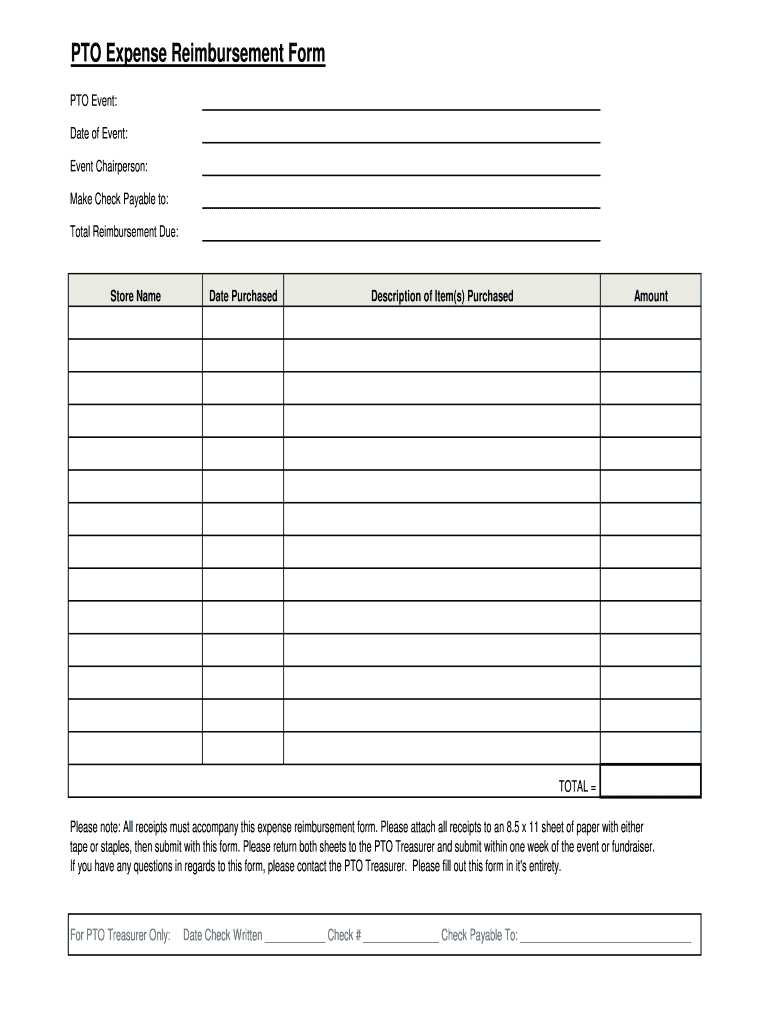
  1. Click ‘Get Form’ to open the PTO Expense Reimbursement Form in the editor.
  2. Begin by filling in the 'PTO Event' field with the name of the event for which you are seeking reimbursement.
  3. Next, enter the 'Date of Event' to specify when the event took place.
  4. Fill in the 'Event Chairperson' section with the name of the individual responsible for organizing the event.
  5. In the 'Make Check Payable to' field, indicate who should receive the reimbursement check.
  6. Calculate and input the 'Total Reimbursement Due' based on your expenses.
  7. List each purchase under 'Store Name', including 'Date Purchased', 'Description of Item(s) Purchased', and 'Amount'.
  8. Ensure all receipts are attached as instructed, then submit both sheets to the PTO Treasurer within one week of your event.

Start using our platform today to easily complete your PTO Expense Reimbursement Form for free!

See more PTO Expense Reimbursement Form - ht-sd versions

We've got more versions of the PTO Expense Reimbursement Form - ht-sd form. Select the right PTO Expense Reimbursement Form - ht-sd version from the list and start editing it straight away!
Versions Form popularity Fillable & printable
2014 4 Satisfied (50 Votes)
be ready to get more

Complete this form in 5 minutes or less

Get form

Got questions?

We have answers to the most popular questions from our customers. If you can't find an answer to your question, please contact us.
Contact us

Microsoft Word doesn’t have signing tools to generate legitimate electronic signatures and enforceable forms. Fortunately, DocHub is an online eSignature-compliant editor that works with various file formats, including .doc files. Log in to your account and import the Word edition of your PTO Expense Reimbursement Form - ht-sd from your device and cloud, or URL - our editor will automatically convert it into an editable PDF. Make all required alterations in your document and click Sign to generate your own legally-binding electronic signature. There are four signing options from which to choose.

If you store your paperwork in Google Drive, there is no need to download your PTO Expense Reimbursement Form - ht-sd on the computer and upload it back to our editor. A much easier way is to install a browser extension created by DocHub to streamline this flow. The extension allows editing PDFs in your browser. Alternatively, you may integrate your DocHub and Gmail accounts for more efficient editing.

What to include on an expense reimbursement template Employee information: Name, department, and contact details. Submission date: When the form was completed. Expense details: Date of purchase, expense category and description. Amount information: Cost per item and total amount.
0:00 9:49 Before creating the new format lets see how it works hi my name is Vijay and you are watchingMoreBefore creating the new format lets see how it works hi my name is Vijay and you are watching office mom lets start the video without any delays. On the top we have to fill all the employee.
A reimbursement form is a standardized document employees use to request repayment for work-related expenses. From travel costs to office supplies, these forms capture purchase details, streamline approvals, and create accurate records.

Security and compliance

At DocHub, your data security is our priority. We follow HIPAA, SOC2, GDPR, and other standards, so you can work on your documents with confidence.

Learn more
ccpa2
pci-dss
gdpr-compliance
hipaa
soc-compliance

People also ask

There must be a business reason for the expense. The expense must be in connection with the performance of services as an employee. The expense must be substantiated or deemed substantiated. There must be receipts and invoices that document the nature and amount of the expenditure(s).
This form is to be used by employees to request reimbursement for business-related expenses incurred during official duties. Ensure all information provided is accurate and all receipts/documents are attached for processing.
How Do You Create an Expense Sheet? Choose a template or expense-tracking software. Edit the columns and categories (such as rent or mileage) as needed. Add itemized expenses with costs. Add up the total. Attach or save your corresponding receipts. Print or email the report.

Related links