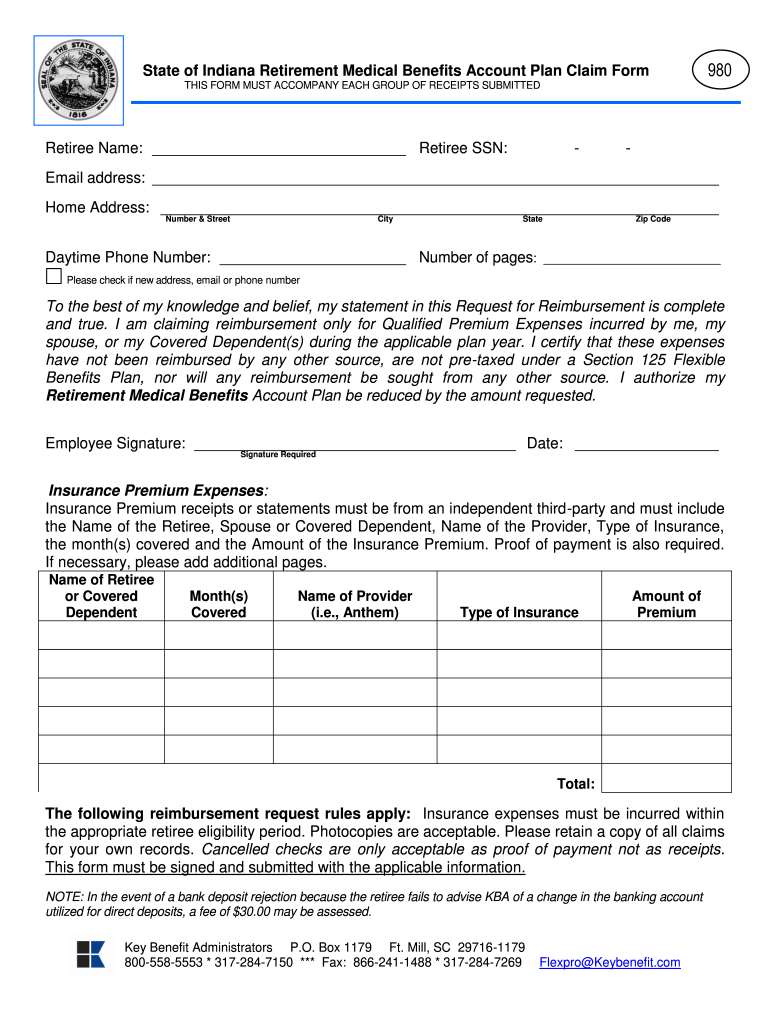
State of Indiana Retirement Medical Benefits Account Plan Claim ... 2026

Get Form
indiana retirement medical benefits account Preview on Page 1

Here's how it works

01. Edit your indiana retirement medical benefits account online
Type text, add images, blackout confidential details, add comments, highlights and more.
02. Sign it in a few clicks
Draw your signature, type it, upload its image, or use your mobile device as a signature pad.
03. Share your form with others
Send indiana retired teachers health insurance via email, link, or fax. You can also download it, export it or print it out.

How to use or fill out State of Indiana Retirement Medical Benefits Account Plan Claim with our platform

Form edit decoration
9.5
Ease of Setup
DocHub User Ratings on G2
9.0
Ease of Use
DocHub User Ratings on G2
  1. Click ‘Get Form’ to open it in the editor.
  2. Begin by entering your Retiree Name and SSN in the designated fields. Ensure accuracy as this information is crucial for processing your claim.
  3. Fill in your email address, home address, and daytime phone number. If any of these details have changed, check the box indicating a new address or contact information.
  4. In the Insurance Premium Expenses section, list each dependent's name, the months covered, the provider's name (e.g., Anthem), type of insurance, and the amount of premium paid. Make sure to attach receipts from an independent third-party provider.
  5. Review your entries for completeness and accuracy. Sign and date the form at the bottom to certify that all information is true and complete.
  6. Submit your completed form along with all required documentation through our platform for efficient processing.

Start using our platform today to easily fill out your State of Indiana Retirement Medical Benefits Account Plan Claim form for free!

See more State of Indiana Retirement Medical Benefits Account Plan Claim ... versions

We've got more versions of the State of Indiana Retirement Medical Benefits Account Plan Claim ... form. Select the right State of Indiana Retirement Medical Benefits Account Plan Claim ... version from the list and start editing it straight away!
Versions Form popularity Fillable & printable
2019 4.3 Satisfied (42 Votes)
2013 4 Satisfied (51 Votes)
be ready to get more

Complete this form in 5 minutes or less

Get form

Got questions?

We have answers to the most popular questions from our customers. If you can't find an answer to your question, please contact us.
Contact us
The RHPA can be used to reimburse (up to the amount in the account) eligible health care premiums for medical, prescription drug (pharmacy), dental, and vision plans, including unsubsidized coverage you purchase on the Federal Health Insurance Marketplace at healthcare.gov or state exchanges; coverage you purchase from
You can apply: Online; or. By calling our national toll-free service at 1-800-772-1213 (TTY 1-800-325-0778) or visiting your local Social Security office. Call ahead to make an appointment. If you do not live in the U.S. or one of its territories, you can also contact your nearest U.S.
You can apply: Online; or. By calling our national toll-free service at 1-800-772-1213 (TTY 1-800-325-0778) or visiting your local Social Security office. Call ahead to make an appointment.
If youre retired, you can get a plan through the ACA healthcare exchanges, and the plan should not be more than 8.5% of your income. Otherwise you would receive subsidies.
An RMSA is a tax-advantaged retiree healthcare savings account where employees set aside money now to help pay for healthcare costs in retirement. It is funded with after-tax employee contributions that can be invested using a variety of investment choices.

Security and compliance

At DocHub, your data security is our priority. We follow HIPAA, SOC2, GDPR, and other standards, so you can work on your documents with confidence.

Learn more
ccpa2
pci-dss
gdpr-compliance
hipaa
soc-compliance
be ready to get more

Complete this form in 5 minutes or less

Get form