Cancellation request documents 2026

Get Form
cancellation request documents Preview on Page 1

Here's how it works

01. Edit your cancellation request documents online
Type text, add images, blackout confidential details, add comments, highlights and more.
02. Sign it in a few clicks
Draw your signature, type it, upload its image, or use your mobile device as a signature pad.
03. Share your form with others
Send efg cancellation form via email, link, or fax. You can also download it, export it or print it out.

How to use or fill out cancellation request documents with our platform

Form edit decoration
9.5
Ease of Setup
DocHub User Ratings on G2
9.0
Ease of Use
DocHub User Ratings on G2
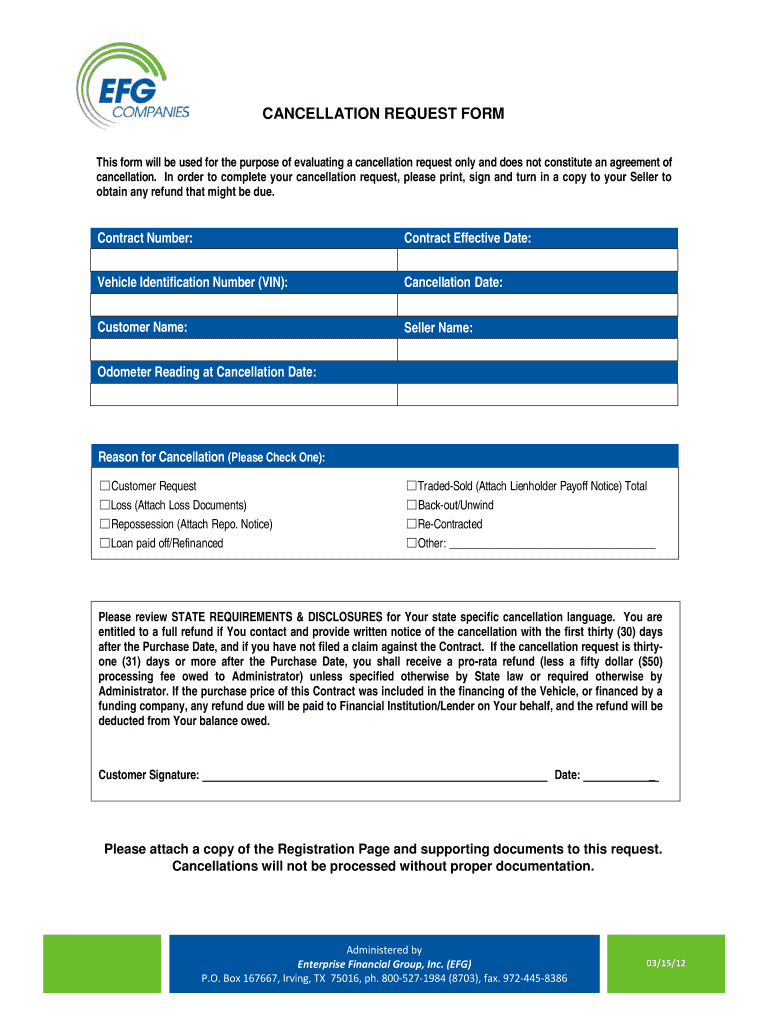
  1. Click ‘Get Form’ to open the cancellation request document in the editor.
  2. Begin by entering your Contract Number and Contract Effective Date at the top of the form. This information is crucial for identifying your specific contract.
  3. Next, input the Vehicle Identification Number (VIN) and Cancellation Date. Ensure these details are accurate to avoid processing delays.
  4. Fill in your Customer Name and Seller Name as they appear on the original contract. This helps maintain clarity in communication.
  5. Provide the Odometer Reading at Cancellation Date, which is necessary for record-keeping purposes.
  6. Select a reason for cancellation by checking one of the provided options. If applicable, attach any required documents such as loss notices or lienholder payoff notices.
  7. Sign and date the form at the bottom. Remember, a signature is mandatory for processing your request.
  8. Finally, attach any additional documentation requested, such as a copy of the Registration Page, before submitting your cancellation request.

Start using our platform today to easily complete your cancellation request documents online for free!

See more cancellation request documents versions

We've got more versions of the cancellation request documents form. Select the right cancellation request documents version from the list and start editing it straight away!
Versions Form popularity Fillable & printable
2012 4.9 Satisfied (305 Votes)
be ready to get more

Complete this form in 5 minutes or less

Get form

Got questions?

We have answers to the most popular questions from our customers. If you can't find an answer to your question, please contact us.
Contact us
Example Cancellation Message: 2 We regret to inform you that the [event] scheduled for [date] has been cancelled due to [Reason]. We apologize for any inconvenience this may cause. We will provide updates on rescheduling or refund options as soon as possible.
Tips for Writing Cancellation Emails Be direct. Use a clear subject line like Cancellation Request and state your purpose in the first sentence. Include key info. Add your account number or relevant details to help them find your account quickly. Stay polite and brief. Ask for proof.
Heres a step-by-step guide on how to write a cancellation letter for an event: Choose a letter format. Make the cancellation clear. Share why the event was cancelled. Apologise for the cancellation. Include information about event refunds. Share words of appreciation.
A cancellation request form allows the request of cancellation of a service, subscription, reservation, or an order, streamlining the cancellation process and ensuring that the request is handled in an organized and efficient manner.
Im writing to let you know that Ive experienced a personal emergency and must cancel our appointment scheduled for [Date] at [Time]. I sincerely apologize for any disruption this may cause to your schedule. Please docHub out to me to reschedule at your earliest convenience.
be ready to get more

Complete this form in 5 minutes or less

Get form

People also ask

Be Polite and Professional: Maintain a courteous tone throughout your response. Personalize the Email: Address the customer by name and reference their specific situation. Express Regret: Show genuine regret that the customer is canceling. Ask for Feedback: Request feedback to understand their reasons for canceling.
The Acord Cancellation Form (ACORD 35) is a standardized document used across the industry for policy termination. Its primary purpose is to provide written confirmation of the policyholders request to terminate coverage before the policys natural expiration date.

efg form