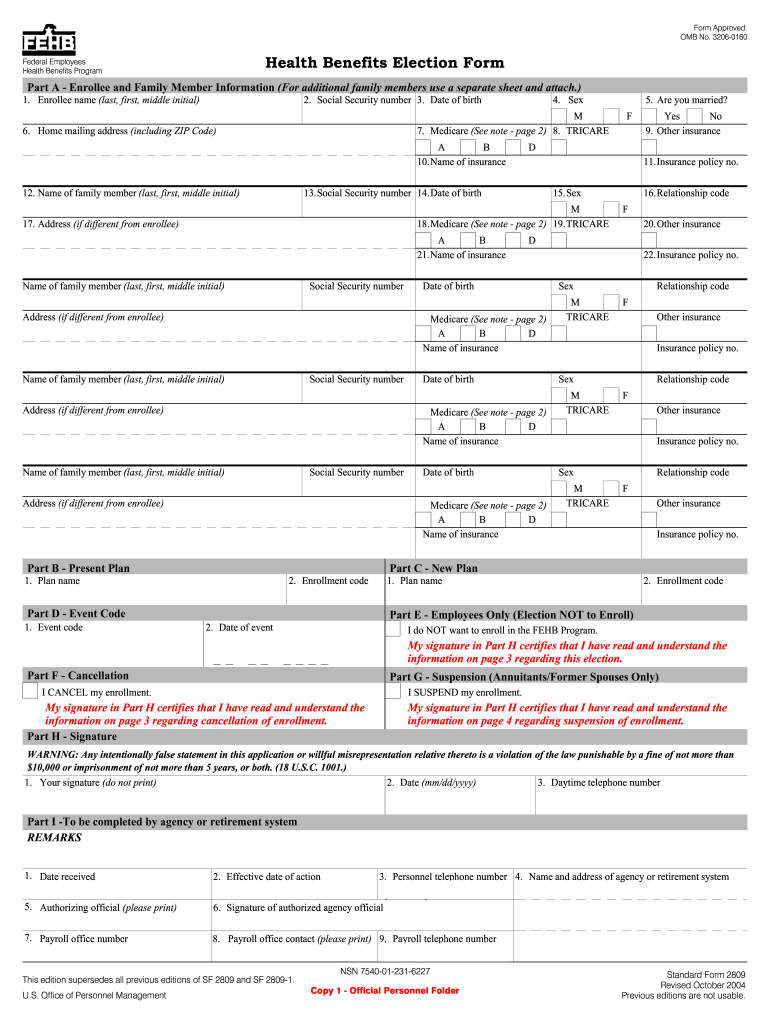
Sf 2809 2004 form-2026

Get Form
form 2809 Preview on Page 1

Here's how it works

01. Edit your form 2809 online
Type text, add images, blackout confidential details, add comments, highlights and more.
02. Sign it in a few clicks
Draw your signature, type it, upload its image, or use your mobile device as a signature pad.
03. Share your form with others
Send sf 2809 via email, link, or fax. You can also download it, export it or print it out.

How to use or fill out sf 2809 2004 form with our platform

Form edit decoration
9.5
Ease of Setup
DocHub User Ratings on G2
9.0
Ease of Use
DocHub User Ratings on G2
  1. Click ‘Get Form’ to open the SF 2809 in the editor.
  2. Begin with Part A, where you will enter your personal information. Fill in your name, Social Security number, and date of birth clearly.
  3. In Part B, provide details about your current health plan. Enter the plan name and enrollment code as specified on your plan brochure.
  4. Move to Part C to select a new plan if you are changing your enrollment. Again, input the plan name and enrollment code.
  5. For event-related changes, complete Part D by entering the appropriate event code that corresponds to your qualifying life event.
  6. If you wish to cancel or suspend your enrollment, navigate to Parts E and F respectively and mark the appropriate boxes.
  7. Finally, sign in Part H to certify that all information is accurate before submitting the form through our platform for processing.

Start using our platform today for free to streamline your SF 2809 form completion!

See more sf 2809 2004 form versions

We've got more versions of the sf 2809 2004 form form. Select the right sf 2809 2004 form version from the list and start editing it straight away!
Versions Form popularity Fillable & printable
2019 4.8 Satisfied (82 Votes)
2015 4.3 Satisfied (340 Votes)
2014 4.4 Satisfied (802 Votes)
2011 4 Satisfied (24 Votes)
2011 4.4 Satisfied (226 Votes)
2004 4 Satisfied (49 Votes)
be ready to get more

Complete this form in 5 minutes or less

Get form

Got questions?

We have answers to the most popular questions from our customers. If you can't find an answer to your question, please contact us.
Contact us
Uses for Standard Form (SF) 2809 Use this form to: Switch designated eligible family member; or. Enroll or reenroll in the FEHB Program; or. Elect not to enroll in the FEHB Program (employees only); or. Change your FEHB enrollment; or.
Health and Human Services, Department of Veterans Affairs Environment Protection. You can also fill out and submit a SF 2809 Form to your agencys personnel office. Please do not submit the form anywhere else.