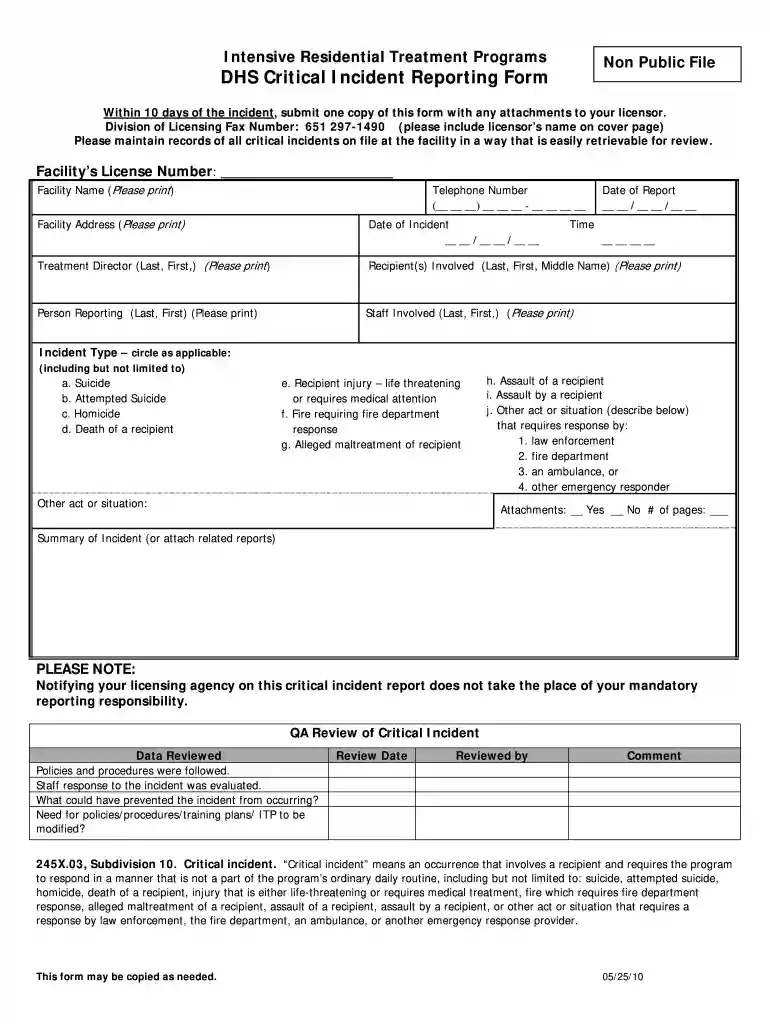
Critical Incident Report Form (PDF) - dhs mn 2026

Get Form
dhs incident report form Preview on Page 1

Here's how it works

01. Edit your dhs incident report form online
Type text, add images, blackout confidential details, add comments, highlights and more.

02. Sign it in a few clicks
Draw your signature, type it, upload its image, or use your mobile device as a signature pad.

03. Share your form with others
Send incident report dhs via email, link, or fax. You can also download it, export it or print it out.

How to use or fill out Critical Incident Report Form (PDF) - dhs mn with our platform

Form edit decoration
9.5
Ease of Setup
DocHub User Ratings on G2
9.0
Ease of Use
DocHub User Ratings on G2
  1. Click ‘Get Form’ to open the Critical Incident Report Form in the editor.
  2. Begin by filling in the Facility’s License Number, Facility Name, and Telephone Number. Ensure that all information is printed clearly for easy readability.
  3. Enter the Date of Incident and Date of Report using the provided format. This helps maintain accurate records.
  4. Document the Time of the incident accurately. This is crucial for reporting purposes.
  5. Fill in the Treatment Director's name, along with details of Recipient(s) Involved and Person Reporting. Make sure to include last names and first names as required.
  6. Indicate the Incident Type by circling all applicable options. This section is vital for categorizing the nature of the incident.
  7. If there are any attachments, mark 'Yes' or 'No' and specify the number of pages attached.
  8. Provide a detailed Summary of Incident or attach related reports to give context to your submission.

Start using our platform today to streamline your form completion process for free!

See more Critical Incident Report Form (PDF) - dhs mn versions

We've got more versions of the Critical Incident Report Form (PDF) - dhs mn form. Select the right Critical Incident Report Form (PDF) - dhs mn version from the list and start editing it straight away!
Versions Form popularity Fillable & printable
2018 4.8 Satisfied (154 Votes)
2013 4.1 Satisfied (44 Votes)
2010 4.7 Satisfied (39 Votes)
be ready to get more

Complete this form in 5 minutes or less

Get form

Got questions?

We have answers to the most popular questions from our customers. If you can't find an answer to your question, please contact us.
Contact us
How to write a workplace incident report Gather essential information. Describe the incident. Include injuries and damages. Interview witnesses. Identify contributing factors. Review company policies and procedures. Attach supporting documents. Maintain objectivity.
How to Write an Incident Report: A Step-by-Step Guide (with Examples) Step 1: Provide Fundamental Information. Step 2: Take Note of Any Damages and Injuries. Step 3: Identify Affected Individual(s) Step 4: Identify Witnesses and Take Their Statements. Step 5: Take Action. Step 6: Close Your Report.
An incident report is a formal document that records accidents, injuries, near misses, and other unexpected events in a workplace. It provides a detailed account of the incident or accident, including where and when it happened, who was involved, and any contributing factors.
Critical incident reporting metrics are designed to measure the events that have the most potential to be psychologically traumatizing for first responders and are closest linked to PTSD and suicide.
Examples of a critical incidents in the workplace include a death or severe injury of a member, a fire, a bomb threat, or an armed hold-up. People who witness a critical incident may suffer from distress and poor emotional well-being moving forward. This may last a few hours or many months.
be ready to get more

Complete this form in 5 minutes or less

Get form