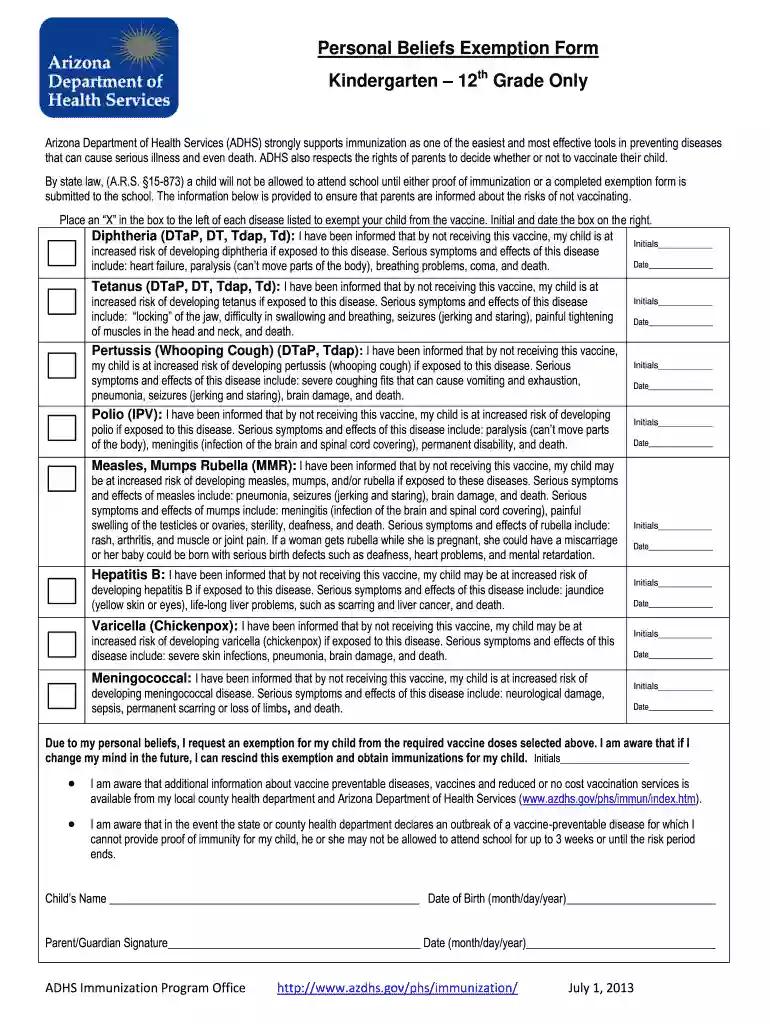
Form arizona immunization 2025

Get Form
arizona vaccine exemption form 2023 Preview on Page 1

Here's how it works

01. Edit your arizona vaccine exemption form 2023 online
Type text, add images, blackout confidential details, add comments, highlights and more.

02. Sign it in a few clicks
Draw your signature, type it, upload its image, or use your mobile device as a signature pad.

03. Share your form with others
Send immunization exemption form arizona via email, link, or fax. You can also download it, export it or print it out.

How to use or fill out form arizona immunization with our platform

Form edit decoration
9.5
Ease of Setup
DocHub User Ratings on G2
9.0
Ease of Use
DocHub User Ratings on G2
  1. Click ‘Get Form’ to open the Arizona Immunization Exemption Form in the editor.
  2. Begin by filling in your child's name and date of birth at the top of the form. This information is essential for identifying your child.
  3. For each vaccine listed, place an 'X' in the box next to the disease you wish to exempt your child from. Ensure you read the associated risks carefully.
  4. After marking each exemption, provide your initials and the date in the designated fields on the right side of each section. This confirms that you understand the implications of not vaccinating.
  5. At the bottom of the form, sign as a parent or guardian and include today's date. This finalizes your request for exemption based on personal beliefs.

Start using our platform today to complete your Arizona Immunization Exemption Form easily and for free!

See more form arizona immunization versions

We've got more versions of the form arizona immunization form. Select the right form arizona immunization version from the list and start editing it straight away!
Versions Form popularity Fillable & printable
2013 4.8 Satisfied (71 Votes)
be ready to get more

Complete this form in 5 minutes or less

Get form

Got questions?

We have answers to the most popular questions from our customers. If you can't find an answer to your question, please contact us.
Contact us
Step 1: Log into Health Portal. . Step 2: Select Medical Clearances on the left. Step 3: Enter Measles/M.M.R. Information. Step 4: Upload Immunization Record. Step 5: Allow 3 business days for review and processing.
Go to My Record Health Summary and select the Immunizations tab. You can see the immunizations youve received and the dates on which you received them. Click the immunization name to learn more. If your immunizations are not up to date, please docHub out to your clinic directly to have your information updated.
Please initial next to each of the statements below: I request a reasonable accommodation due to my sincere religious beliefs. I understand and assume the risks of non-vaccination. I accept full responsibility for my health, thus removing liability from the City to the required vaccinations.
All vaccines administered should be fully documented in the patients permanent medical record. Health care providers who administer vaccines that are covered by the National Vaccine Injury Compensation Program are required by law to ensure the permanent medical record of the recipient indicates: Date of administration.
I request a reasonable accommodation due to my sincere religious beliefs. I understand and assume the risks of non-vaccination. I accept full responsibility for my health, thus removing liability from the City to the required vaccinations.

People also ask

Overall, among adults aged 18 years who did not get a 202324 COVID-19 vaccine, the most commonly reported reasons for not getting one were: concern about serious/unknown side effects (39.7%), lack of concern about getting sick (33.6%), belief that the vaccine cant prevent infection (25.9%), not trusting the

vaccine exemption form arizona adults