Health savings account contribution form 2026

Get Form
health account contribution form Preview on Page 1

Here's how it works

01. Edit your health account contribution form online
Type text, add images, blackout confidential details, add comments, highlights and more.
02. Sign it in a few clicks
Draw your signature, type it, upload its image, or use your mobile device as a signature pad.
03. Share your form with others
Send health contribution form via email, link, or fax. You can also download it, export it or print it out.

How to use or fill out health savings account contribution form with our platform

Form edit decoration
9.5
Ease of Setup
DocHub User Ratings on G2
9.0
Ease of Use
DocHub User Ratings on G2
  1. Click ‘Get Form’ to open the health savings account contribution form in the editor.
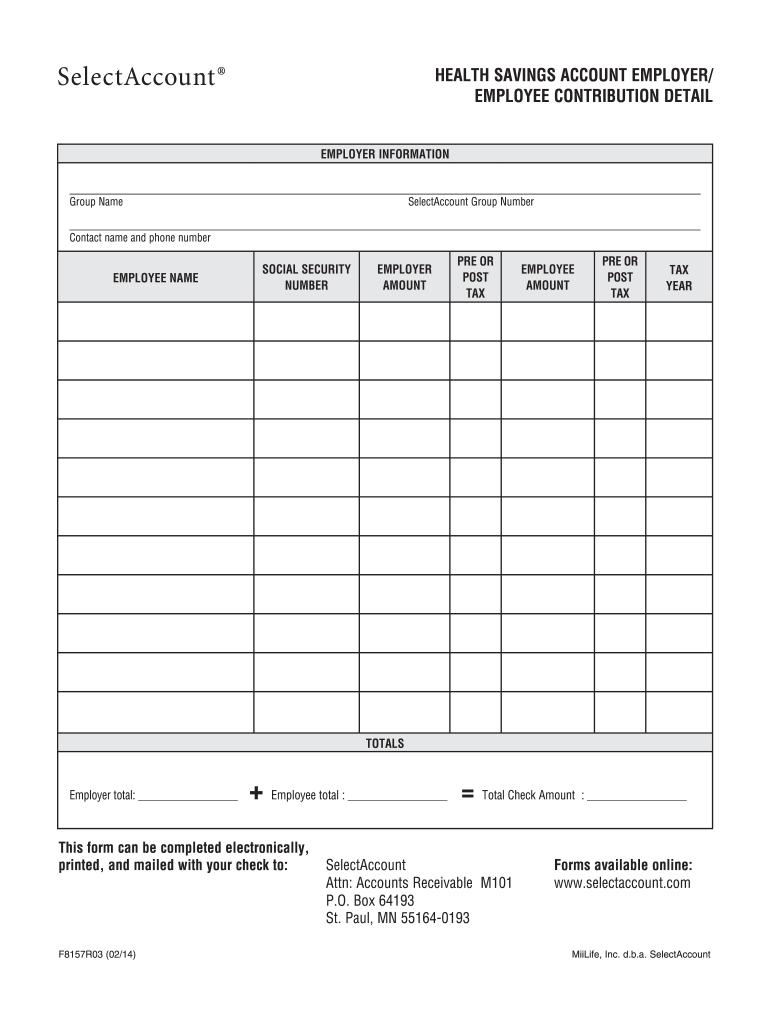
  2. Begin by entering the employer information. Fill in the Group Name and SelectAccount Group Number, along with the contact name and phone number for any inquiries.
  3. Next, provide the employee's name and Social Security Number. This information is crucial for accurate record-keeping.
  4. In the Employer Amount section, specify the contribution amount and indicate whether it is pre-tax or post-tax. Repeat this for the Employee Amount section.
  5. Enter the tax year relevant to these contributions to ensure proper reporting.
  6. Review your entries carefully. The totals will automatically calculate based on your inputs, showing both employer and employee contributions.
  7. Finally, confirm that all information is correct before printing or saving your completed form for submission.

Start using our platform today to effortlessly complete your health savings account contribution form online for free!

See more health savings account contribution form versions

We've got more versions of the health savings account contribution form form. Select the right health savings account contribution form version from the list and start editing it straight away!
Versions Form popularity Fillable & printable
2014 4.8 Satisfied (167 Votes)
be ready to get more

Complete this form in 5 minutes or less

Get form

Got questions?

We have answers to the most popular questions from our customers. If you can't find an answer to your question, please contact us.
Contact us
More In Forms and Instructions File Form 8889 to: Report health savings account (HSA) contributions (including those made on your behalf and employer contributions).
Use Form 8889 to: Report health savings account (HSA) contributions (including those made on your behalf and employer contributions), Figure your HSA deduction, Report distributions from HSAs, and. Figure amounts you must include in income and additional tax you may owe if you fail to be an eligible individual.
HSA Tax Advantages All contributions to your HSA are tax-deducible, or if made through payroll deductions, are pre-tax which lowers your overall taxable income. Your contributions may be 100 percent tax-deductible, meaning contributions can be deducted from your gross income.
You must report any nonqualifying purchases made using funds from your HSA. If you file your return with 1040.com, you simply report these purchases on the 1040.com Health Savings Account screen. Not claiming the nonqualifying expenses may lead to an audit, and youll be subject to penalties and fines.
HSA Bank provides multiple ways for you to make a contribution to your account. Payroll Deductions If you have a health plan through your employer, you may be able to make pre-tax contributions to your HSA from your paycheck. Online Transfers You can contribute to your account through our Member Website.

Security and compliance

At DocHub, your data security is our priority. We follow HIPAA, SOC2, GDPR, and other standards, so you can work on your documents with confidence.

Learn more
be ready to get more

Complete this form in 5 minutes or less

Get form

People also ask

You must always file a Form 8889 in any year you or an employer contributes money to your HSA or you make withdrawals from the account. The deduction you calculate on Form 8889 is taken on the first page of your income tax return.
You can claim a tax deduction for contributions you, or someone other than your employer, make to your HSA even if you dont itemize your deductions on Schedule A (Form 1040). Contributions to your HSA made by your employer (including contributions made through a cafeteria plan) may be excluded from your gross income.
The purpose of Form 5498-SA is to report how much money is contributed to an HSA, Archer MSA or MA MSA over the course of a tax year. In the case of HSAs and Archer MSAs, the tax year extends to April 15 of the following year.

savings account contribution form