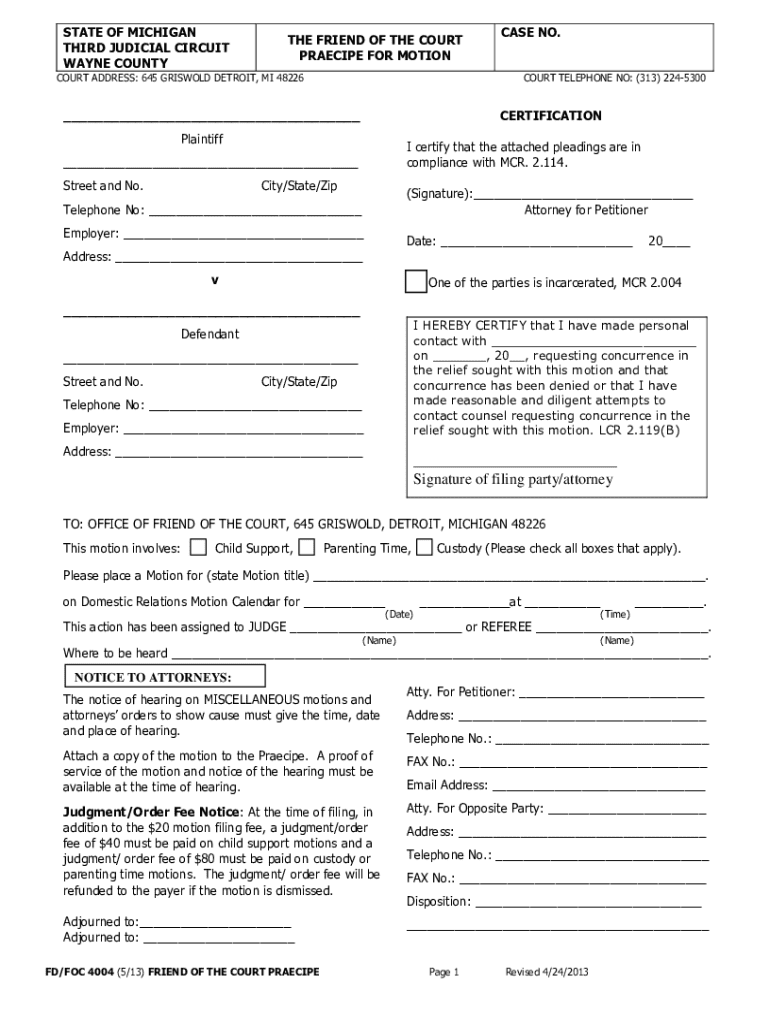
MOTION TO ADDRESS GENERAL FINANCIAL ISSUES - 3Rdcc.org - 3rdcc 2026

Get Form
check request Preview on Page 1

Here's how it works

01. Edit your check request online
Type text, add images, blackout confidential details, add comments, highlights and more.
02. Sign it in a few clicks
Draw your signature, type it, upload its image, or use your mobile device as a signature pad.
03. Share your form with others
Send reduce request via email, link, or fax. You can also download it, export it or print it out.

How to use or fill out MOTION TO ADDRESS GENERAL FINANCIAL ISSUES - 3Rdcc.org - 3rdcc with Our Platform

Form edit decoration
9.5
Ease of Setup
DocHub User Ratings on G2
9.0
Ease of Use
DocHub User Ratings on G2
  1. Click ‘Get Form’ to open the MOTION TO ADDRESS GENERAL FINANCIAL ISSUES in our editor.
  2. Begin by filling out pages 1 and 2 using black or blue ink. Ensure you write your Case Number in the upper right corner of every page.
  3. Attach a complete copy of your most recent child support order and parenting time order to your forms.
  4. If requesting a reduction in the Income Withholding Order, include documents like paycheck stubs and proof of living expenses that justify your request.
  5. Keep all forms in numerical order and make three sets of copies of pages 1 through 2 along with all attachments before filing.
  6. Bring the original forms and copies to the Coleman A. Young Municipal Center for filing, ensuring you have the necessary filing fee ready.
  7. After filing, obtain a stamped 'Motion Praecipe' form as proof of submission, which is essential for scheduling your hearing date.

Start editing your motion today for free on our platform and ensure a smooth process!

See more MOTION TO ADDRESS GENERAL FINANCIAL ISSUES - 3Rdcc.org - 3rdcc versions

We've got more versions of the MOTION TO ADDRESS GENERAL FINANCIAL ISSUES - 3Rdcc.org - 3rdcc form. Select the right MOTION TO ADDRESS GENERAL FINANCIAL ISSUES - 3Rdcc.org - 3rdcc version from the list and start editing it straight away!
Versions Form popularity Fillable & printable
2013 4.8 Satisfied (124 Votes)
be ready to get more

Complete this form in 5 minutes or less

Get form

Got questions?

We have answers to the most popular questions from our customers. If you can't find an answer to your question, please contact us.
Contact us
How to File a Motion Filing in person in Room 200A of the Coleman A. Young Municipal Center, located at Two Woodward Avenue, Detroit, MI 48226 Mondays and Thursdays ONLY 8:00 AM 12:00 PM and 1:00 4:00 PM (must be in line by 3:30 pm). Mail to Wayne County Clerk, Room 201, Coleman A.
If you want to file a motion, the process is generally something like this: You write your motion. You file your motion with the court clerk. The court clerk inserts the date and time your motion will be heard by the judge. You serve (mail) your motion to the other side.
How to File a Motion Filing in person in Room 200A of the Coleman A. Young Municipal Center, located at Two Woodward Avenue, Detroit, MI 48226 Mondays and Thursdays ONLY 8:00 AM 12:00 PM and 1:00 4:00 PM (must be in line by 3:30 pm). Mail to Wayne County Clerk, Room 201, Coleman A. Friend of the Court FAQ - Third Judicial Circuit of Michigan Third Judicial Circuit of Michigan divisions friend-of-the-court-f Third Judicial Circuit of Michigan divisions friend-of-the-court-f
How to Write a Motion for Court? Step-by-Step Guide Step 1: Understand the Purpose of Your Motion. Step 2: Research Court Rules and Requirements. Step 3: Start with a Clear and Concise Title. Step 4: Draft the Introduction. Step 5: Present the Relevant Facts. Step 6: Provide Legal Arguments.
File your Motion and the copies with the court clerks office in the court where your case was heard. File a copy of the proposed order with your Motion. Contact your court to find out which filing methods are available. Depending on your court, you may be able to file electronically. How to File a Motion and Affidavit to Set Aside a - Michigan Legal Help Michigan Legal Help step Michigan Legal Help step

Security and compliance

At DocHub, your data security is our priority. We follow HIPAA, SOC2, GDPR, and other standards, so you can work on your documents with confidence.

Learn more
ccpa2
pci-dss
gdpr-compliance
hipaa
soc-compliance