




Here's how it works

01. Edit your fidelity life insurance death claim online
Type text, add images, blackout confidential details, add comments, highlights and more.

02. Sign it in a few clicks
Draw your signature, type it, upload its image, or use your mobile device as a signature pad.

03. Share your form with others
Send fidelity life insurance claims via email, link, or fax. You can also download it, export it or print it out.
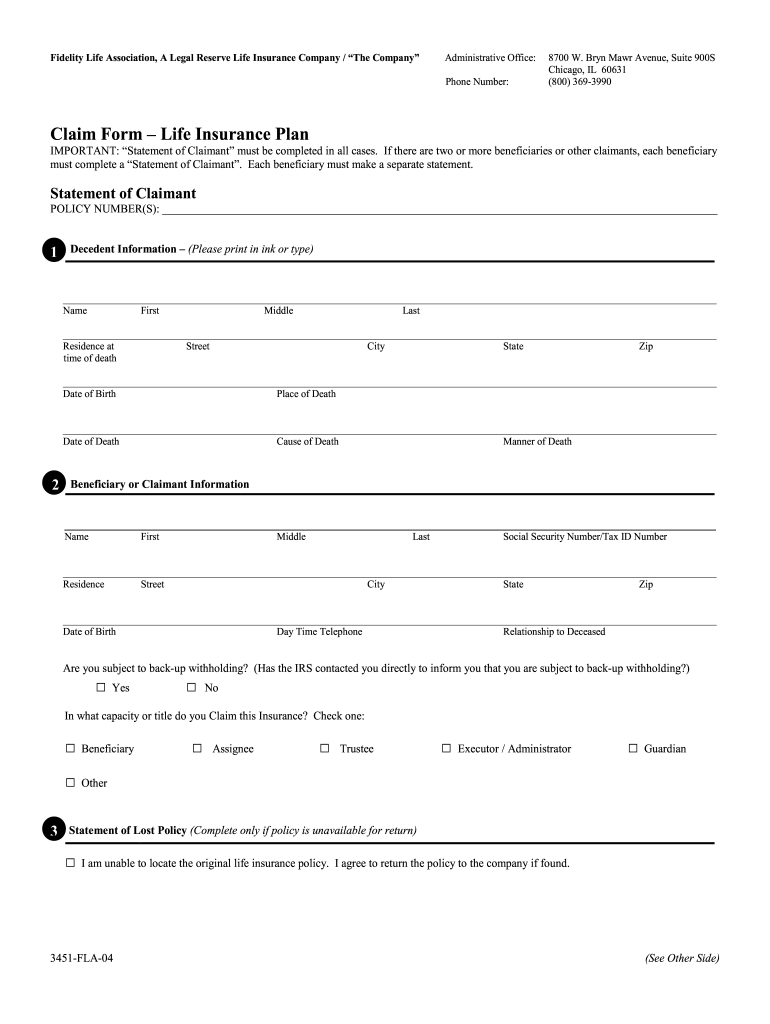
How to use or fill out Claim Form Life Insurance Plan Yes No - Fidelity Life with DocHub

- Click ‘Get Form’ to open it in the editor.
- Begin by filling out the 'Statement of Claimant' section. Enter the policy number and complete the decedent information, including their name, residence at the time of death, date of birth, place of death, date of death, cause of death, and manner of death.
- Next, provide your information as the beneficiary or claimant. Fill in your name, Social Security Number/Tax ID Number, residence details, date of birth, daytime telephone number, and your relationship to the deceased.
- Indicate if you are subject to back-up withholding by checking 'Yes' or 'No'. Then select your capacity or title for claiming this insurance by checking one of the options provided.
- If applicable, complete the 'Statement of Lost Policy' section. Confirm that you are unable to locate the original policy and agree to return it if found.
- Choose your payment preference under 'Payment of Fund'. Select either a single sum payment or installment payments and specify the frequency.
- Finally, sign and date the form. Ensure that all information is accurate before submitting.
Start using our platform today to fill out your Claim Form Life Insurance Plan easily and for free!
Fill out Claim Form Life Insurance Plan Yes No - Fidelity Life online
It's free
It's free
Security and compliance
At DocHub, your data security is our priority. We follow HIPAA, SOC2, GDPR, and other standards, so you can work on your documents with confidence.
Learn more


