Physical intervention form fill in online 2026

Get Form
intervention form template Preview on Page 1

Here's how it works

01. Edit your intervention form template online
Type text, add images, blackout confidential details, add comments, highlights and more.

02. Sign it in a few clicks
Draw your signature, type it, upload its image, or use your mobile device as a signature pad.

03. Share your form with others
Send intervention form via email, link, or fax. You can also download it, export it or print it out.

How to use or fill out physical intervention form fill in online

Form edit decoration
9.5
Ease of Setup
DocHub User Ratings on G2
9.0
Ease of Use
DocHub User Ratings on G2
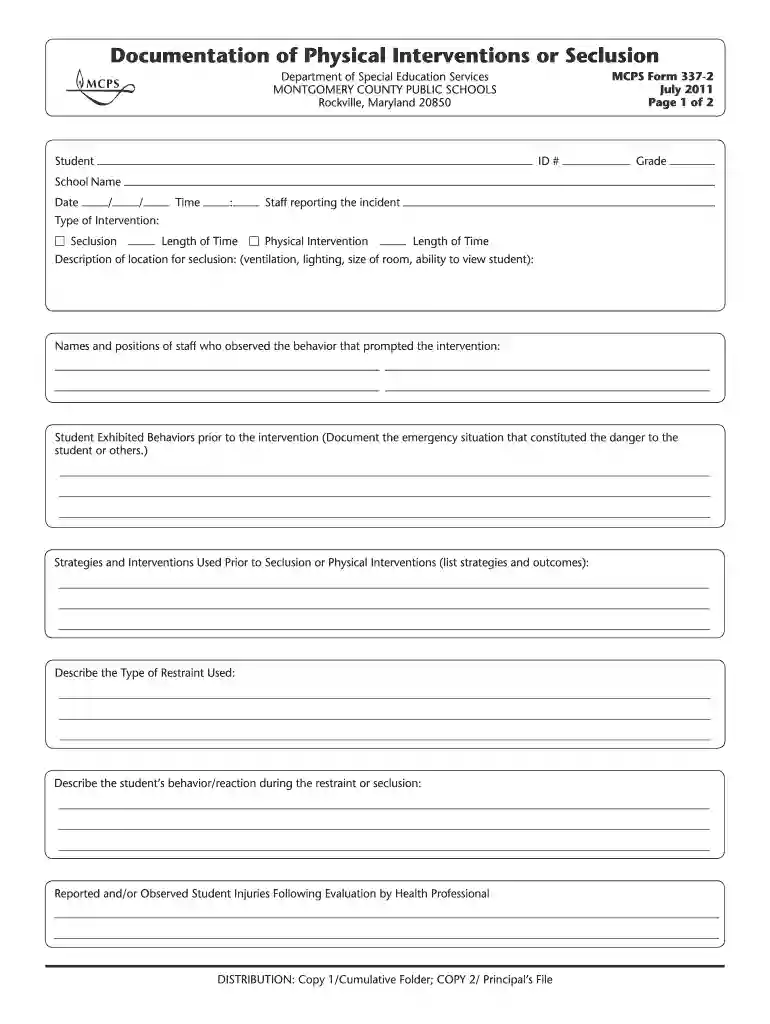
  1. Click ‘Get Form’ to open it in the editor.
  2. Begin by entering the student's ID number, grade, and school name at the top of the form. This information is crucial for identifying the student involved.
  3. Fill in the date and time of the incident. Accurate timestamps are essential for documentation purposes.
  4. Select the type of intervention used by checking either 'Seclusion' or 'Physical Intervention'. Be sure to indicate the length of time for each intervention.
  5. Provide a detailed description of the location where seclusion occurred, including ventilation, lighting, and room size.
  6. List names and positions of staff who observed the behavior that led to the intervention. This ensures accountability and clarity.
  7. Document any behaviors exhibited by the student prior to intervention. This section should capture emergency situations that necessitated action.
  8. Outline strategies and interventions attempted before resorting to seclusion or physical intervention, noting their outcomes.
  9. Describe the type of restraint used during the intervention clearly and thoroughly.
  10. Record the student's behavior or reaction during restraint or seclusion to provide insight into their experience.
  11. Indicate any reported injuries following evaluation by a health professional, ensuring all incidents are documented.
  12. Complete notification sections regarding communication with parents and other relevant staff members post-intervention.
  13. Finally, ensure that printed names and signatures of all involved staff members are included at the bottom of the form for verification purposes.

Start filling out your physical intervention form online today for free using our platform!

See more physical intervention form fill in online versions

We've got more versions of the physical intervention form fill in online form. Select the right physical intervention form fill in online version from the list and start editing it straight away!
Versions Form popularity Fillable & printable
2011 4.8 Satisfied (154 Votes)
be ready to get more

Complete this form in 5 minutes or less

Get form

Security and compliance

At DocHub, your data security is our priority. We follow HIPAA, SOC2, GDPR, and other standards, so you can work on your documents with confidence.

Learn more
ccpa2
pci-dss
gdpr-compliance
hipaa
soc-compliance