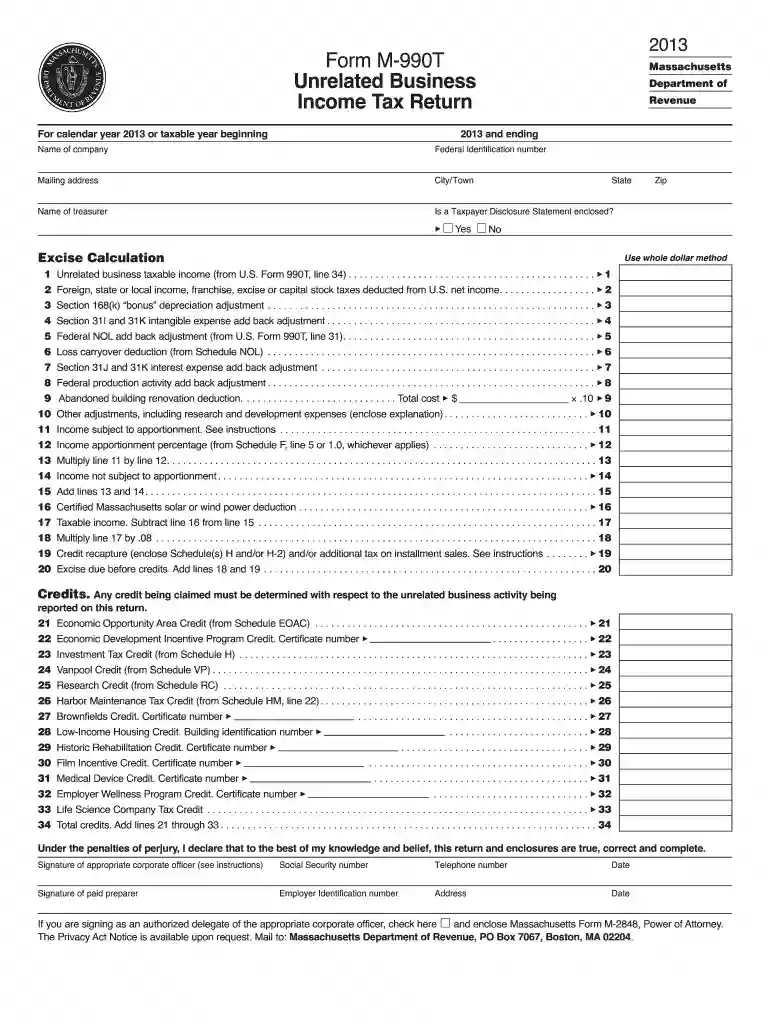
Form M-990T - Mass.Gov - mass 2026

Get Form
m 990t 62 Preview on Page 1

Here's how it works

01. Edit your m 990t 62 online
Type text, add images, blackout confidential details, add comments, highlights and more.

02. Sign it in a few clicks
Draw your signature, type it, upload its image, or use your mobile device as a signature pad.

03. Share your form with others
Send it via email, link, or fax. You can also download it, export it or print it out.

How to use or fill out Form M-990T - Mass.Gov - mass with our platform

Form edit decoration
9.5
Ease of Setup
DocHub User Ratings on G2
9.0
Ease of Use
DocHub User Ratings on G2
  1. Click ‘Get Form’ to open it in the editor.
  2. Begin by entering the calendar year or taxable year at the top of the form. This is crucial for accurate tax reporting.
  3. Fill in your company name, federal identification number, and mailing address. Ensure all details are correct to avoid processing delays.
  4. Complete the treasurer's name field and indicate whether a Taxpayer Disclosure Statement is enclosed by selecting 'Yes' or 'No'.
  5. Proceed to the Excise Calculation section. Carefully input figures from U.S. Form 990T as instructed, ensuring accuracy in each line item.
  6. Review all adjustments and deductions applicable to your business income, such as foreign taxes and depreciation adjustments.
  7. Finally, sign and date the form at the bottom, ensuring that all required signatures are included before submission.

Start using our platform today for free to streamline your Form M-990T completion!

See more Form M-990T - Mass.Gov - mass versions

We've got more versions of the Form M-990T - Mass.Gov - mass form. Select the right Form M-990T - Mass.Gov - mass version from the list and start editing it straight away!
Versions Form popularity Fillable & printable
2022 4.7 Satisfied (56 Votes)
2021 4.6 Satisfied (39 Votes)
2020 4.8 Satisfied (75 Votes)
2019 4.3 Satisfied (174 Votes)
2018 4.3 Satisfied (175 Votes)
2017 4.3 Satisfied (78 Votes)
2016 4.3 Satisfied (116 Votes)
2015 4.3 Satisfied (162 Votes)
2014 3.9 Satisfied (41 Votes)
2013 4 Satisfied (20 Votes)
2009 4 Satisfied (32 Votes)
be ready to get more

Complete this form in 5 minutes or less

Get form

Got questions?

We have answers to the most popular questions from our customers. If you can't find an answer to your question, please contact us.
Contact us
Understanding the distinct purposes of these formsForm 990 as an annual report of an organizations mission and financial activities, and Form 990-T for reporting income from unrelated business activitiesenables nonprofits to fulfill their obligations effectively.
You can file your income tax return for free through MassTaxConnect if you: Were a Massachusetts (MA) full-year resident Previously filed a MA return and The schedules needed to complete your return are supported (see list below). Your tax return must be e-filed through MassTaxConnect.
Nonprofits with annual revenue of less than $200,000 and assets valued at less than $500,000 may file the Form 990-EZ, or may elect to file the Form 990. Nonprofits with annual revenue of $500,000 or more must file the Form 990.
Individual taxpayers can make bill, estimated, extension, or return payments on MassTaxConnect without logging in. From the MassTaxConnect homepage, select the Make a Payment hyperlink in the Quick Links section. Select the Individual payment type radio button. Enter the taxpayers name. Choose the appropriate ID Type.
Unrelated Business Taxable Income (UBTI) 1 When UBTI equals $1,0002 or more per year, a Form 990-T must be filed by the custodian for each applicable retirement account and taxes may be required to be paid from the retirement account.
be ready to get more

Complete this form in 5 minutes or less

Get form

People also ask

Exempt organizations use Form 990-T to: Report unrelated business income. Figure and report unrelated business income tax liability. Report proxy tax liability.
The tax-exempt organization needs to file Form 990-T if they have gross unrelated business income of $1,000 or more during the tax year. The UBIT rate is determined by the federal corporate income tax rates, which may vary depending on the amount of taxable income and any applicable tax law changes.
Massachusetts individual income tax forms and instructions can be found on the Massachusetts Department of Revenue website. The Massachusetts tax forms for part-year resident and nonresident individuals is Form 1-NR/PY. Please refer to the MA state guides for part-year and nonresident individuals for more information.

Related links