




Here's how it works

01. Edit your fannie mae bpo form pdf online
Type text, add images, blackout confidential details, add comments, highlights and more.

02. Sign it in a few clicks
Draw your signature, type it, upload its image, or use your mobile device as a signature pad.

03. Share your form with others
Send commercial bpo form via email, link, or fax. You can also download it, export it or print it out.
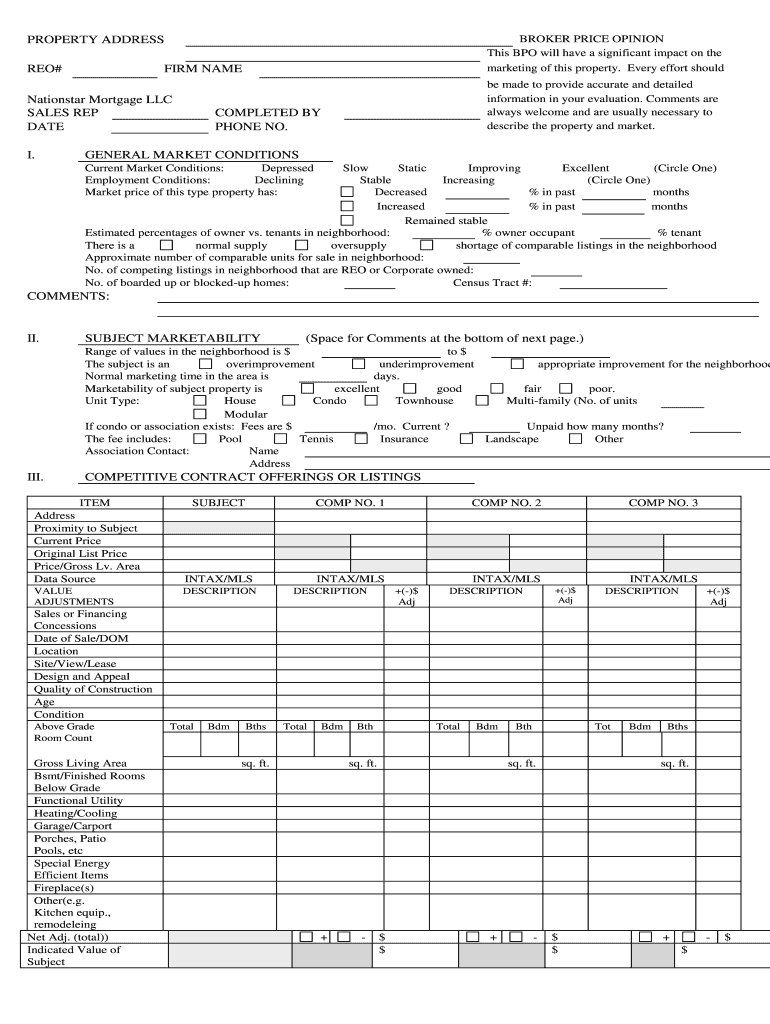
How to Use or Fill Out BPO Form with Our Platform

- Click ‘Get Form’ to open the BPO form in the editor.
- Begin by entering the property address and REO number at the top of the form. This information is crucial for identifying the property being evaluated.
- Fill in your firm name, sales representative details, and contact information. Accurate details here ensure proper communication regarding the evaluation.
- In the 'General Market Conditions' section, circle the appropriate market conditions and provide percentage changes over recent months. This data helps assess current market trends.
- For 'Subject Marketability', indicate whether the property is an overimprovement or underimprovement and estimate normal marketing time. This section aids in understanding how well the property will perform in the market.
- Complete sections on competitive contract offerings and closed sales by entering relevant data for comparable properties. This analysis supports a comprehensive valuation.
- Finally, review all entries for accuracy before saving or sharing your completed BPO form. Utilize our platform’s features to easily export or send your document as needed.
Start using our platform today to streamline your BPO form completion for free!
Fill out bpo form online
It's free
It's free
Security and compliance
At DocHub, your data security is our priority. We follow HIPAA, SOC2, GDPR, and other standards, so you can work on your documents with confidence.
Learn more


Related forms

Extension of Protection from Stalking Order for Two Additional Years - kansasjudicialcouncil
Extension of Protection from Stalking Order for Two Additional Years - kansasjudicialcouncil
The document is a legal order from a District Court in Kansas regarding the extension of a Protection from Stalking Orde ...
Indiana Administrative Rules - IN
The document is a notification form for the employment status of a Prosecuting Attorney in Indiana, affirming whether th ...
Representation florida sample
The document outlines the 'Agreement Limiting Representation' form for Florida Family Law, which is used when an attorne ...

Riverside waiver
The document is a legal form from the Superior Court of California, County of Riverside, requesting a bond waiver for th ...
Acknowledgment form
The document is an acknowledgment certificate used by a notary public in California, verifying the identity of individua ...
Ca conservator peace
The document outlines the process for a conservator in California to request peace officer assistance for detaining a co ...
California proof disability form
The document is a legal form (DAL-012) used in California for proof of service in disability access litigation cases. It ...
Adr 110
The document is an 'Order Appointing Referee' used in the Superior Court of California. It outlines the process for appo ...