Type text, add images, blackout confidential details, add comments, highlights and more.

02. Sign it in a few clicks
Draw your signature, type it, upload its image, or use your mobile device as a signature pad.

03. Share your form with others
Send ato application form via email, link, or fax. You can also download it, export it or print it out.

How to use or fill out ato forms with our platform
Ease of Setup
DocHub User Ratings on G2
Ease of Use
DocHub User Ratings on G2
Click ‘Get Form’ to open the ato form in the editor.
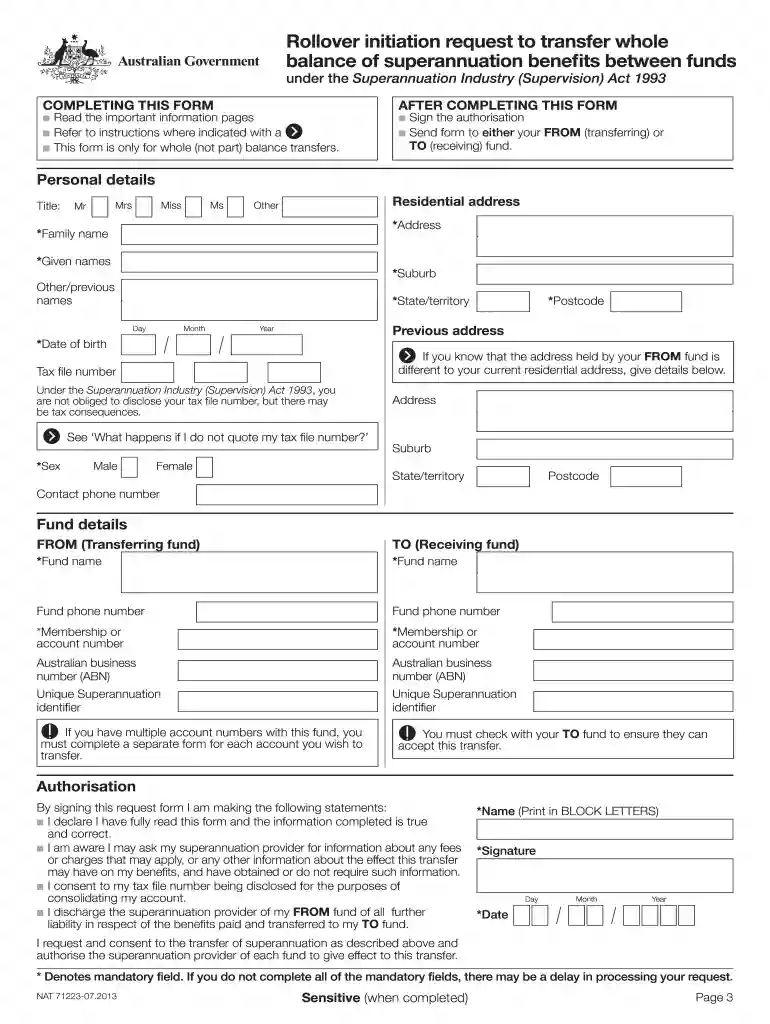
Begin by filling in your personal details. Ensure you provide your title, full name, residential address, date of birth, and tax file number if applicable. Use BLOCK LETTERS for clarity.
Next, complete the fund details section. Enter the names and membership numbers of both the transferring (FROM) and receiving (TO) funds. Verify that your TO fund can accept the transfer.
Review all information entered for accuracy. Make sure all mandatory fields are completed to avoid delays in processing.
Sign and date the authorisation section at the end of the form to confirm your request.
Finally, send your completed form to either your FROM or TO fund as instructed.
Start using our platform today for free to streamline your ato forms completion!
Printable ato formsATO forms Download PDFAto forms onlineTFN declaration form PDF DownloadATO forms 2025ATO forms orderTax declaration form ATOATO new employee form pdf
Security and compliance
At DocHub, your data security is our priority. We follow HIPAA, SOC2, GDPR, and other standards, so you can work on your documents with confidence.
Non-Credit Course RFP - Academic Technology and OutDocHub
Academic Technology and OutDocHub (ATO) at Montana State University invites proposals to develop non-credit professional development courses for 2022.Read more
Cookie consent notice
This site uses cookies to enhance site navigation and personalize your experience.
By using this site you agree to our use of cookies as described in our Privacy Notice.
You can modify your selections by visiting our Cookie and Advertising Notice.