Type text, add images, blackout confidential details, add comments, highlights and more.
02. Sign it in a few clicks
Draw your signature, type it, upload its image, or use your mobile device as a signature pad.
03. Share your form with others
Send it via email, link, or fax. You can also download it, export it or print it out.
How to use or fill out patient history questionnaire software with our platform
Ease of Setup
DocHub User Ratings on G2
Ease of Use
DocHub User Ratings on G2
Click ‘Get Form’ to open the patient history questionnaire in the editor.
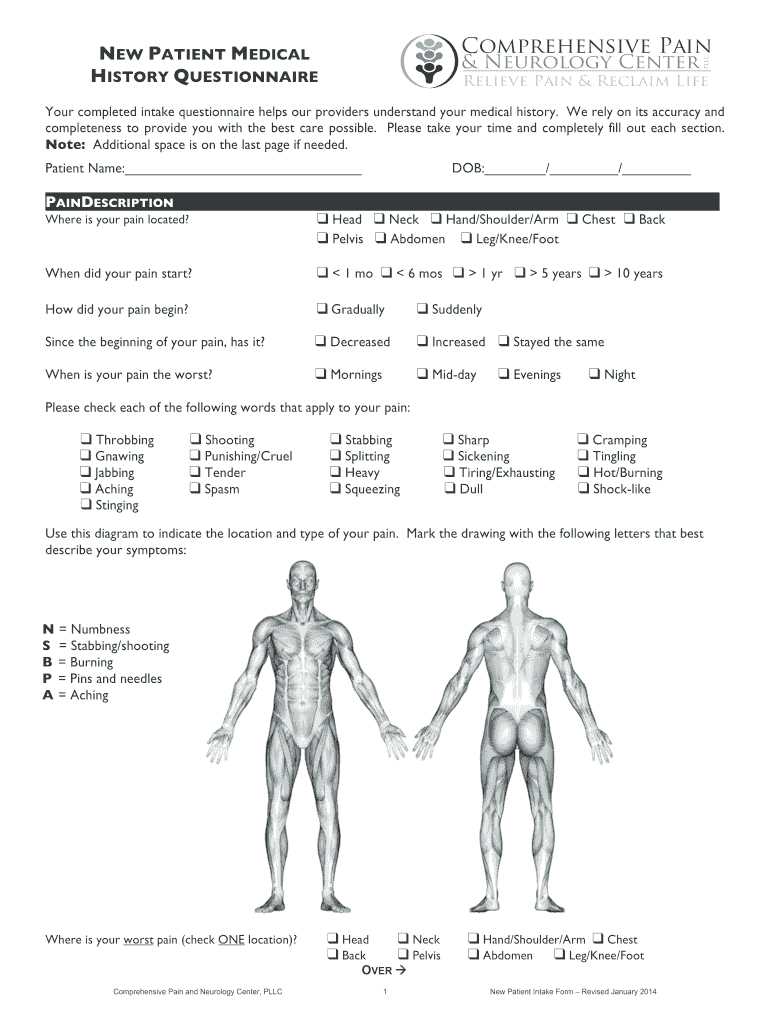
Begin by entering your personal information, including your name and date of birth, in the designated fields at the top of the form.
Proceed to the 'Pain Description' section. Here, you will indicate where your pain is located by checking the appropriate boxes and providing a description of your pain.
In the 'Pain Intensity' section, rate your pain on a scale from 0 to 10 for different time frames: usually, worst, least, and right now. Make sure to select one option for each category.
Continue through each section methodically, ensuring that you check all relevant boxes regarding medical history, medications, allergies, and family history.
If you need more space for any answers, utilize the additional space provided at the end of the form.
Once completed, review all entries for accuracy before saving or submitting your form through our platform.
Start filling out your patient history questionnaire today for free using our editor!
Fill out patient history questionaire software online It's free
See more patient history questionaire software versions
We've got more versions of the patient history questionaire software form. Select the right patient history questionaire software version from the list and start editing it straight away!
Forms, Survey and Questionnaire Software Options at U-M
A compilation of software and cloud services for electronic data capture, forms, surveys, polls, questionnaires, etc. Find the right survey tool for business,Read more
Obtaining patients medical history using a digital device prior
by K Albrink 2022 Cited by 15 With the help of digital tools patients medical histories can be collected quickly and transferred into their electronic medical records.
The workshop provides a platform for different participants to share their views, experiences and insights. And we also talked to doctors and patientsRead more
Cookie consent notice
This site uses cookies to enhance site navigation and personalize your experience.
By using this site you agree to our use of cookies as described in our Privacy Notice.
You can modify your selections by visiting our Cookie and Advertising Notice.