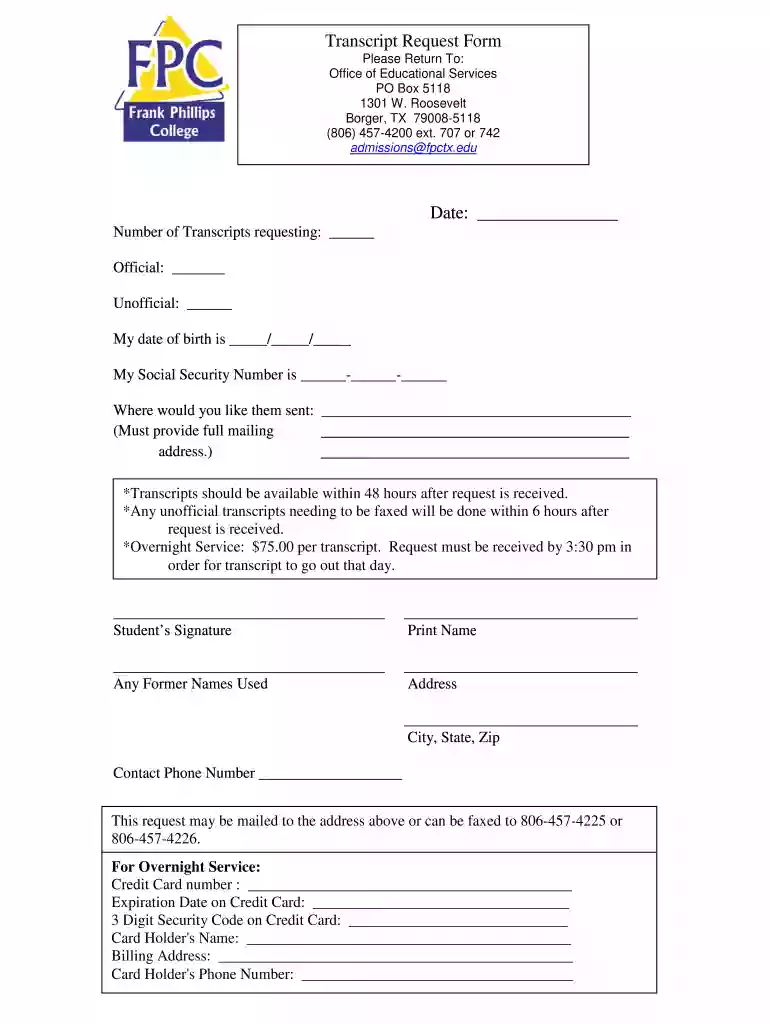
Frank phillips college transcript request 2026

Get Form
frank phillips college transcript request Preview on Page 1

Here's how it works

01. Edit your form online
Type text, add images, blackout confidential details, add comments, highlights and more.

02. Sign it in a few clicks
Draw your signature, type it, upload its image, or use your mobile device as a signature pad.

03. Share your form with others
Send it via email, link, or fax. You can also download it, export it or print it out.

How to use or fill out frank phillips college transcript request with our platform

Form edit decoration
9.5
Ease of Setup
DocHub User Ratings on G2
9.0
Ease of Use
DocHub User Ratings on G2
  1. Click ‘Get Form’ to open the frank phillips college transcript request in the editor.
  2. Begin by entering the date at the top of the form. This helps track your request.
  3. Indicate the number of transcripts you are requesting by filling in the appropriate field for official and unofficial copies.
  4. Provide your date of birth and Social Security Number in the designated fields to verify your identity.
  5. Fill in where you would like the transcripts sent, ensuring you include a complete mailing address.
  6. Sign and print your name at the bottom of the form, along with any former names used for accurate processing.
  7. Complete your contact information, including phone number and address, to facilitate communication regarding your request.
  8. If opting for overnight service, provide credit card details as specified on the form.

Start using our platform today to easily fill out and submit your transcript request for free!

See more frank phillips college transcript request versions

We've got more versions of the frank phillips college transcript request form. Select the right frank phillips college transcript request version from the list and start editing it straight away!
Versions Form popularity Fillable & printable
2016 4.4 Satisfied (56 Votes)
2011 4 Satisfied (40 Votes)
be ready to get more

Complete this form in 5 minutes or less

Get form

Got questions?

We have answers to the most popular questions from our customers. If you can't find an answer to your question, please contact us.
Contact us
You can request transcripts electronically or by mail. If sending transcripts electronically, you must use one of the electronic transcript vendors below. If sending transcripts by mail, they must be mailed directly from your registrar. Sending Official Transcripts - Liaison International Liaison - Liaison International 1SendingOfficialTransc Liaison - Liaison International 1SendingOfficialTransc
Average school sending times vary based on the credential, from 2 business days to 18 days from when you request a credential. Note that sending times vary by school and can get delayed by a schools inability to match your order to their records. How It Works | Students - Parchment Parchment students how-it-works Parchment students how-it-works
Q: How do I obtain an official copy of my transcript if the school I attended is closed? A: If you would like a transcript from a closed school, please fill out the form located at: Transcript Request Form. Resources - FAQs - Arkansas Department of Higher Education Arkansas Department of Higher Education resources faqs Arkansas Department of Higher Education resources faqs
If you do not have an academic transcript you will need to contact your previous institution to request one. A transcript from a professional body will list all the units completed, grades achieved and confirmation of any exemptions. What is an academic transcript? - Credit transfer | Open University Credit transfer | Open University faqs what-academic- Credit transfer | Open University faqs what-academic-

Security and compliance

At DocHub, your data security is our priority. We follow HIPAA, SOC2, GDPR, and other standards, so you can work on your documents with confidence.

Learn more
ccpa2
pci-dss
gdpr-compliance
hipaa
soc-compliance
be ready to get more

Complete this form in 5 minutes or less

Get form