




Here's how it works



How to use or fill out sunny d book spree 2019 with our platform

- Click ‘Get Form’ to open the sunny d book spree 2019 entry form in the editor.
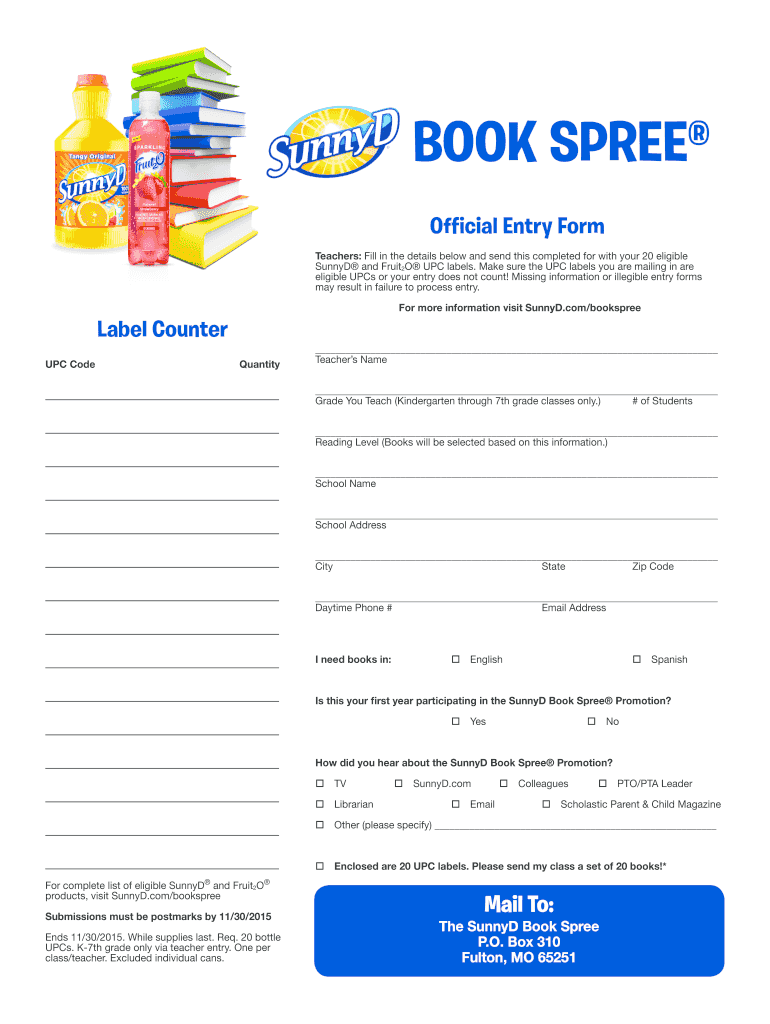
- Begin by filling in the 'Label Counter' section. Enter the UPC codes and their corresponding quantities for each eligible SunnyD® and Fruit2O® product.
- Next, provide your details in the 'Teacher’s Name' field, followed by the grade you teach (Kindergarten through 7th grade). Indicate the number of students in your class.
- Fill out the 'Reading Level' section to help select appropriate books for your students. Then, enter your school name and address, including city, state, and zip code.
- Provide your daytime phone number and email address for communication purposes.
- Indicate your language preference for books (English or Spanish) and whether this is your first year participating in the promotion.
- Lastly, specify how you heard about the SunnyD Book Spree® Promotion and confirm that you are enclosing 20 UPC labels before submitting your form.
Start using our platform today to easily complete your sunny d book spree 2019 entry form for free!
It's free
See more sunny d book spree 2019 versions
Got questions?
How can I eSign my sunny d book spree 2019 in Word?
Microsoft Word doesn’t have signing tools to generate legitimate eSignatures and enforceable forms. Luckily, DocHub is an online eSignature-compliant editor that supports various file formats, such as .doc files. Sign in to your account and add the Word version of your sunny d book spree 2019 from your device and cloud, or URL - our editor will automatically convert it into an editable PDF. Make all required adjustments in your document and click Sign to generate your own legally-binding eSignature. You will find four signing options from which to choose.
How do you edit sunny d book spree 2019 on Android?
Document editing with DocHub is equally convenient on desktop and mobile devices. You only need an internet browser to modify your sunny d book spree 2019 on Android. Open our website and sign in to access the tools you require. Add your document and introduce your intended modifications. Next, you can keep your form in your document storage or send it out instantly.
Security and compliance
At DocHub, your data security is our priority. We follow HIPAA, SOC2, GDPR, and other standards, so you can work on your documents with confidence.
Learn more


