Type text, add images, blackout confidential details, add comments, highlights and more.
02. Sign it in a few clicks
Draw your signature, type it, upload its image, or use your mobile device as a signature pad.
03. Share your form with others
Send it via email, link, or fax. You can also download it, export it or print it out.
How to use or fill out de 1snp form with our platform
Ease of Setup
DocHub User Ratings on G2
Ease of Use
DocHub User Ratings on G2
Click ‘Get Form’ to open the de 1snp form in the editor.
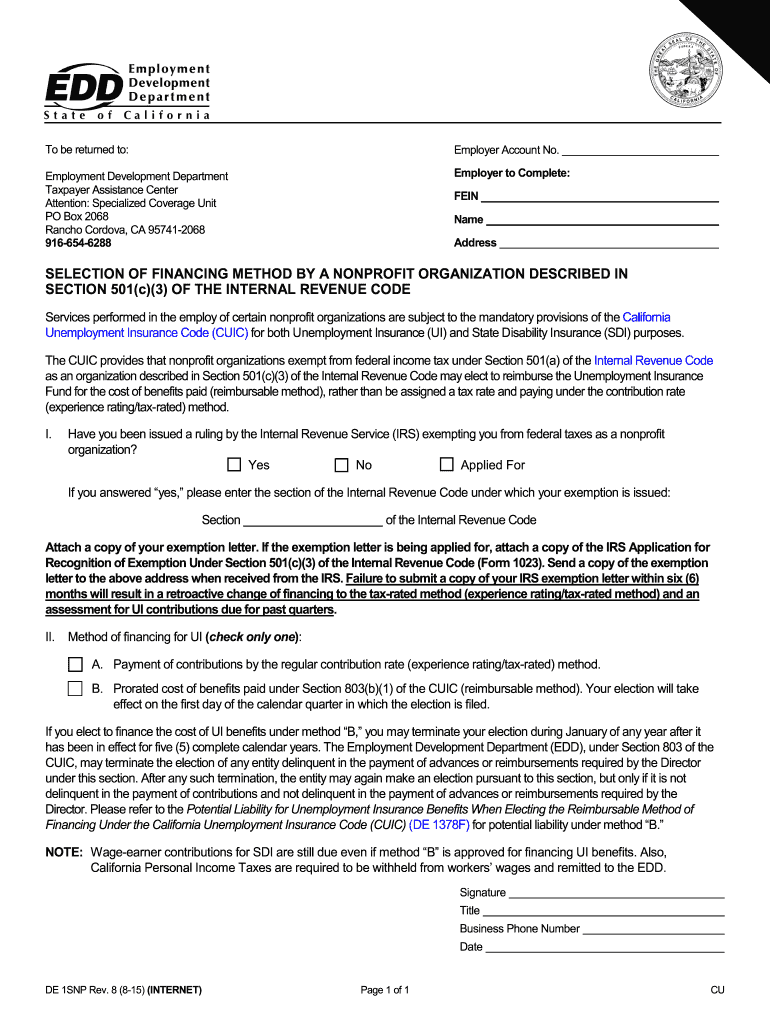
Begin by entering your Employer Account Number at the top of the form. This is essential for identification purposes.
Fill in your Federal Employer Identification Number (FEIN), along with your organization’s name and address in the designated fields.
In Section I, indicate whether you have received a ruling from the IRS exempting you from federal taxes as a nonprofit organization by selecting 'Yes', 'No', or 'Applied For'. If 'Yes', provide the relevant section of the Internal Revenue Code.
Attach any necessary documents, such as your exemption letter or IRS Application for Recognition of Exemption (Form 1023), using our platform's attachment feature.
In Section II, select your method of financing for Unemployment Insurance (UI) by checking either option A or B. Ensure you understand the implications of each choice before making a selection.
Complete the signature section by providing your name, title, business phone number, and date to finalize the form.
Start filling out your de 1snp form online for free today!
DE1SNP Selection of Financing Method by a Nonprofit
Failure to submit a copy of your IRS exemption letter within six (6) months will result in a retroactive change of financing to the tax-rated method (experienceRead more
HP Universal Print Driver System Administrators Guide
This system administrators guide provides information about the HP Universal Print Driver (HP UPD) software. This guide is distributed in an electronicRead more
Cookie consent notice
This site uses cookies to enhance site navigation and personalize your experience.
By using this site you agree to our use of cookies as described in our Privacy Notice.
You can modify your selections by visiting our Cookie and Advertising Notice.