




Here's how it works



How to use or fill out elc pinellas with our platform

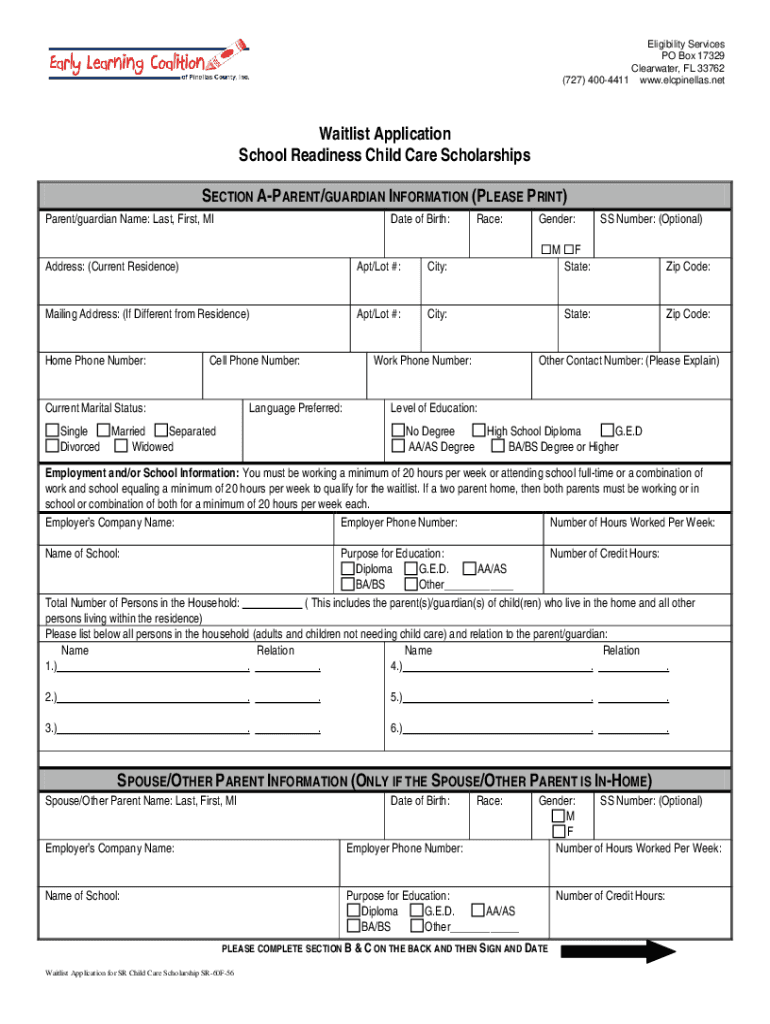
- Click ‘Get Form’ to open the Waitlist Application in the editor.
- Begin with SECTION A, where you will enter your parent/guardian information. Fill in your name, date of birth, race, gender, and contact details accurately.
- In SECTION B, provide details for each child needing care. Include their names, dates of birth, and any relevant information regarding disabilities or current childcare locations.
- Move to SECTION C to report your family and household income. Check the types of income received, indicate who receives it, and provide gross amounts along with the frequency of receipt.
- Review all sections for accuracy before signing and dating the application at the end. Ensure that all required fields are completed to avoid delays.
Start filling out your elc pinellas application online for free today!
It's free
Got questions?
How do I sign my elc income requirements pinellas county without printing?
Electronic signatures are a perfect replacement for traditional signing, as they save time, effort, and money people spend on printing, scanning, and paper delivery. You can electronically sign your elc income requirements pinellas county using a trustworthy and powerful online document management services like DocHub. It complies with major eSignature standards (ESIGN and UETA), so all forms approved there are legally binding and have the same validity as manually signed ones.
How do you modify elc pinellas county from Google Drive?
If you store your documents in Google Drive, there is no need to download your elc pinellas county on your computer and upload it back to our editor. A much simpler way is to set up a browser extension developed by DocHub to simplify this flow. The extension allows editing PDFs right in your browser. Alternatively, you may integrate your DocHub and Gmail accounts for more efficient editing.
What does ELC mean in daycare?
What is the income limit for school readiness in Florida?
What is Florida ELC?
Security and compliance
At DocHub, your data security is our priority. We follow HIPAA, SOC2, GDPR, and other standards, so you can work on your documents with confidence.
Learn more


