CERT-135, Reduced Sales and Use Tax Rete for Motor ... - CT.gov 2026

Get Form
CERT-135, Reduced Sales and Use Tax Rete for Motor ... - CT.gov Preview on Page 1

Here's how it works

01. Edit your form online
Type text, add images, blackout confidential details, add comments, highlights and more.

02. Sign it in a few clicks
Draw your signature, type it, upload its image, or use your mobile device as a signature pad.

03. Share your form with others
Send it via email, link, or fax. You can also download it, export it or print it out.

How to use or fill out CERT-135, Reduced Sales and Use Tax Rete for Motor Vehicles - CT.gov

Form edit decoration
9.5
Ease of Setup
DocHub User Ratings on G2
9.0
Ease of Use
DocHub User Ratings on G2
  1. Click ‘Get Form’ to open it in the editor.
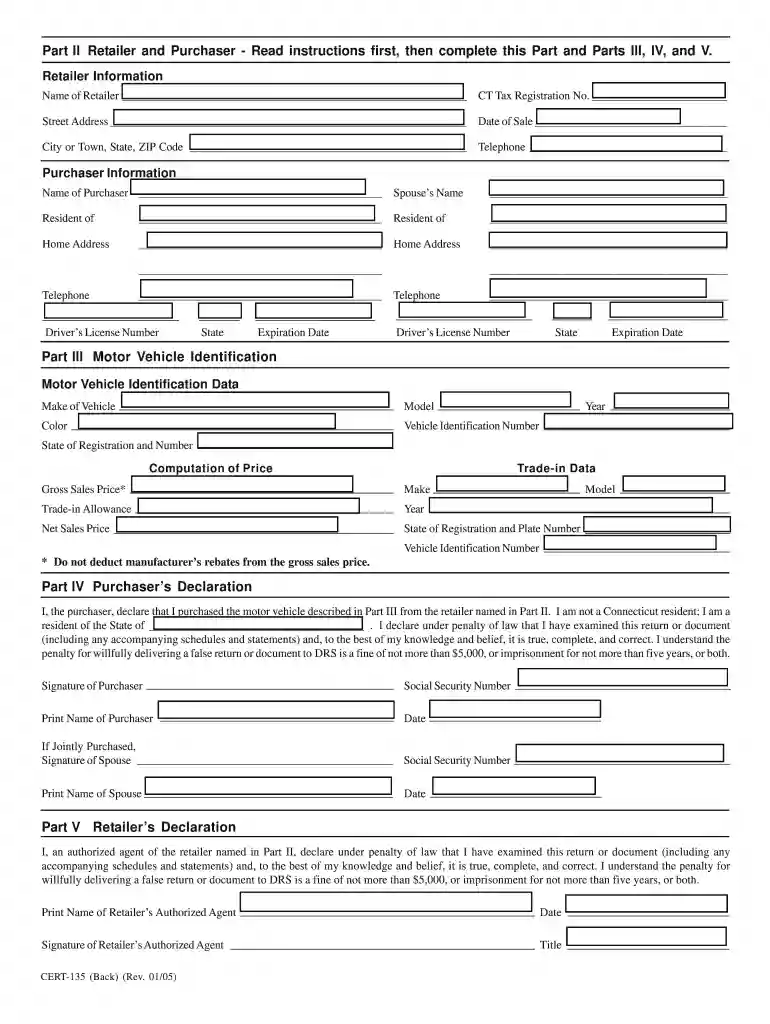
  2. Begin with Part II, where you will enter the retailer's information. Fill in the name of the retailer, their CT Tax Registration Number, and address.
  3. Next, provide the date of sale and the city or town where the transaction occurs. Ensure to include a contact telephone number for both parties.
  4. In the Purchaser Information section, input your name and your spouse’s name if applicable. Include details about your residency and home address.
  5. Proceed to Part III to describe the motor vehicle being purchased. Fill in details such as make, model, year, color, and Vehicle Identification Number (VIN).
  6. Complete Part IV by declaring your non-residency status and signing the form. If jointly purchased, ensure both signatures are included.
  7. Finally, in Part V, have an authorized agent from the retailer sign and date the declaration.

Start using our platform today to fill out CERT-135 easily and for free!

be ready to get more

Complete this form in 5 minutes or less

Get form

Got questions?

We have answers to the most popular questions from our customers. If you can't find an answer to your question, please contact us.
Contact us
You can deduct sales tax on a vehicle purchase, but only the state and local sales tax. Youll only want to deduct sales tax if you paid more in state and local sales tax than you paid in state and local income tax.
Sellers are required to charge sales tax on all transactions subject to tax except when a jurisdictions rules allow for the sale to be made tax-exempt. An exemption certificate is the form presented by an exempt organization or individual to the seller when making a tax-exempt purchase.
There are no additional sales taxes imposed by local jurisdictions in Connecticut. While the general sales and use tax rate is 6.35%, other rates are imposed under Connecticut law as follows: 1%
The 6,000-pound vehicle tax deduction is a rule under the federal tax code that allows people to deduct up to $25,000 of a vehicles purchasing price on their tax return. The vehicle purchased must weigh over 6,000 pounds, ing to the gross vehicle weight rating (GVWR), but no more than 14,000 pounds.
For example, in California, the Vehicle License Fee (VLF) is calculated at 0.65% of your vehicles value. This portion of your registration fee would be tax-deductible, while other flat fees for things like highway use or smog certification would not be.

Security and compliance

At DocHub, your data security is our priority. We follow HIPAA, SOC2, GDPR, and other standards, so you can work on your documents with confidence.

Learn more
ccpa2
pci-dss
gdpr-compliance
hipaa
soc-compliance

People also ask

0:01 1:52 Lets get started. Are car taxes deductible in CT. In Connecticut car taxes are assessed based onMoreLets get started. Are car taxes deductible in CT. In Connecticut car taxes are assessed based on the value of the vehicle.
You can deduct the tax you pay on personal property like cars and boats. Personal property tax also called an excise tax is based on the value of the item.
Passenger vehicles and light duty trucks purchased from private owners (not a dealership) are subject to sales tax of 6.35% (or 7.75% for vehicles over $50,000). Connecticut Sales and Use Tax is based on the NADA average trade-in value or bill of sale value (whichever is higher).

Related links