Type text, add images, blackout confidential details, add comments, highlights and more.
02. Sign it in a few clicks
Draw your signature, type it, upload its image, or use your mobile device as a signature pad.
03. Share your form with others
Send record spectra vaccination via email, link, or fax. You can also download it, export it or print it out.
How to use or fill out spectra vaccine record with our platform
Ease of Setup
DocHub User Ratings on G2
Ease of Use
DocHub User Ratings on G2
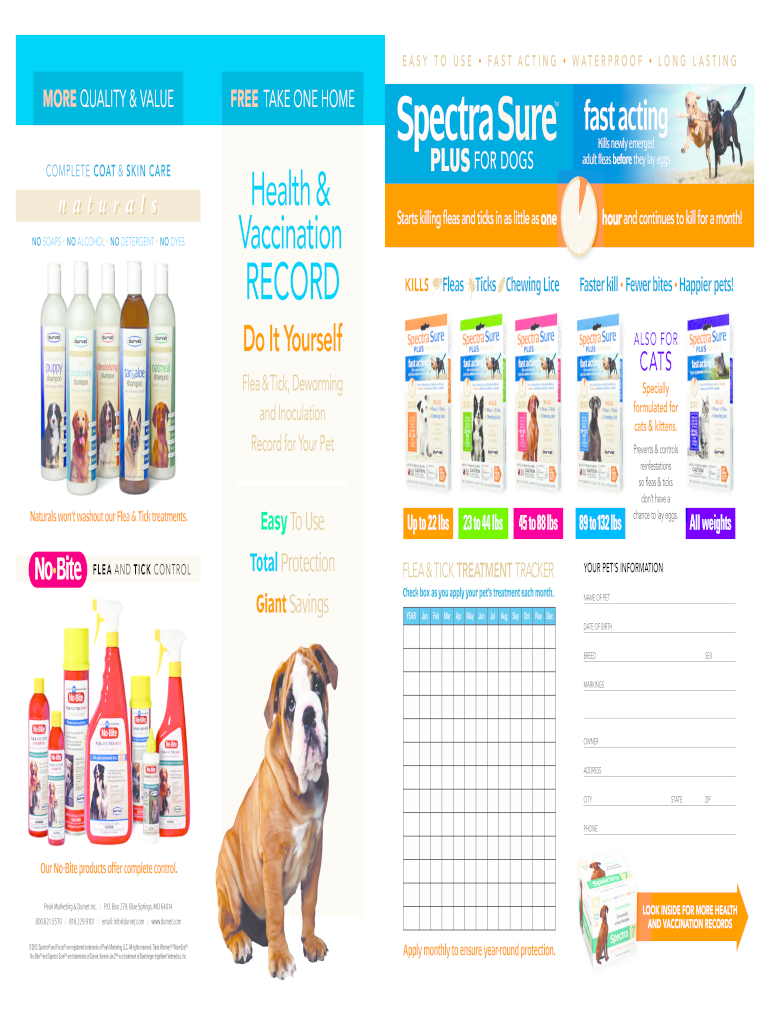
Click ‘Get Form’ to open the spectra vaccine record in the editor.
Begin by filling in your pet’s information. Enter the NAME OF PET, DATE OF BIRTH, BREED, SEX, and any MARKINGS that distinguish your pet.
Next, provide your contact details as the OWNER. Fill in your ADDRESS, CITY, STATE, ZIP, and PHONE number to ensure proper communication.
For vaccination tracking, check the boxes corresponding to each vaccine administered under the VACCINATION RECORD section. Make sure to note the AGE and DATE for each entry.
Complete the DEWORMING RECORD by checking off when deworming treatments are given. This helps maintain a comprehensive health history for your pet.
Start using our platform today for free to easily manage your pet's vaccination records!
Spectra vaccine record templateSpectra vaccine record pdfSpectra vaccine record onlineSpectra vaccine record for dogsSpectra vaccine record freeDog vaccination record printable PDF freeFree printable pet vaccination recordDog shot records online free
Security and compliance
At DocHub, your data security is our priority. We follow HIPAA, SOC2, GDPR, and other standards, so you can work on your documents with confidence.
TL;DR: Anchored in the industry context, we reviewed current classes of anticancer agents to distill clinical improvement needs, then testedvia structuralRead more
Raman spectroscopy-based identification of toxoid vaccine
by A Silge 2018 Cited by 14 A 1000 1000 m sample raster with 10 10 measurement points were arranged per droplet. Accordingly 100 spectra were recorded for each sample.Read more
This record is a good way to keep track of your dog shots. Covering day 1 to 18 months; Spectra focus vaccines are made to exacting quality standards andRead more
Cookie consent notice
This site uses cookies to enhance site navigation and personalize your experience.
By using this site you agree to our use of cookies as described in our Privacy Notice.
You can modify your selections by visiting our Cookie and Advertising Notice.