Type text, add images, blackout confidential details, add comments, highlights and more.
02. Sign it in a few clicks
Draw your signature, type it, upload its image, or use your mobile device as a signature pad.
03. Share your form with others
Send it via email, link, or fax. You can also download it, export it or print it out.
How to use or fill out form pc50318 with our platform
Ease of Setup
DocHub User Ratings on G2
Ease of Use
DocHub User Ratings on G2
Click ‘Get Form’ to open it in the editor.
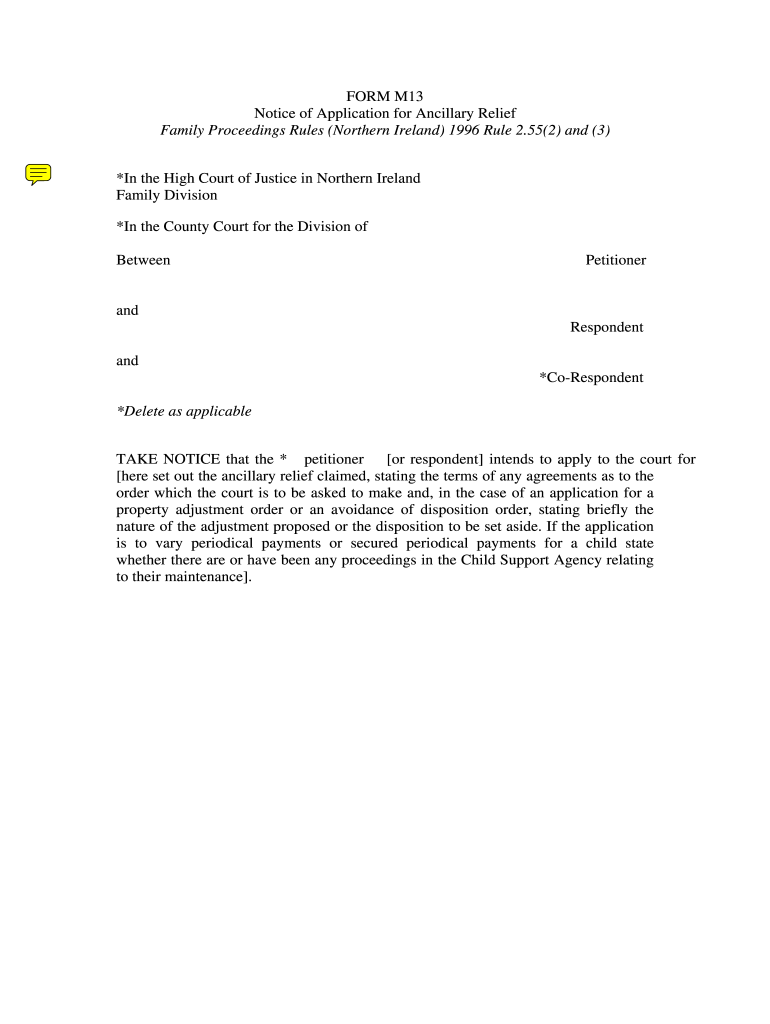
Begin by filling in the 'Petitioner' and 'Respondent' sections. Clearly state the names of both parties involved in the application.
In the section regarding ancillary relief, specify the type of relief being sought. Include any agreements related to the order you are requesting from the court.
If applicable, indicate whether you are applying for periodical payments for a child. Be sure to check all relevant boxes and provide details about any existing Child Support Agency assessments.
Complete the notice section by providing details about the hearing date and time, ensuring accuracy for proper notification.
Finally, sign and date the document at the bottom, ensuring that all required information is filled out correctly before submission.
Start using our platform today to easily complete form pc50318 online for free!
In summary, if you prefer a larger refund and can afford to have less take-home pay, claim 0. If you want more immediate cash flow and are comfortable managing your tax liability, claim 1.
What is the IRS form w-8eci?
About Form W-8 ECI, Certificate of Foreign Persons Claim That Income Is Effectively Connected With the Conduct of a Trade or Business in the United States | Internal Revenue Service.
What are common W-9 form mistakes?
Common mistakes and how to avoid them Common mistakes on Form W-9 include: Not checking the right box for federal tax classification. Not entering a federal tax classification that matches the name provided in line 1. Not entering the exemption codes in the correct boxes.
How to properly fill out a W9 form?
How to fill out a W9 form. Line 1. The payees name. Line 2. Business name (if different from line 1). Line 3. The payees federal tax classification. Line 4. Exception codes. Lines 56. The payees mailing address. Part I. The payees taxpayer identification number (TIN). Part II.
How to get aw9 form?
Most of the time, a company or financial institution will send you a blank W-9 form to complete before you begin business with them. If you need to issue the form, you can download a W-9 from the IRS website.
Related Searches
Form pc50318 instructionsForm pc50318 pdfForm pc50318 download
Security and compliance
At DocHub, your data security is our priority. We follow HIPAA, SOC2, GDPR, and other standards, so you can work on your documents with confidence.
If you do business with a company that pays you as an independent contractor, freelancer or gig worker (in other words, self-employed), or will be paid income such as interest or dividends, a company may request that you fill out and send a W-9 so they can accurately prepare a 1099 form, report the payments they make
How to complete aw 9 form?
How to fill out a W-9 form Download the W-9 form from IRS.gov. Provide your full legal name and business name. Business structure. Exemption. Enter your mailing address. Add any account numbers. Provide your Social Security number or Employer Identification Number. See if you need to sign and date the form.
Cookie consent notice
This site uses cookies to enhance site navigation and personalize your experience.
By using this site you agree to our use of cookies as described in our Privacy Notice.
You can modify your selections by visiting our Cookie and Advertising Notice.