Type text, add images, blackout confidential details, add comments, highlights and more.
02. Sign it in a few clicks
Draw your signature, type it, upload its image, or use your mobile device as a signature pad.
03. Share your form with others
Send tsp 77 via email, link, or fax. You can also download it, export it or print it out.
How to use or fill out tsp form 77 with our platform
Ease of Setup
DocHub User Ratings on G2
Ease of Use
DocHub User Ratings on G2
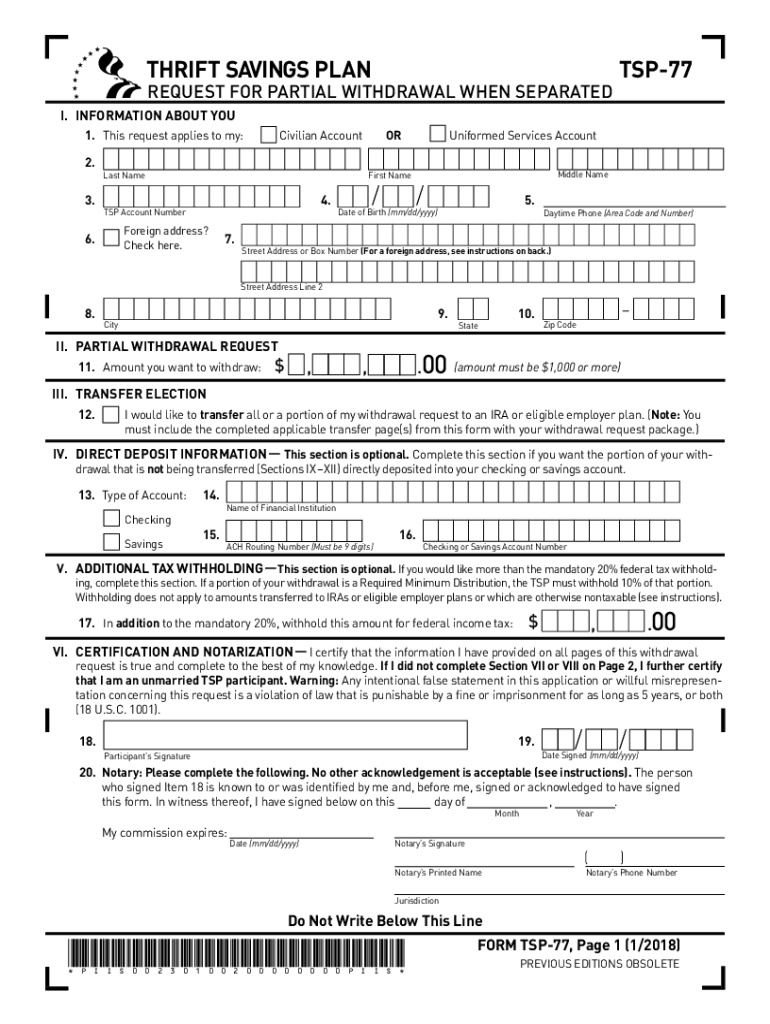
Click ‘Get Form’ to open the TSP-77 in the editor.
Begin by filling out Section I, which includes your personal information such as last name, first name, date of birth, and TSP account number. Ensure accuracy as this information is crucial for processing your request.
In Section II, specify the amount you wish to withdraw. Remember that the minimum withdrawal amount is $1,000.
If you want to transfer part of your withdrawal to an IRA or employer plan, check the appropriate box in Section III and complete the necessary pages for traditional and Roth balances.
Complete Section IV if you prefer direct deposit for any portion not being transferred. Fill in your bank details accurately.
In Section VI, sign and date the form. Your signature must be notarized for validation.
Start using our platform today to streamline your TSP-77 form completion for free!
TSP-77, Request for Partial Withdrawal When Separated (
Participants who are separated from Federal service can use this form to request a one-time partial withdrawal of $1,000 or more from their TSP accounts. YouRead more
Groundwater Sampling and Monitoring with Direct Push
This report has been funded wholly by the United States Environmental Protection Agency (EPA) under Contract. Number 68-W-02-033. The report is not intendedRead more
Cookie consent notice
This site uses cookies to enhance site navigation and personalize your experience.
By using this site you agree to our use of cookies as described in our Privacy Notice.
You can modify your selections by visiting our Cookie and Advertising Notice.