Doe sharing form 2026

Get Form
nyc doe discharge form Preview on Page 1

Here's how it works

01. Edit your nyc doe discharge form online
Type text, add images, blackout confidential details, add comments, highlights and more.

02. Sign it in a few clicks
Draw your signature, type it, upload its image, or use your mobile device as a signature pad.

03. Share your form with others
Send nyc doe calendar 2024 25 printable pdf via email, link, or fax. You can also download it, export it or print it out.

How to use or fill out doe sharing form with our platform

Form edit decoration
9.5
Ease of Setup
DocHub User Ratings on G2
9.0
Ease of Use
DocHub User Ratings on G2
  1. Click ‘Get Form’ to open the doe sharing form in the editor.
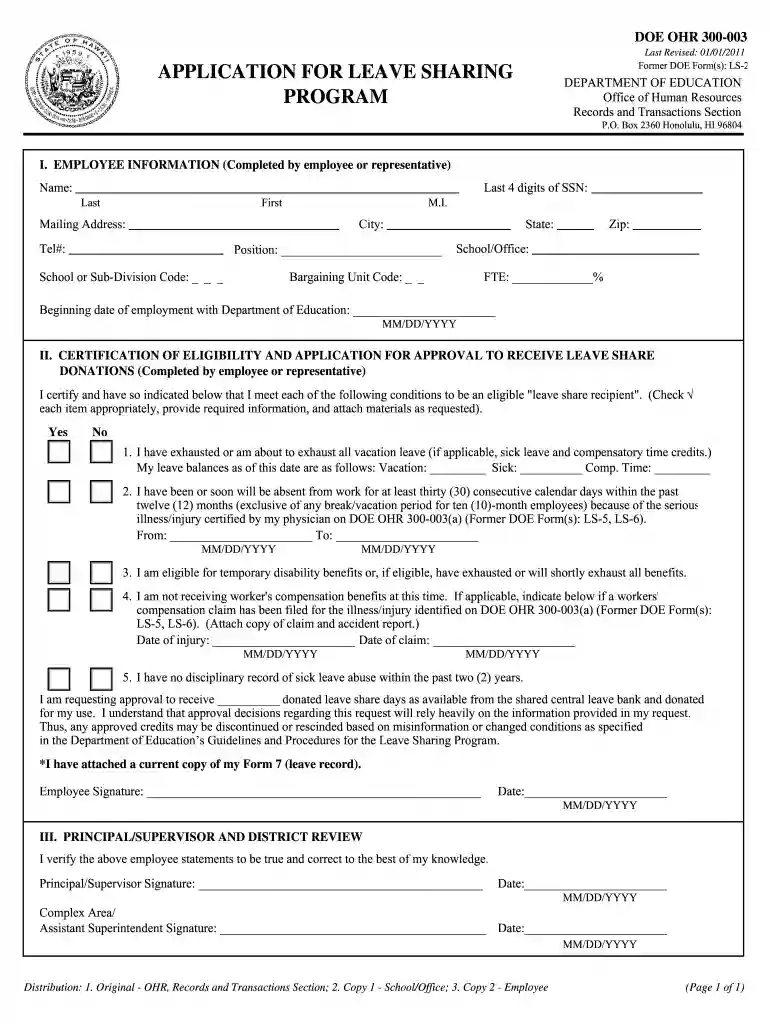
  2. Begin by filling out the Employee Information section. Enter your name, mailing address, telephone number, position, school or sub-division code, and the last four digits of your Social Security Number.
  3. In the Certification of Eligibility section, check each condition that applies to you. Provide your leave balances for vacation, sick leave, and compensatory time credits as required.
  4. Indicate your absence dates due to serious illness/injury and ensure you attach any necessary documentation as specified.
  5. Complete the request for donated leave share days and sign the form. Ensure all information is accurate to avoid any issues with approval.
  6. Finally, have your principal/supervisor review and sign the form before submission.

Start using our platform today to easily fill out your doe sharing form online for free!

See more doe sharing form versions

We've got more versions of the doe sharing form form. Select the right doe sharing form version from the list and start editing it straight away!
Versions Form popularity Fillable & printable
2011 4.8 Satisfied (242 Votes)
be ready to get more

Complete this form in 5 minutes or less

Get form

Got questions?

We have answers to the most popular questions from our customers. If you can't find an answer to your question, please contact us.
Contact us
Log in with your DOE User ID and Password. Once you are logged in, search for W-2 or review the following articles: W-2 and 1095-C Forms Distribution. W-2 and 1095-C Forms - Requests from Previous Years, and Requests for Corrections.
What documents are required for school enrollment? Proof of Address, including two of the following: Proof of age usually the childs birth certificate or passport. Childs immunization history. Childs transcript or latest report card.
DOE Student Accounts is created automatically when you enroll in school. Every NYC public school student has a DOE account. Your DOE account stays the same the entire time you are in school, and with it you can access all DOE technology platforms.
DOE is an acronym that stands for depends on experience. Employers use this in job descriptions instead of listing a specific salary if the candidates salary expectations could depend on how much previous work experience they have had in a related role or field.
DOE employees are eligible for many additional benefits, including commuter benefits, a college savings program, and employee discounts on everything from technology and media to travel and education. In addition, scholarships, financial incentives, and other special programs are available for many employees.

Security and compliance

At DocHub, your data security is our priority. We follow HIPAA, SOC2, GDPR, and other standards, so you can work on your documents with confidence.

Learn more
ccpa2
pci-dss
gdpr-compliance
hipaa
soc-compliance

People also ask

The Department of Education has many different and varied responsibilities under its current formation and governs many offices including the Federal Student Aid (FSA), Institute of Education Sciences (IES), Office for Civil Rights (OCR), and the Office of Special Education and Rehabilitative Services (OSERS).
To create an account, enter your email address and password below. You will be taken to your account management screen, where you can view saved searches, export bibliographies and create content alerts. Members of the DOE community have access to additional reference information for many records.

doe forms