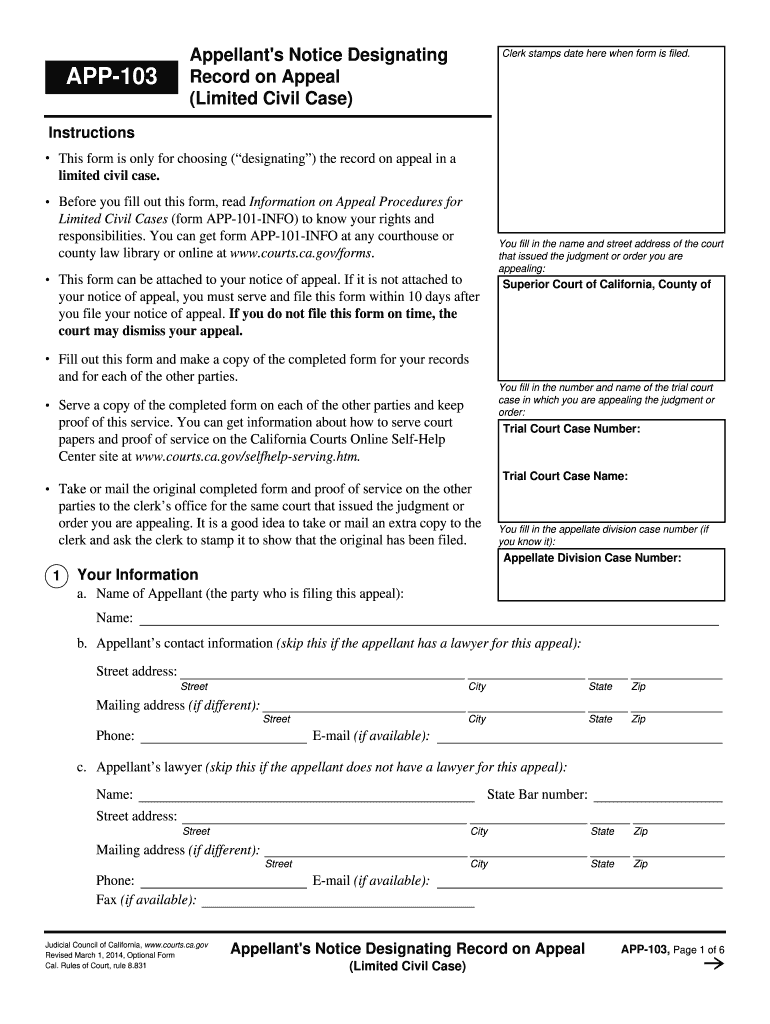
APP-103 Appellant's Notice Designating Record on Appeal. Judicial Council forms - courtinfo ca 2026

Get Form
app 103 Preview on Page 1

Here's how it works

01. Edit your app 103 online
Type text, add images, blackout confidential details, add comments, highlights and more.
02. Sign it in a few clicks
Draw your signature, type it, upload its image, or use your mobile device as a signature pad.
03. Share your form with others
Send ca judicial council forms browse by category via email, link, or fax. You can also download it, export it or print it out.

How to use or fill out APP-103 Appellant's Notice Designating Record on Appeal. Judicial Council forms - courtinfo ca with our platform

Form edit decoration
9.5
Ease of Setup
DocHub User Ratings on G2
9.0
Ease of Use
DocHub User Ratings on G2
  1. Click ‘Get Form’ to open it in the editor.
  2. Begin by entering the name and street address of the court that issued the judgment or order you are appealing. This is crucial for proper identification.
  3. Fill in the trial court case number and name, ensuring accuracy as this links your appeal to the correct case.
  4. Provide your information as the appellant, including your name, contact details, and if applicable, your lawyer’s information.
  5. In section 3, select whether you want a Clerk’s Transcript or an Agreed Statement. If choosing Clerk’s Transcript, list required documents and their filing dates.
  6. Decide if you will pay for the transcript or request a fee waiver. Attach necessary documentation if applying for a waiver.
  7. Complete section 4 regarding oral proceedings. Choose whether to include a record of what was said during trial and provide necessary details.
  8. Finally, review all entries for accuracy before signing and dating the form. Make copies for your records and other parties involved.

Start using our platform today to streamline your document editing process for free!

See more APP-103 Appellant's Notice Designating Record on Appeal. Judicial Council forms - courtinfo ca versions

We've got more versions of the APP-103 Appellant's Notice Designating Record on Appeal. Judicial Council forms - courtinfo ca form. Select the right APP-103 Appellant's Notice Designating Record on Appeal. Judicial Council forms - courtinfo ca version from the list and start editing it straight away!
Versions Form popularity Fillable & printable
2021 4.8 Satisfied (72 Votes)
2018 4 Satisfied (25 Votes)
2016 4.4 Satisfied (242 Votes)
2014 4.4 Satisfied (234 Votes)
be ready to get more

Complete this form in 5 minutes or less

Get form

Got questions?

We have answers to the most popular questions from our customers. If you can't find an answer to your question, please contact us.
Contact us

Yes, you can utilize DocHub for signing any business and private paperwork, including your notice designating record on appeal california. All electronic signatures you generate with our tool are legally binding and court-admissible, as DocHub complies with criteria required by ESIGN and UETA. Save your accomplished document with a detailed Audit Trail if necessary.

If you use Chrome, there are two simple methods to edit your APP-103 Appellant's Notice Designating Record on Appeal. Judicial Council forms - courtinfo ca online. First, go to the DocHub site, add your file, and edit it using our toolbar. You can also set up our Chrome extension and edit any document by dragging and dropping it in your web browser window.

In most civil appeals, you must designate the record on appeal. "Designating the record" means that you must let the superior court know what documents and oral proceedings, if any, to include in the record that will be sent to the appellate court.
Section 3,27 Rule 41 of the Rules of Court, retains the original 30 days as the period for perfecting the appeal by record on appeal to take into consideration the need for the trial court to approve the record on appeal.
You can file a notice of appeal as soon as the order or judgment you want to appeal is signed by the superior court judge and stamped "Filed" by the court clerk. The judgment is "entered" when it is stamped "Filed." This is also called the "entry of judgment."

Security and compliance

At DocHub, your data security is our priority. We follow HIPAA, SOC2, GDPR, and other standards, so you can work on your documents with confidence.

Learn more
ccpa2
pci-dss
gdpr-compliance
hipaa
soc-compliance
be ready to get more

Complete this form in 5 minutes or less

Get form

People also ask

The appellant is always the first party to designate the record on appeal. The other parties have 10 days to review the appellant's list of materials. The days start when the appellant files notice designating the record on appeal with the trial court.
--(1) Any party aggrieved by any decision or order of the Appellate Tribunal may file an appeal to the High Court within a period of sixty days from the date of communication of the decision or order of the Appellate Tribunal to him on any question of law arising out of such order.
After you file your Notice of Appeal This is called "designating the record." In most civil appeals, the appellant must pay for both the record that is sent to the appellate court and for his or her copy of the record, and the respondent must pay for his or her copy of the record.
The appellant is always the first party to designate the record on appeal. The other parties have 10 days to review the appellant's list of materials. The days start when the appellant files notice designating the record on appeal with the trial court.
(1) Except as provided in (2) and (3), a notice of appeal must be filed within 60 days after the rendition of the judgment or the making of the order being appealed.

Related links