New mexico ifta login 2025

Get Form
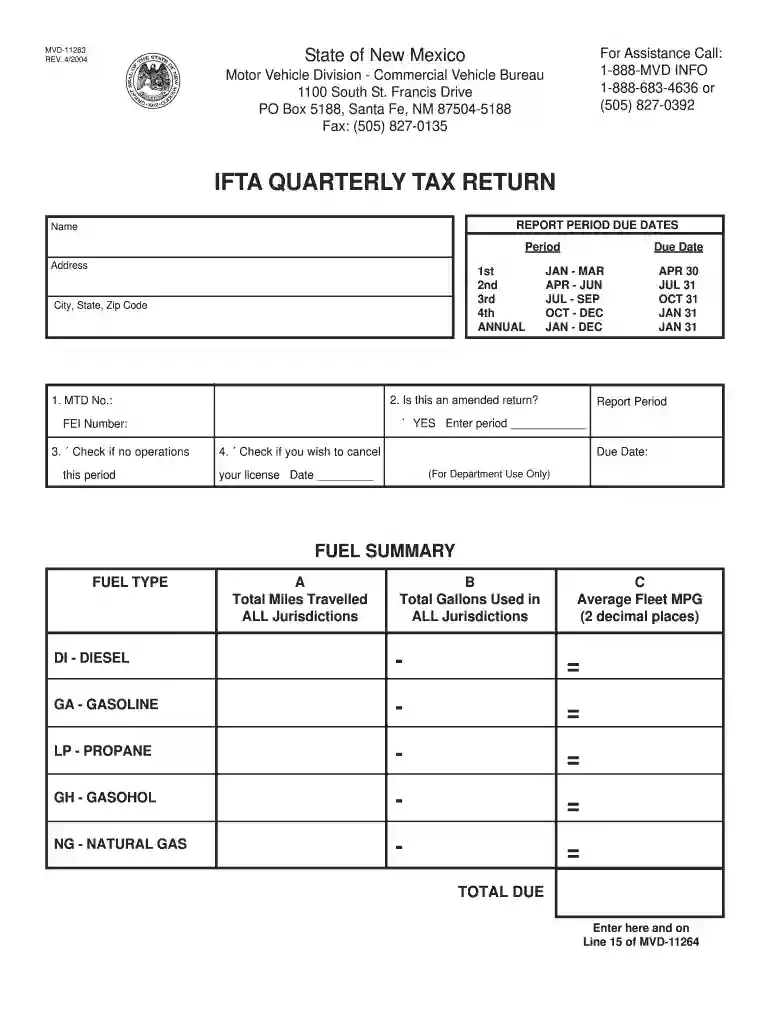
new mexico ifta login Preview on Page 1

Here's how it works

01. Edit your new mexico ifta login online
Type text, add images, blackout confidential details, add comments, highlights and more.

02. Sign it in a few clicks
Draw your signature, type it, upload its image, or use your mobile device as a signature pad.

03. Share your form with others
Send nm ifta login via email, link, or fax. You can also download it, export it or print it out.

How to use or fill out New Mexico IFTA Login with Our Platform

Form edit decoration
9.5
Ease of Setup
DocHub User Ratings on G2
9.0
Ease of Use
DocHub User Ratings on G2
  1. Click ‘Get Form’ to open the New Mexico IFTA login form in the editor.
  2. Begin by entering your name and address in the designated fields. Ensure that all information is accurate to avoid any processing delays.
  3. Select the report period from the options provided (1st, 2nd, 3rd, 4th, or Annual) and enter the corresponding dates for submission.
  4. Fill in your FEI Number and MTD Number if applicable. If this is an amended return, check the appropriate box.
  5. Complete the Fuel Summary section by entering total miles traveled and total gallons used for each fuel type. Calculate average fleet MPG as needed.
  6. Finally, review all entries for accuracy before submitting your form through our platform.

Start using our platform today to streamline your New Mexico IFTA login process for free!

See more new mexico ifta login versions

We've got more versions of the new mexico ifta login form. Select the right new mexico ifta login version from the list and start editing it straight away!
Versions Form popularity Fillable & printable
2012 4.7 Satisfied (25 Votes)
2004 4.6 Satisfied (40 Votes)
be ready to get more

Complete this form in 5 minutes or less

Get form

Got questions?

We have answers to the most popular questions from our customers. If you can't find an answer to your question, please contact us.
Contact us
Currently to obtain an IFTA license in New Mexico you must submit an application to be sent to the Motor Vehicle Division. You will also need to purchase your IFTA decals that are $3.50 each. Each qualified vehicle is required to have one set.
You can pay online through Taxpayer Access Point (TAP). Go to and under GENERAL TASKS, click Make a Payment, then Individual. The electronic check authorizes the Department to debit your checking account in the amount and on the date you specify.
Use the IRS Wheres My Refund tool or the IRS2Go mobile app to check your refund online. This is the fastest and easiest way to track your refund. The systems are updated once every 24 hours.
Taxpayers can view status of refund 10 days after their refund has been sent by the Assessing Officer to the Refund Banker. Status of paid refund, being paid other than through Refund Banker, can also be viewed at .tin-nsdl.com by entering the PAN and Assessment Year.
Electronically filed returns claiming a refund are processed within 6 to 8 weeks. For paper returns or applications for a tax refund, please wait up to 12 weeks before calling the Department. Paper returns or applications for tax refunds are processed within 8 to 12 weeks.
be ready to get more

Complete this form in 5 minutes or less

Get form

People also ask

To check the status of your refund for the current taxable year visit the Taxation and Revenue Departments online service the Taxpayer Access Point (TAP). Once you are on the TAP website go to the Personal Income tile and select the Wheres My Refund? link.
Because of the rules associated with being a member of IFTA, the State of New Mexico is required to audit three percent of its IFTA accounts per year.

new mexico fuel tax login