Overton security com 2026

Get Form
overton security com Preview on Page 1

Here's how it works

01. Edit your overton security com online
Type text, add images, blackout confidential details, add comments, highlights and more.

02. Sign it in a few clicks
Draw your signature, type it, upload its image, or use your mobile device as a signature pad.

03. Share your form with others
Send overton security fremont ca via email, link, or fax. You can also download it, export it or print it out.

How to use or fill out overton security com with our platform

Form edit decoration
9.5
Ease of Setup
DocHub User Ratings on G2
9.0
Ease of Use
DocHub User Ratings on G2
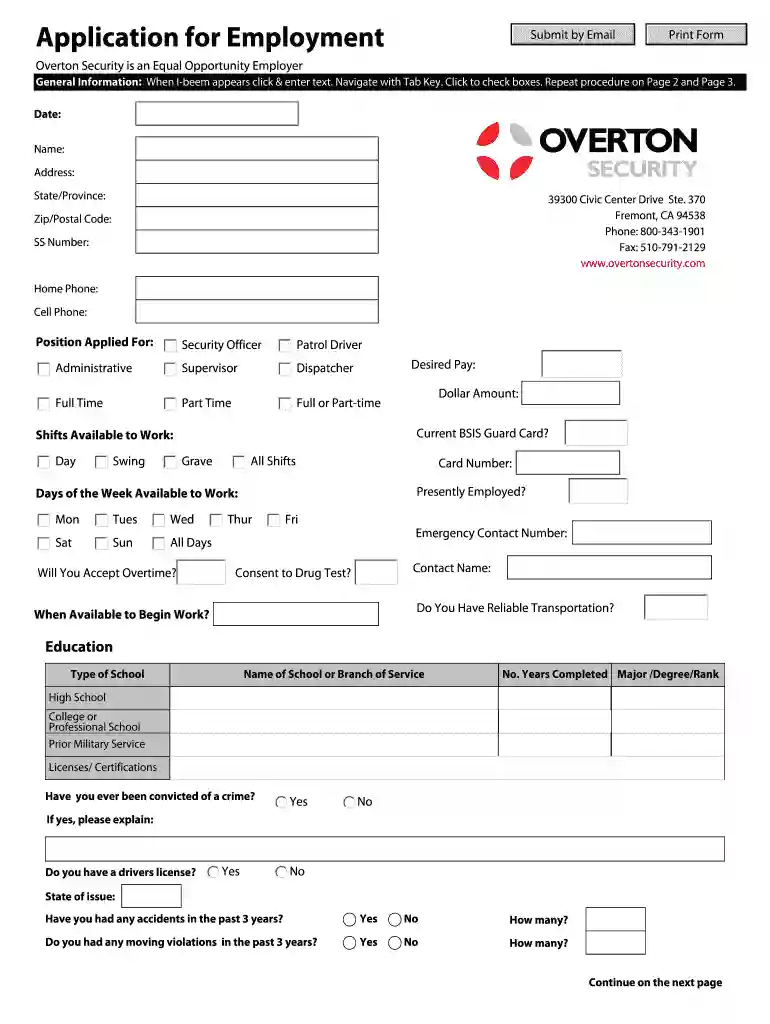
  1. Click ‘Get Form’ to open the Application for Employment in the editor.
  2. Begin by entering your personal information in the General Information section. Fill in the date, name, address, phone numbers, and Social Security number as prompted.
  3. Indicate the position you are applying for by selecting from options such as Security Officer or Administrative. Specify your desired pay and availability for shifts.
  4. Complete the Education section by listing your schools attended, years completed, and any degrees earned. Include details about licenses or certifications.
  5. In the Previous Employment section, provide details for up to three past employers including names, dates of employment, job titles, and reasons for leaving.
  6. List your skills and references in the designated sections. Use the additional information space to elaborate on your qualifications.
  7. Review all entries for accuracy before submitting. You can print or email your completed application directly from our platform.

Start filling out your application today using our platform for free!

be ready to get more

Complete this form in 5 minutes or less

Get form

Got questions?

We have answers to the most popular questions from our customers. If you can't find an answer to your question, please contact us.
Contact us
Website costs can vary widely. Basic sites can cost around $200, while custom-built websites can range from $1,000 to $100,000 or more. Using website builders can help cut costs. These platforms offer free themes, hosting, and tools to get your site up without breaking the bank.
Lets look at the steps you need to take to create a professional website for your business. Choosing your platform. Laying the foundation. Securing your domain. Crafting your identity: creating a logo. Create useful content. Optimising for search engines. Registering your business with Google Business. Mobile-friendly design.
Top Strategies for Successfully Marketing Your Security Company Identify Your Strengths: Clearly define what sets your services apart. Target Your Audience: Communicate your value to a well-identified target group. Facilitate Engagement: Make it easy for potential clients to docHub out and engage with your brand.
How to Make a Website Secure: 7 Different Ways Find a Secure Hosting Option. Not all website hosts offer the same level of security. an SSL/TLS Certificate. Use Strong Passwords. Choose Plugins and Add-Ons Carefully. Create Levels of Access. Get Support. Leave Lots of Time For Testing.
Here are eight steps that can help you build out your business website: Register your domain. Pick a website style. Build out your website pages. Connect your POS. Implement some SEO (search engine optimization). Create a content plan. Promote your website. Track your website metrics.
be ready to get more

Complete this form in 5 minutes or less

Get form

People also ask

Andy Overton - CEO and Co-Founder Overton Security Services | LinkedIn.

Related links