Type text, add images, blackout confidential details, add comments, highlights and more.
02. Sign it in a few clicks
Draw your signature, type it, upload its image, or use your mobile device as a signature pad.
03. Share your form with others
Send it via email, link, or fax. You can also download it, export it or print it out.
How to use or fill out ok frx 200 with our platform
Ease of Setup
DocHub User Ratings on G2
Ease of Use
DocHub User Ratings on G2
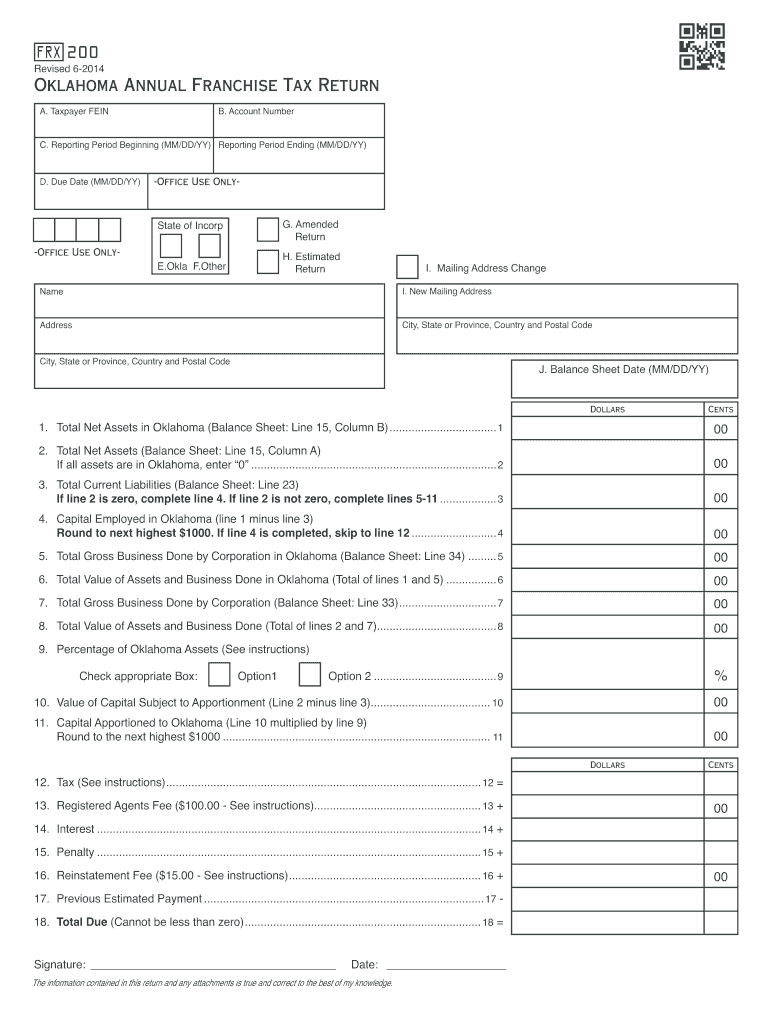
Click ‘Get Form’ to open the ok frx 200 in the editor.
Begin by entering your Taxpayer FEIN in Block A and your Account Number in Block B. Ensure these details are accurate for smooth processing.
In Block C, input the Reporting Period Beginning and Ending dates in MM/DD/YY format. This is crucial for determining your tax obligations.
Fill in the Due Date in Block D. Make sure to check if you are filing an amended return or an estimated return by marking the appropriate boxes.
Complete the Balance Sheet section, ensuring all figures reflect your financial status accurately. Lines 1 through 11 should be derived from your balance sheet.
For Schedule A, provide current officer information including names, Social Security Numbers, and contact details. This is mandatory for compliance.
Finally, review all entries for accuracy before submitting your form through our platform. Ensure all required schedules are attached.
Start using our platform today to fill out your ok frx 200 form easily and for free!
Engineered Approaches to In Situ Bioremediation of
Air and gas were injected into the saturated zone through the lower horizontal well at a rate of 200 scfm. Air and contaminants were then extracted from theRead more
Form FRX-200 Oklahoma Annual Franchise Tax Return for
Form FRX-200 (Oklahoma Annual Franchise Tax Return) should be used for tax year 2023 and prior. Do not use Form FRX-200 for tax years that are after 2023.Read more
Cookie consent notice
This site uses cookies to enhance site navigation and personalize your experience.
By using this site you agree to our use of cookies as described in our Privacy Notice.
You can modify your selections by visiting our Cookie and Advertising Notice.