




Here's how it works

01. Edit your 877 302 7338 online
Type text, add images, blackout confidential details, add comments, highlights and more.

02. Sign it in a few clicks
Draw your signature, type it, upload its image, or use your mobile device as a signature pad.

03. Share your form with others
Send it services management richmond va via email, link, or fax. You can also download it, export it or print it out.
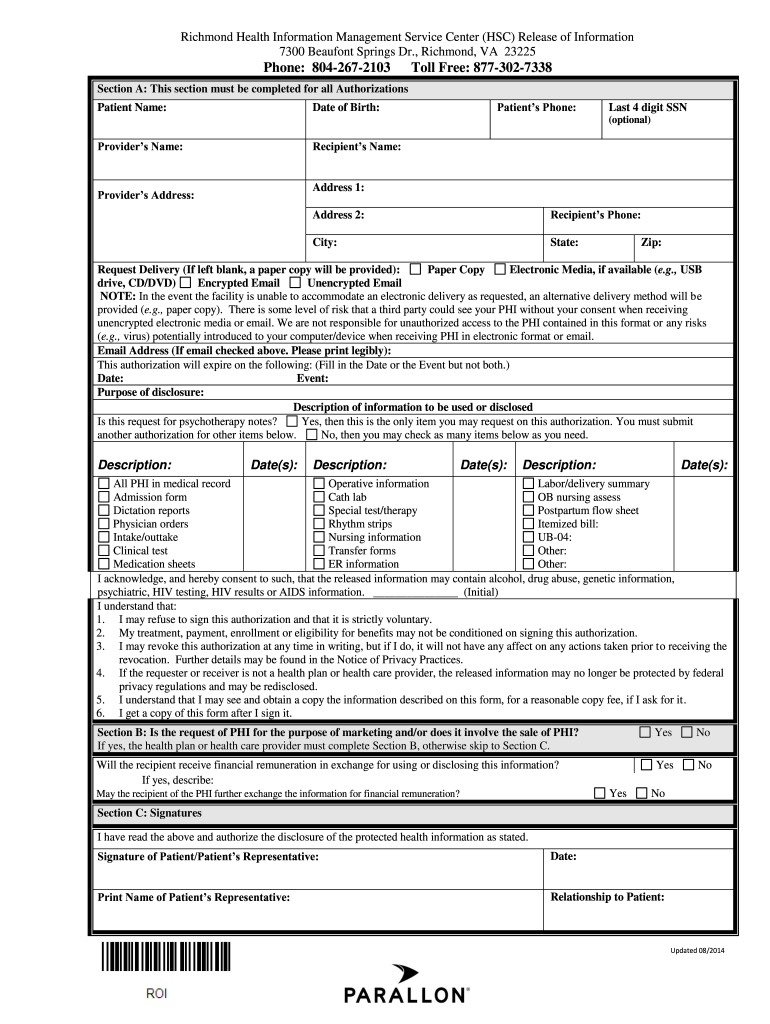
How to use or fill out Richmond Health Information Management Service Center with our platform

- Click ‘Get Form’ to open it in the editor.
- Begin with Section A. Fill in the Patient Name, Date of Birth, and Patient’s Phone. The Last 4 digits of SSN is optional but can be included for identification.
- Enter the Provider’s Name and Recipient’s Name along with their respective addresses and phone numbers. Ensure all information is accurate for proper processing.
- Specify the Request Delivery method. Choose between Paper Copy, Electronic Media, Encrypted Email, or Unencrypted Email based on your preference.
- Indicate the expiration date or event for this authorization. This will help clarify how long the authorization remains valid.
- In the Description of Information section, check all relevant boxes that pertain to your request. Be mindful of any fees associated with document requests.
- Complete Section C by signing and dating the form. If someone else is signing on behalf of the patient, include their relationship to the patient.
Start using our platform today to streamline your document editing and form completion process for free!
Fill out richmond health information management service center online
It's free
It's free
See more richmond health information management service center versions
We've got more versions of the richmond health information management service center form. Select the right richmond health information management service center version from the list and start editing it straight away!
| Versions | Form popularity | Fillable & printable |
|---|---|---|
| 2014 | 4.8 Satisfied (275 Votes) |
Security and compliance
At DocHub, your data security is our priority. We follow HIPAA, SOC2, GDPR, and other standards, so you can work on your documents with confidence.
Learn more


