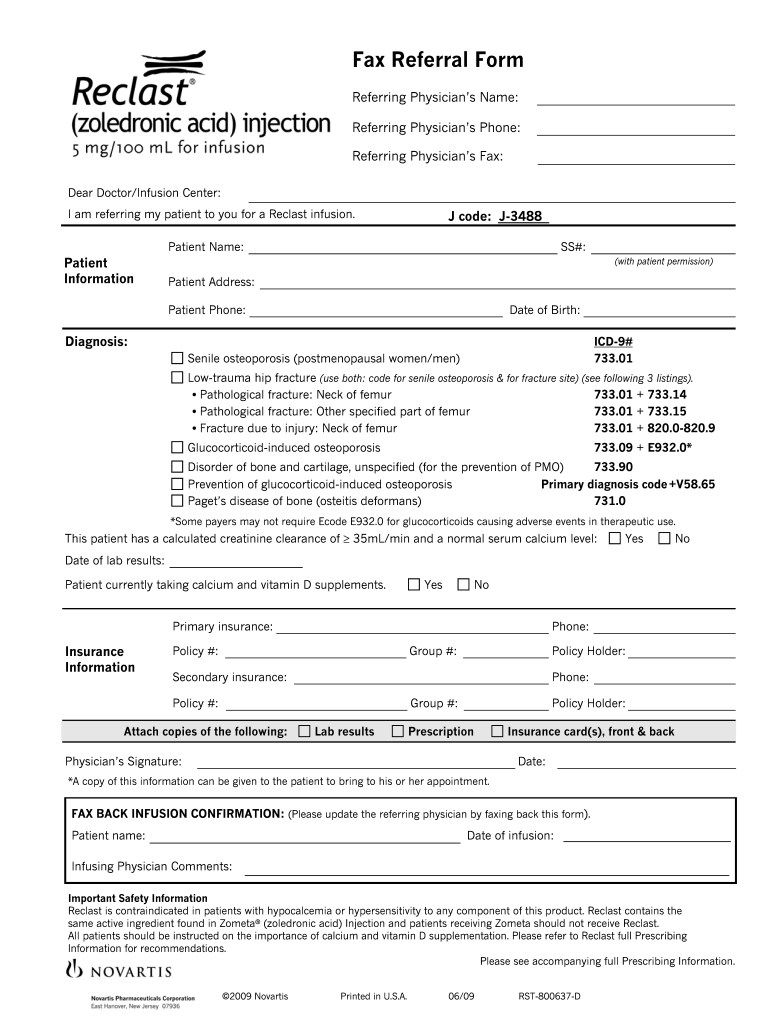
Fax Referral Form - Pacific Infusion Center 2026

Get Form
reclast infusion Preview on Page 1

Here's how it works

01. Edit your reclast infusion online
Type text, add images, blackout confidential details, add comments, highlights and more.
02. Sign it in a few clicks
Draw your signature, type it, upload its image, or use your mobile device as a signature pad.
03. Share your form with others
Send reclast via email, link, or fax. You can also download it, export it or print it out.

How to use or fill out Fax Referral Form - Pacific Infusion Center with our platform

Form edit decoration
9.5
Ease of Setup
DocHub User Ratings on G2
9.0
Ease of Use
DocHub User Ratings on G2
  1. Click ‘Get Form’ to open the Fax Referral Form in the editor.
  2. Begin by entering the Referring Physician’s Name, Phone, and Fax number at the top of the form. This information is crucial for communication regarding your patient.
  3. In the Patient Information section, fill in the Patient Name, SS#, Address, Phone, and Date of Birth. Ensure you have patient permission before including their SS#.
  4. Next, specify the Diagnosis and corresponding ICD-9# codes based on the patient's condition. Refer to the provided options for accurate coding.
  5. Indicate whether the patient has a calculated creatinine clearance of ≥ 35mL/min and a normal serum calcium level by selecting 'Yes' or 'No'.
  6. Complete the Insurance Information section with details about primary and secondary insurance providers, including phone numbers and policy numbers.
  7. Attach any required documents such as lab results and prescriptions before signing at the bottom of the form.
  8. Finally, ensure to fax back infusion confirmation details after filling out all necessary fields.

Start using our platform today to streamline your document editing and form completion process for free!

be ready to get more

Complete this form in 5 minutes or less

Get form

Got questions?

We have answers to the most popular questions from our customers. If you can't find an answer to your question, please contact us.
Contact us

Upload your Fax Referral Form - Pacific Infusion Center to DocHub (once you’ve created an account for this). If you need to complete fields in it, use appropriate tools from the top pane. For instance, add Signature Fields, assign each to a particular person, and click on Sign → Request signatures from others. Personalize your message for your recipients and click Send Request. You can also send your document by fax or as a Signing link instead of using email (you’ll find these options by navigating to the Menu → Send)

When you edit your Fax Referral Form - Pacific Infusion Center with DocHub, you only require a steady internet connection and virtually any web browser installed on your device. No need to install any third-party applications or study tutorials. Just open a tab with DocHub, drag and drop your file, and modify it on the spot.

Security and compliance

At DocHub, your data security is our priority. We follow HIPAA, SOC2, GDPR, and other standards, so you can work on your documents with confidence.

Learn more
ccpa2
pci-dss
gdpr-compliance
hipaa
soc-compliance
be ready to get more

Complete this form in 5 minutes or less

Get form