




Here's how it works

01. Edit your form online
Type text, add images, blackout confidential details, add comments, highlights and more.

02. Sign it in a few clicks
Draw your signature, type it, upload its image, or use your mobile device as a signature pad.

03. Share your form with others
Send it via email, link, or fax. You can also download it, export it or print it out.
How to use or fill out OMB No. 1140-0010 (Bureau of Alcohol, Tobacco, Firearms and Explosives) with Our Platform

- Click ‘Get Form’ to open it in the editor.
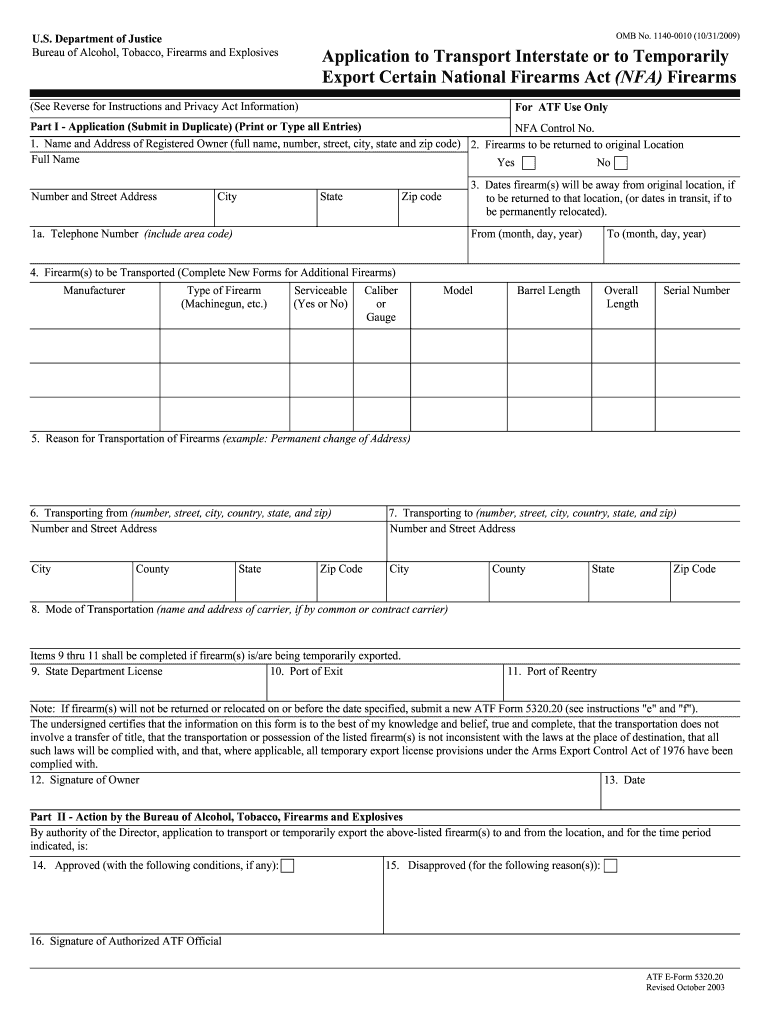
- Begin by filling out Part I. Enter your name and address as the registered owner, ensuring all details are accurate.
- Indicate whether the firearms will be returned to their original location by selecting 'Yes' or 'No'.
- Provide the dates during which the firearm(s) will be away from the original location in the specified fields.
- List each firearm you wish to transport, including manufacturer, type, caliber, model, barrel length, overall length, and serial number.
- State your reason for transportation clearly in the designated field.
- Fill in both transporting addresses: where you are sending from and where you are sending to.
- Specify the mode of transportation and include any necessary carrier information if applicable.
- If temporarily exporting firearms, complete items 9 through 11 regarding state department licenses and ports of exit/reentry.
- Finally, sign and date the form at the bottom before submitting it as instructed.
Start using our platform today for free to streamline your form completion process!
Fill out OMB No. 1140-0010 ( Bureau of Alcohol, Tobacco, Firearms and ... online
It's free
It's free
Security and compliance
At DocHub, your data security is our priority. We follow HIPAA, SOC2, GDPR, and other standards, so you can work on your documents with confidence.
Learn more




