Type text, add images, blackout confidential details, add comments, highlights and more.
02. Sign it in a few clicks
Draw your signature, type it, upload its image, or use your mobile device as a signature pad.
03. Share your form with others
Send hacla login via email, link, or fax. You can also download it, export it or print it out.
How to use or fill out happ authority of los angeles with our platform
Ease of Setup
DocHub User Ratings on G2
Ease of Use
DocHub User Ratings on G2
Click ‘Get Form’ to open the happ authority of los angeles document in the editor.
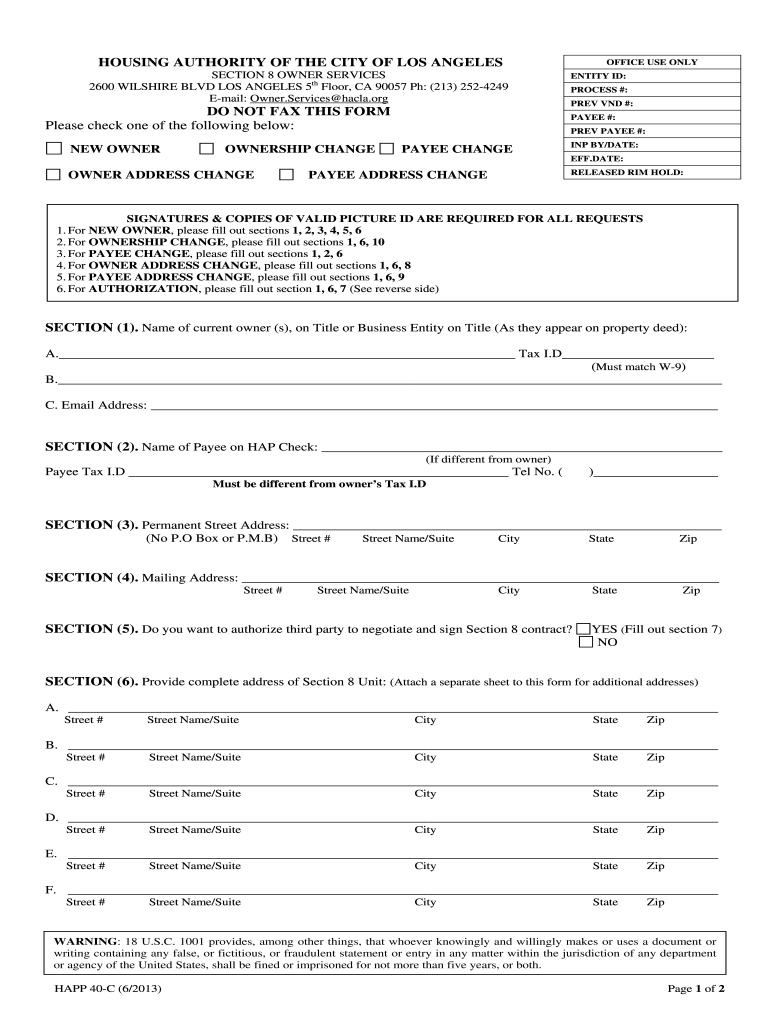
Begin by selecting whether you are a NEW OWNER, making an OWNERSHIP CHANGE, or requesting a PAYEE CHANGE. This will determine which sections you need to complete.
In Section 1, enter the name(s) of the current owner(s) as they appear on the property deed along with their Tax ID. Ensure this matches your W-9 form.
Proceed to Section 2 if applicable, and provide the name and Tax ID of the payee on the HAP check, ensuring it differs from the owner's Tax ID.
Fill out Section 3 with your permanent street address. Avoid using P.O. Boxes.
Complete Section 4 for your mailing address if it differs from your permanent address.
If authorizing a third party in Section 5, select 'YES' and fill out Section 7 with their details.
In Sections 6 through 10, provide any additional information required based on your selected request type. Be thorough and accurate to avoid delays.
Finally, ensure all signatures are included at the bottom of the form before submitting it through our platform.
Start filling out your happ authority of los angeles form online for free today!
Fill out happ authority of los angeles online It's free
We've got more versions of the happ authority of los angeles form. Select the right happ authority of los angeles version from the list and start editing it straight away!
HACLA2600 Wilshire Blvd, Los Angeles, CA 90057Los Angeles Housing Authority Waiting ListLos Angeles County Housing Authority PortalApply for Section 8 online Los AngelesLos Angeles Housing Authority phone numberApply for Section 8 online Los Angeles no waiting listLos Angeles Housing Authority Section 8
Security and compliance
At DocHub, your data security is our priority. We follow HIPAA, SOC2, GDPR, and other standards, so you can work on your documents with confidence.
Promoting Transit-Oriented Developments by Addressing
by S Mathur Cited by 6 Transit Oriented Communities Affordable Housing Incentive Program: Frequently. Asked Questions and Answers, Los Angeles City Planning, last updated May 15,.Read more
Cookie consent notice
This site uses cookies to enhance site navigation and personalize your experience.
By using this site you agree to our use of cookies as described in our Privacy Notice.
You can modify your selections by visiting our Cookie and Advertising Notice.