







Definition & Meaning
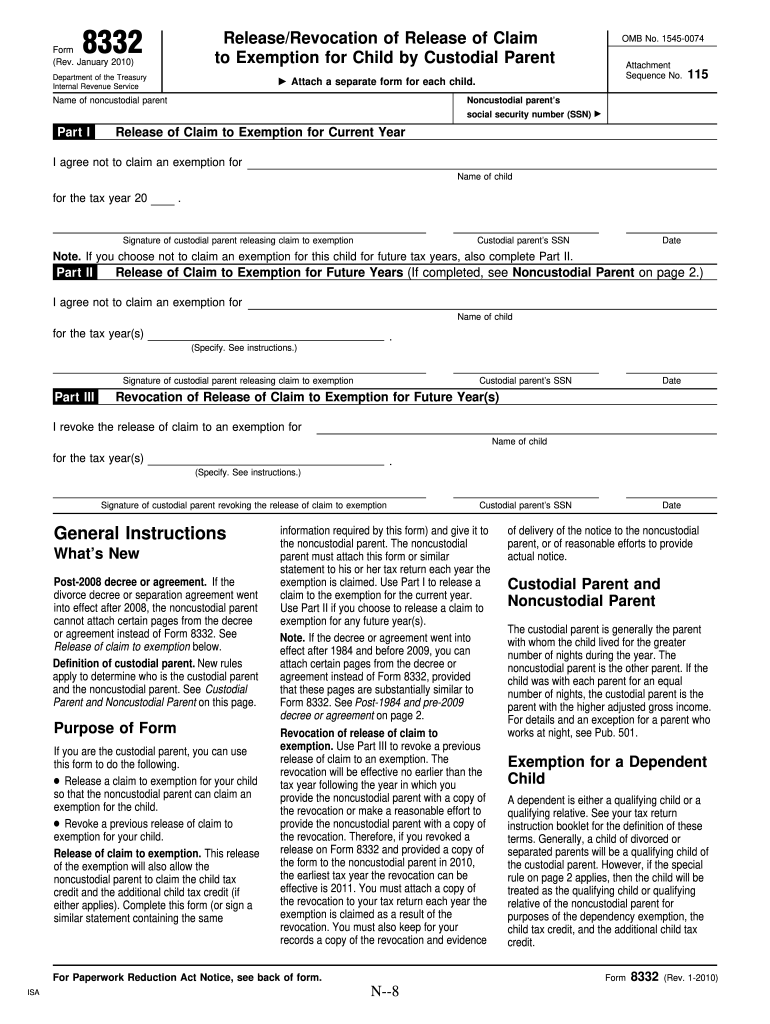
Form 8332, also known as "Release/Revocation of Release of Claim to Exemption for Child by Custodial Parent," plays a crucial role in the allocation of dependency exemptions between divorced or separated parents in the United States. It permits the custodial parent to release the claim to a child's dependency exemption, enabling the noncustodial parent to claim the child as a dependent for tax purposes. The form can be used both to release a claim for the current or future tax years and to revoke a previously granted release. Its function is crucial in ensuring that the tax benefits associated with child dependency are claimed appropriately, aligning with IRS regulations.
How to Use the Form 8332 Fillable
Using the fillable version of Form 8332 simplifies the process of releasing or revoking the claim to a child's exemption. This digital format can be edited and completed online, ensuring clarity and accuracy. Users can enter required details such as the children's names, the noncustodial parent's name, and other relevant tax years directly into the document. This approach reduces errors typically associated with manual entry. Importantly, the fillable form supports electronic signatures, allowing parents to authenticate the document online, streamlining the submission process.
Steps to Complete the Form
-
Access the Form: Obtain the fillable Form 8332 from a reliable source, ensuring it is the latest version from the IRS or a trusted document management platform like DocHub.
-
Provide Custodial Parent Information: Enter the custodial parent's full name as registered with the IRS and their taxpayer identification number for proper identification.
-
Enter Child’s Details: Accurately input the names of the children for whom the exemption claim is being released or revoked.
-
Specify Years and Parents: Indicate the applicable tax year(s) and the noncustodial parent's information, including their taxpayer identification number.
-
Signature: Affix your electronic signature and date the form, confirming its validity.
-
Submission: Depending on IRS guidelines and personal preference, you can submit the form electronically or via mail.
How to Obtain the Form 8332 Fillable
Obtaining the fillable version of Form 8332 is relatively simple. It is available for free on the IRS official website and through various document management platforms that offer form filling services. Platforms such as DocHub provide additional features, including annotation and editing tools, which enhance the ease of completing the form accurately. Access can vary between websites and may require creating an account or simply downloading the form.
Who Typically Uses the Form 8332 Fillable
Form 8332 is primarily utilized by divorced or separated parents to manage exemption claims related to their children. Custodial parents fill out this form to officially grant or revoke the right for the noncustodial parent to claim their child as a dependent. This form is crucial for parents whose tax situations involve shared custody arrangements, and who aim to comply with IRS dependency regulations. Tax professionals may also use these forms to assist clients in correctly filing their returns.


Important Terms Related to Form 8332 Fillable
-
Custodial Parent: The parent who has custody of the child for the greater part of the year.
-
Noncustodial Parent: The parent who does not have custody of the child for the majority of the year but may seek the tax exemption with the custodial parent's consent.
-
Dependency Exemption: A tax deduction that reduces taxable income, typically claimed for qualifying dependents.
-
Release of Claim: The custodial parent's action to allow the noncustodial parent to claim the child's dependency exemption.
-
Revocation of Release: The rescinding of a previously granted claim to the exemption by the custodial parent.
Key Elements of the Form 8332 Fillable
Form 8332 encompasses several critical elements that ensure its proper utilization:
-
Child Information: Details of the child or children involved, including full names and Social Security numbers.
-
Custodial Parent's Details: Information about the releasing parent, including their full name and taxpayer identification number.
-
Noncustodial Parent's Details: Information about the parent receiving the exemption claim, including their full name and taxpayer identification number.
-
Effective Years: The specific tax years for which the release or revocation is applicable.
-
Signature and Date: Mandatory authentication from the custodial parent confirming their consent to the terms of the release or revocation.
IRS Guidelines
The IRS provides specific guidelines on the completion and submission of Form 8332 to maintain compliance with tax laws. It is essential to use the form for releasing the right to claim a child’s exemption in situations where the noncustodial parent is eligible to claim the child. Additionally, the IRS stresses the importance of accurate details and timely submission to avoid penalties or denied claims. Adhering to guidelines ensures that both parents' tax returns reflect the correct dependent status, facilitating accurate tax calculations.
Filing Deadlines / Important Dates
Form 8332 does not have a specific standalone deadline but is generally submitted with the noncustodial parent's tax return for the relevant tax year. It is essential to prepare and complete the form promptly to ensure that the dependent claim is processed without delay. Taxpayers must also adhere to the overall annual tax filing deadlines set by the IRS, typically April 15, to prevent late fees or penalties. In cases where form revocation is involved, sufficient notice should be given to the noncustodial parent to adjust their filing plans.
Required Documents
When preparing Form 8332, it is helpful to have relevant documents readily available for accuracy and verification, such as:
-
Identification of Parents: Government-issued ID or taxpayer identification number for both custodial and noncustodial parents.
-
Child Identification: Birth certificates or Social Security cards for the children involved to confirm dependent status.
-
Custody Documentation: Court orders or custody agreements that outline the custody and visitation rights of parents.
Form Submission Methods (Online / Mail / In-Person)
Form 8332 can be submitted via traditional mail or digitally, depending on the preferences of the filer and the capabilities of the IRS's acceptance methods. Email and online submission through document management systems streamline the process, providing immediate confirmation of receipt. However, if submitting by mail, ensure that the form reaches the intended IRS address, accompanying the noncustodial parent's tax return. Filing in advance of the tax deadline is recommended to avoid processing delays.
Each section above is structured to provide a comprehensive understanding of Form 8332, emphasizing critical information and practical instructions tailored for easy navigation and accurate completion of this critical tax document.




