Type text, add images, blackout confidential details, add comments, highlights and more.
02. Sign it in a few clicks
Draw your signature, type it, upload its image, or use your mobile device as a signature pad.
03. Share your form with others
Send douglas county divorce forms via email, link, or fax. You can also download it, export it or print it out.
How to use or fill out divorce papers with our platform
Ease of Setup
DocHub User Ratings on G2
Ease of Use
DocHub User Ratings on G2
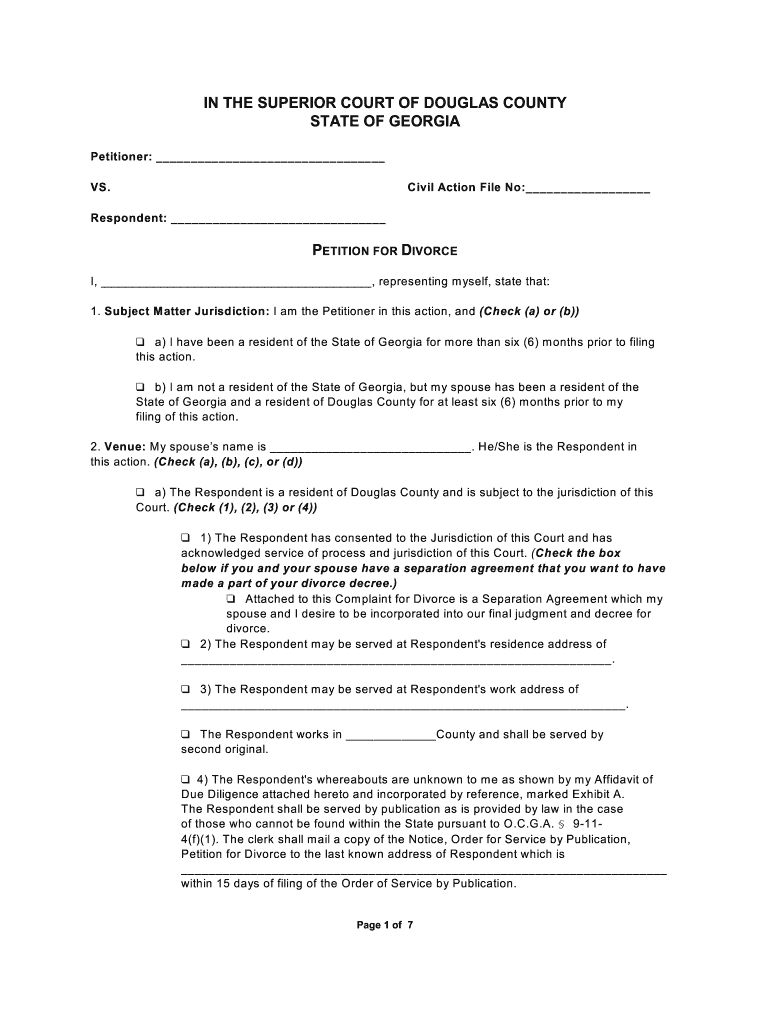
Click ‘Get Form’ to open the divorce papers in the editor.
Begin by filling in your name as the Petitioner and the Respondent's name in the designated fields. Ensure accuracy as this information is crucial for court proceedings.
Indicate your jurisdiction by checking either option (a) or (b) under Subject Matter Jurisdiction, confirming residency requirements.
Complete the Venue section by selecting the appropriate option regarding your spouse's residency and providing their address if applicable.
Fill in the Date of Marriage and Date of Separation, ensuring these dates are correct to avoid complications.
If there are minor children, provide their details including names, sex, and date of birth. Specify custody arrangements and any other relevant information regarding child support.
Review all sections carefully before submitting. Use our platform’s features to save your progress and make edits as needed.
Start using our editor today to complete your divorce papers online for free!
Jul 31, 2024 This site provides a guide to divorce and legal separation in Wisconsin and takes you through a series of questions, filling in most of the forms necessary.Read more
This application must be completed before we can make a determination as to whether we can assist you. You must provide proof of your income and a photoRead more
Cookie consent notice
This site uses cookies to enhance site navigation and personalize your experience.
By using this site you agree to our use of cookies as described in our Privacy Notice.
You can modify your selections by visiting our Cookie and Advertising Notice.