Ssa 7050 f4-2026

Get Form
ssa 7050 form Preview on Page 1

Here's how it works

01. Edit your ssa 7050 form online
Type text, add images, blackout confidential details, add comments, highlights and more.

02. Sign it in a few clicks
Draw your signature, type it, upload its image, or use your mobile device as a signature pad.

03. Share your form with others
Send ssa 7050 f4 via email, link, or fax. You can also download it, export it or print it out.

How to use or fill out SSA 7050 F4 with our platform

Form edit decoration
9.5
Ease of Setup
DocHub User Ratings on G2
9.0
Ease of Use
DocHub User Ratings on G2
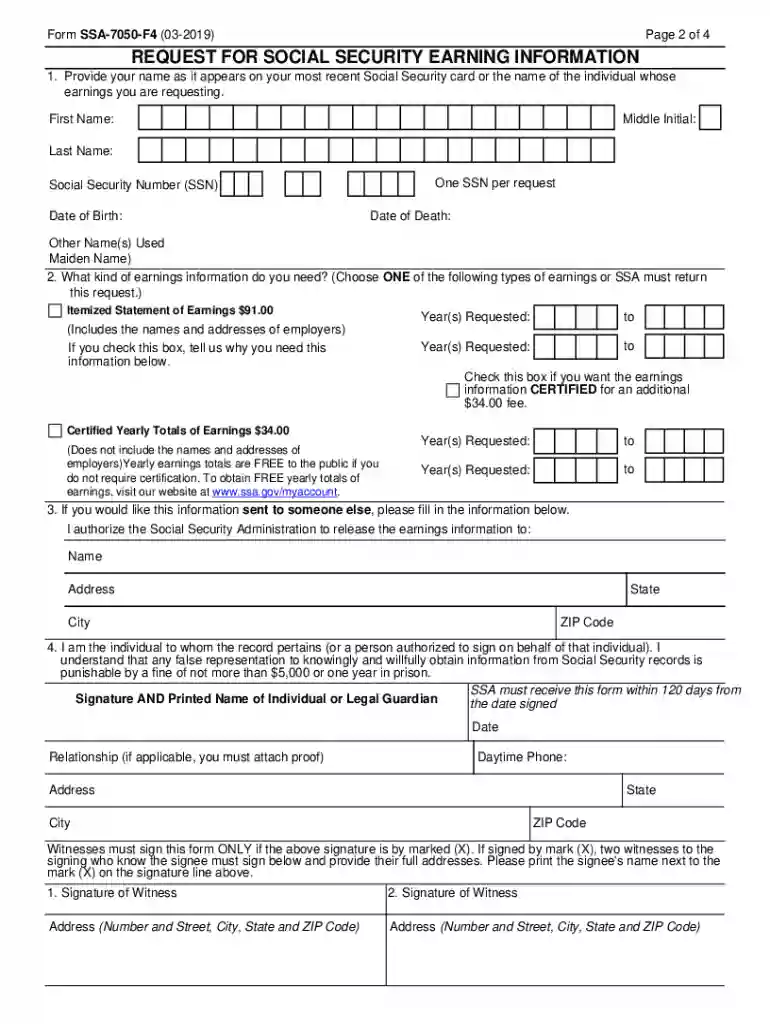
  1. Click ‘Get Form’ to open the SSA 7050 F4 in the editor.
  2. Begin by entering your name as it appears on your Social Security card in the designated fields for First Name, Middle Initial, and Last Name.
  3. Input your Social Security Number (SSN) and Date of Birth. If applicable, include any other names you have used.
  4. Select the type of earnings information you need by checking either the Itemized Statement of Earnings or Certified Yearly Totals of Earnings. Specify the years requested.
  5. If you want the information sent to someone else, fill in their name and address in section 3.
  6. Sign and date the form. If signing with an 'X', ensure two witnesses sign as well.
  7. Review all entered information for accuracy before saving and sending your completed form to SSA within 120 days.

Start using our platform today to easily fill out your SSA 7050 F4 form for free!

See more ssa 7050 f4 versions

We've got more versions of the ssa 7050 f4 form. Select the right ssa 7050 f4 version from the list and start editing it straight away!
Versions Form popularity Fillable & printable
2022 4.2 Satisfied (51 Votes)
2021 4.8 Satisfied (140 Votes)
2020 4.4 Satisfied (196 Votes)
2019 4.3 Satisfied (56 Votes)
2014 4.4 Satisfied (540 Votes)
2010 4 Satisfied (26 Votes)
2001 3.8 Satisfied (33 Votes)
be ready to get more

Complete this form in 5 minutes or less

Get form

Got questions?

We have answers to the most popular questions from our customers. If you can't find an answer to your question, please contact us.
Contact us

Electronic document approval demands a software solution that works in compliance with data security and eSignature regulations. DocHub is a great tool for that, because it meets all the above mentioned requirements. Whatever method you like to sign your ssa 7050 form pdf in DocHub, your eSignature will be legally binding and court-admissible.

If you store your documents in Google Drive, there is no need to download your form ssa 7050 f4 on the computer and upload it back to our editor. A much easier way is to set up a browser extension developed by DocHub to simplify this flow. The extension allows editing PDFs right in your web browser. Alternatively, you can integrate your DocHub and Gmail accounts for more efficient modifying.

Form SSA-7050 | Request for Social Security Earnings Information.
You can receive a statement of your employment history from Social Security by completing a Request for Social Security Earnings Information form. You will receive detailed information about your work history including employment dates, employer names and addresses, and earnings.
Certified yearly earnings totals or an itemized earnings statement (certified or non-certified) can be obtained by completing the Request for Social Security Earnings Information (Form SSA-7050).

Security and compliance

At DocHub, your data security is our priority. We follow HIPAA, SOC2, GDPR, and other standards, so you can work on your documents with confidence.
Learn more
ccpa2
pci-dss
gdpr-compliance
hipaa
soc-compliance

People also ask

There is a form called the SSA-7050 which you can submit to Social Security for your client to get an itemized statement of their past earnings and employer information; however, it costs $92 to get this record. Here is a link to the SSA-7050: .
The Master Beneficiary Record contains information about each claimant who has applied for retirement, survivors, or disability benefits or who is to be enrolled in the Hospital Insurance or Supplementary Medical Insurance program.
Who needs an SSA Form 7050-F4? An individual taxpayer should file Form SSA-7050-F4 in case they want to obtain an itemized earnings statement (either certified or noncertified, including the names of employers) or certified yearly earnings totals, providing no employment details, only the earnings.
How to complete an SSA 7050 (Step by Step) Name. Social security number. Date of birth. Date of death. Other names used. Indicate which type of earnings information you need: Itemized statement of earnings ($91) Years requested. If you would like the information send to someone else, provide their name and address. Date.
$44.00 for certified yearly earnings totals. $100.00 for a non-certified detailed (itemized) earnings statement. $144.00 for a certified detailed (itemized) earnings statement.

form 7050 ssa