1199 retiree forms-2026

Get Form
1199 retirement forms Preview on Page 1

Here's how it works

01. Edit your 1199 retirement forms online
Type text, add images, blackout confidential details, add comments, highlights and more.

02. Sign it in a few clicks
Draw your signature, type it, upload its image, or use your mobile device as a signature pad.

03. Share your form with others
Send 1199 forms for members via email, link, or fax. You can also download it, export it or print it out.

How to use or fill out 1199 retiree forms with our platform

Form edit decoration
9.5
Ease of Setup
DocHub User Ratings on G2
9.0
Ease of Use
DocHub User Ratings on G2
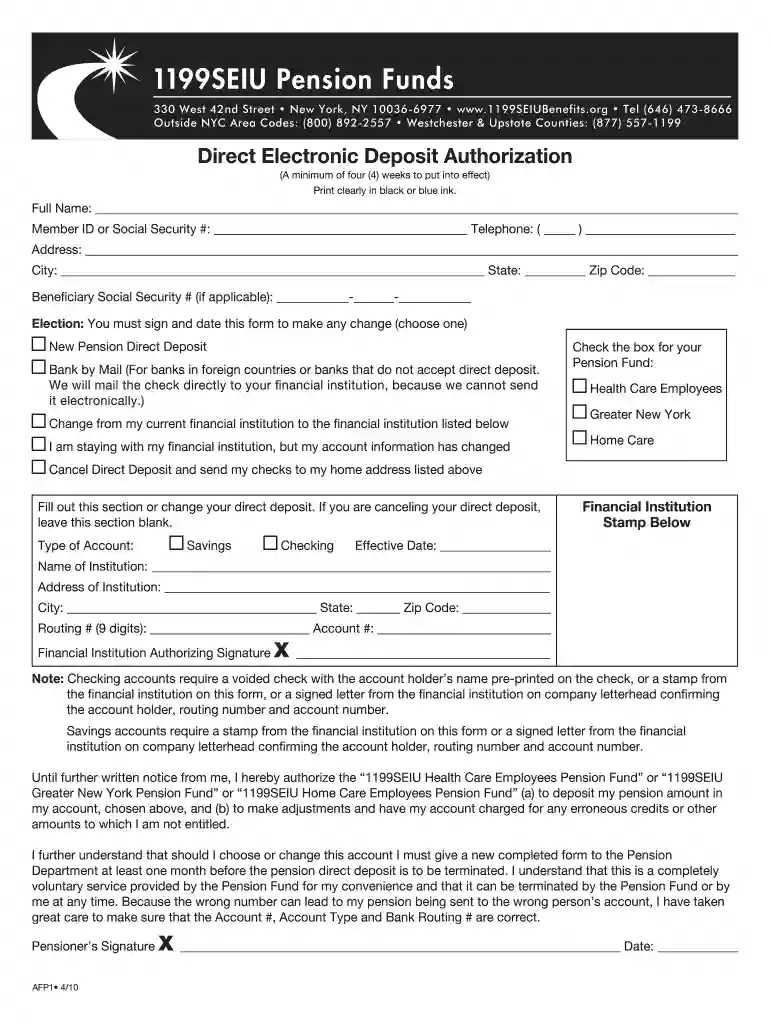
  1. Click ‘Get Form’ to open the 1199 retiree form in the editor.
  2. Begin by filling in your Full Name and Member ID or Social Security Number clearly in the designated fields.
  3. Provide your Telephone number, Address, City, State, and Zip Code. Ensure all information is accurate for effective communication.
  4. If applicable, enter your Beneficiary's Social Security Number. This is important for any future benefits.
  5. Select your Election by checking the appropriate box. You must sign and date this form to confirm any changes.
  6. Fill out the Type of Account section by selecting either Savings or Checking. Then provide the Financial Institution details including Routing Number and Account Number.
  7. Ensure you have a voided check or a stamp from your financial institution if you are using a checking account. For savings accounts, include a stamp or signed letter from your bank.
  8. Finally, sign and date the form at the bottom to authorize direct deposit into your chosen account.

Start using our platform today to easily complete your 1199 retiree forms online for free!

be ready to get more

Complete this form in 5 minutes or less

Get form

Got questions?

We have answers to the most popular questions from our customers. If you can't find an answer to your question, please contact us.
Contact us
How do I become vested? You earn one year of vesting service if you work 1,000 or more hours in a calendar year. You need 5 vesting credits and at least one (1) employer contribution to be 100% vested in the Plan. Please refer to the Summary Plan Description (SPD) for additional ways to fully vest in the plan.
The form: confirms your personal details, advises us of the choices you make about retirement, collects information about the total value of your pensions, as required by HM Revenue and Customs.
Pension Fund For questions about your pension, send the email to pension@1199nefunds.org.
Contact the SEIU Benefit Funds office at 800-458-1010, Monday-Friday, 9 am to 5:30 pm ET, for more information on how to apply for your pension, but be sure to check here first to read helpful FAQs.
If you need to see us in person, you can avoid wait times by scheduling an appointment with a Member Services Representative. Make an appointment or call (646) 473-9200. You may also email us at OutdocHubAssistance@1199Funds.org.

Security and compliance

At DocHub, your data security is our priority. We follow HIPAA, SOC2, GDPR, and other standards, so you can work on your documents with confidence.

Learn more
ccpa2
pci-dss
gdpr-compliance
hipaa
soc-compliance

People also ask

You may retire at age 65 or older with at least 5 years of credited service (or 10 years of credited service if you left covered employment before September 1, 1998.) Your final pension amount will depend on how many credits you have earned. Retire due to disability at any age with 15 pension credits.
Workers, Retirees, Beneficiaries in Single-Employer Plans International callers on mobile phones call 1-800-400-7242. If calling from a landline, please call 202-326-4000, and press 0 for a Customer Service Representative.

1199 pension